
Every tool your team uses.
Every agent you deploy.
One context layer.
Atlan MCP delivers certified business context — definitions, lineage, access rules, and institutional knowledge — to every AI tool and agent your team is already using, without extra configuration.

Set up MCP in 3 steps.
Remote MCP is hosted and managed by Atlan. Your AI tool connects via OAuth — the same login you already use in Atlan.
Want your AI to do it for you? Copy the steps and paste them into Cursor.
Install the plugin
Click Install. The Atlan MCP server is added to Cursor automatically — no config files, no JSON to edit.
Authenticate via OAuth
Sign in with your Atlan account. Your existing roles and data permissions apply automatically. You're live.
What your agents can do when they know your business.
Ask a data question in plain English. Get an answer your data team would sign off on.
AI-BI tools fail when they guess at metric definitions. Atlan MCP delivers your certified table descriptions, business vocabulary, and access context to every data tool — so AI analysts answer data questions like your best human analysts.
 Cortex Analyst
Debug faster. Understand unfamiliar code. Know what breaks before you change it.
Engineers don't need more tools — they need the right context in the one they're already using. Atlan MCP puts lineage, ownership, and schema context directly in the editor, where the work actually happens.
Agents that run on your context — not training data.
Production agents fail quietly when the context they rely on goes stale. Atlan MCP feeds every running agent the same certified context your data team maintains — updated automatically, access-controlled by default.

One context layer. Every person in your org, every copilot they use.
Every copilot gives confident answers. With Atlan MCP, those answers resolve against your certified definitions, approved metrics, and actual business logic — not what the model predicts your business looks like.
 ClaudeMCP Connected
What production MCP looks like at the enterprises building on it.
"Atlan captures Workday's shared language to be leveraged by AI via its MCP server. As part of Atlan's AI labs, we're co-building the semantic layer that AI needs."
Joe DosSantos
VP Enterprise Data & Analytics, Workday

"Atlan is much more than a catalog of catalogs. It's more of a context operating system — with an MCP server delivering context to AI models across everything we do."
Sridher Arumugham
Chief Data & Analytics Officer, DigiKey

What teams are building with
Atlan MCP
From lookup tool to building block
"We built our semantic model in Atlan's Context Studio, and Atlan's Remote MCP is how we ground the AI analyst in that context at runtime. The same source of truth, accessed wherever the work happens."

Jessie Buelteman
Senior Director of Data Engineering, Elastic
"We built a skill in Claude that connects to Atlan via MCP, generates accurate descriptions at scale, and writes them back into Atlan without anyone opening the UI. What would have taken months now runs in hours."
Head of Data
Insurance
"We built an internal agent that connects to Atlan via MCP and uses our Confluence documentation as context to generate descriptions for tables and columns at scale."
Deputy CTO
Automotive Marketplace
"Schema Sentinel calls Atlan's MCP on every schema-change PR, checks the lineage, and posts a comment telling the engineer exactly what their change will break — before they merge."
Director of Engineering
Healthcare Data
The answer is already in Atlan — MCP puts it one prompt away
"We're seeing a lot of value already — here's the definition of certain things, here's how to retrieve it from Atlan. The MCP is a big focus for us right now."

Jon Chen
Director of Enterprise AI/ML Solutions, Workday
"Having the Atlan MCP connected to Cursor is super useful — the AI writing the code is now aware of the documentation, the context, and the lineage surrounding the model. The data models come out significantly better."
Data Engineer
Technology & SaaS
"With new data requests, I feed that to Claude and say, go talk to Atlan, go figure out how much of this data we have and where it is."
Director of Enterprise Data & Analytics
Cybersecurity
The clearest sign something is working
"I did 3,000 descriptions and 92 READMEs in the last 30 days."
Analytics Manager
Retail & Apparel
"That was a month project that took an hour."
Director of Enterprise Data & Analytics
Cybersecurity
"Usage has gone 3x — and I think that is all enabled via the MCP."
Director of Analytics
EdTech
"Our CTO always talks about force multiplying — taking something and really blowing it out. This is a tool that is doing that right now."
Data Governance Architect
Insurance
"Atlan is like the compass or directory — where to find the data, which is the relevant source, what other teams use."
Product Marketing Manager
HR Tech
Go deeper on the context layer behind Atlan MCP.
Set Up Atlan MCP in Your Environment
Remote MCP configuration, supported tools, and how context is delivered to your agents.
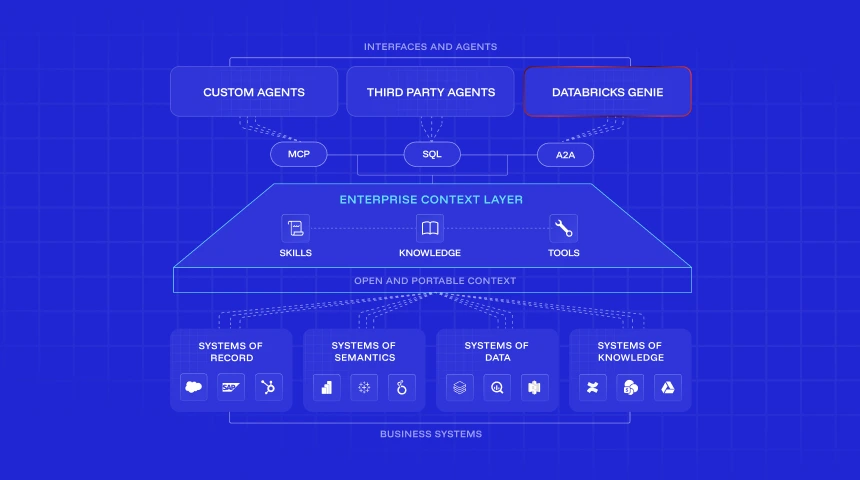
What the Enterprise Context Layer Actually Is
53+ resources on the infrastructure between your data estate and your AI agents — what it is, how it works, and why teams that have it reach production faster.
Build with Atlan MCP
A 45-minute live session for Atlan customers to set up Atlan MCP in the AI tools your team already uses.
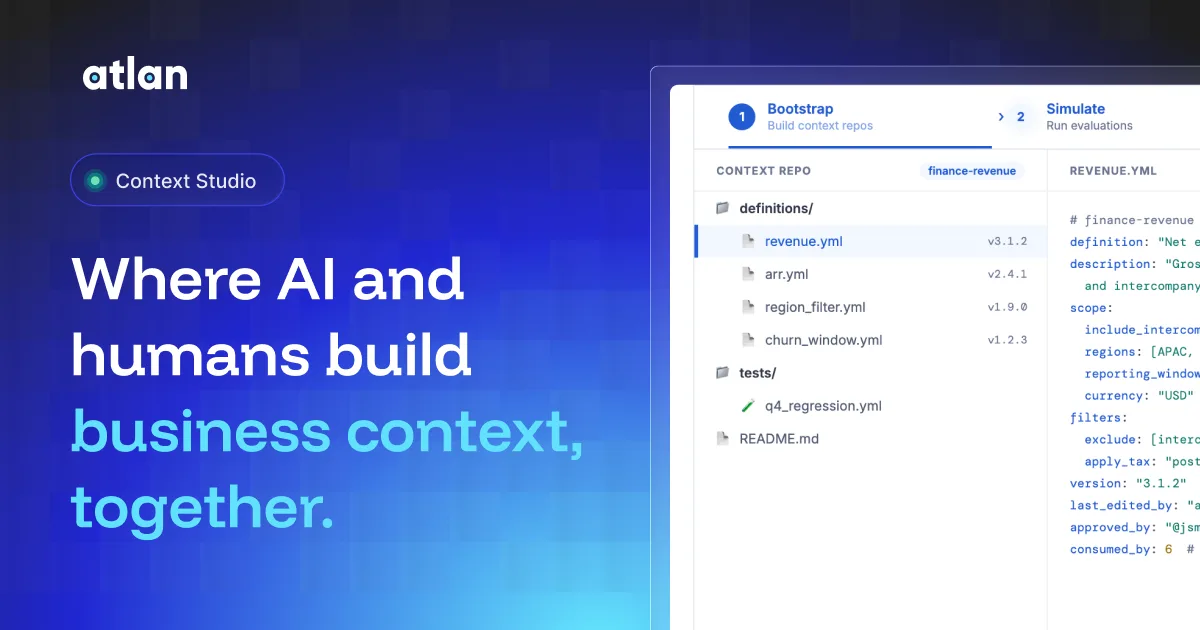
Talk-to-Data That Actually Works
Why AI-BI tools succeed or stall at the context layer — and how teams from DigiKey to Workday are connecting their AI-BI deployments to certified business definitions.
Set Up Atlan MCP in Your Environment
Remote MCP configuration, supported tools, and how context is delivered to your agents.
What the Enterprise Context Layer Actually Is
53+ resources on the infrastructure between your data estate and your AI agents — what it is, how it works, and why teams that have it reach production faster.
Build with Atlan MCP
A 45-minute live session for Atlan customers to set up Atlan MCP in the AI tools your team already uses.
Talk-to-Data That Actually Works
Why AI-BI tools succeed or stall at the context layer — and how teams from DigiKey to Workday are connecting their AI-BI deployments to certified business definitions.
Everything you need to know about Atlan MCP
The enterprise context layer is the infrastructure between your data estate and your AI tools. It holds your certified definitions, ownership records, lineage traces, access rules, and quality scores — the institutional knowledge that tells an AI tool what a metric actually means in your organization, not what it might mean in general. Atlan builds this layer by connecting to 400+ source systems and continuously reconciling context across them. When a connected AI tool asks about a table or metric, it gets your org's certified answer, not a trained approximation.
A data catalog stores documentation about your data — descriptions, ownership, tags. A context layer actively delivers that context to connected AI tools at query time, in the format those tools can use. RAG retrieves documents that might be relevant; the context layer delivers certified, structured context — specific definitions, lineage traces, access controls — from a governed source. In practice: RAG-grounded answers are only as good as the retrieved document. Context-layer-grounded answers reflect your actual business logic, maintained and certified by the people who own the data.
Column-level lineage (where data came from and what it feeds downstream), certified metric definitions (the definition your team approved, not the model's interpretation), business glossary terms (what your org means by "revenue," "churn," or "active user"), data quality scores (current quality status from the source system), ownership records (who is responsible for each asset), and access control rules (what the requesting user is allowed to see). When an agent requests context about a table, it gets all of this in a single response — structured context, not a document to search through.
Yes. Atlan MCP exposes 29 tools across 8 categories. Read tools — semantic_search, get_assets, traverse_lineage, resolve_metadata, and others — deliver catalog context at query time. But the same connection supports write operations: agents can update descriptions, apply or remove classification tags with optional downstream propagation through lineage, set certification status, create glossary terms, and manage announcements — all from within the AI tool conversation. Every change is marked as "Updated using Atlan AI" in the audit trail. Admin tools for data quality rules and custom metadata schemas require Atlan admin permissions.
No. Atlan MCP only delivers metadata — descriptions, lineage, ownership records, glossary terms, certification status, classification tags, and quality scores. Your actual row-level data does not pass through MCP. Metadata is retrieved in real time from Atlan's REST APIs with no intermediate caching, and neither your metadata nor your prompts are used by Atlan or its AI providers to train or fine-tune foundation models. All tool calls are logged as structured audit events with sensitive fields masked before storage.
Two options. OAuth (recommended for individuals) runs every call as the signed-in user — the same roles, personas, and access rules they have in Atlan apply automatically to every tool call, with no separate permissions to configure. API keys, generated from Admin Settings → API Keys/Tokens, are for service accounts and automation workflows like n8n and Windsurf. API key tokens scoped to multiple personas are rejected; service identities must operate within a single permission scope. Each Atlan tenant has a dedicated MCP server instance with no shared state between tenants.
No. Atlan hosts and manages the MCP server for every tenant at https://your-tenant.atlan.com/mcp — nothing to deploy, maintain, or scale on your side. Most tools (Cursor, VS Code, Claude Code, Snowflake Cortex) connect directly via HTTP with no intermediary. Tools that don't yet support native HTTP transport — Claude Desktop and Google ADK — use the open-source mcp-remote npm package as a local bridge to the same hosted endpoint; this requires Node.js 18+ installed locally.
Atlan's Context Agents continuously read from connected systems — query history, lineage signals, column usage, BI semantic models, and documentation — and update the context layer as things change. Atlan MCP retrieves metadata in real time from Atlan's REST APIs with no intermediate caching, so any enrichment Context Agents have applied is immediately available to every connected AI tool on the next query. There is no refresh cycle to manage and no stale cache to clear.
Yes. Atlan exposes context through multiple interfaces simultaneously — MCP, SQL, API, and Graph — so Cursor, a Snowflake Cortex agent, a custom Google ADK agent, and a Glean-powered copilot can all read from the same certified context source at the same time. Each tool connects via its preferred protocol. When the context layer updates, all of them get the update. This is how you avoid context sprawl — Cortex and your ADK agent stay in sync on the same version of "revenue."
Local MCP runs a context server on the developer's machine, requiring each user to manage their own connection and credentials. Remote MCP — Atlan's recommended deployment — runs the MCP server centrally, so every developer, every agent, and every tool connects to the same governed, current context layer without per-user setup. Context updates reach all connected tools immediately, rather than requiring each local instance to pull new context.