

Build Your AI Context Stack
Get the blueprint for implementing context graphs across your enterprise. This guide walks through the four-layer architecture: from metadata foundation to agent orchestration, with practical implementation steps for 2026.
Get the Stack Guide
Context layer in LangGraph: What does it involve?
A context layer is the set of mechanisms an AI agent uses to access the right information, in the right format, at the right step of its reasoning loop.
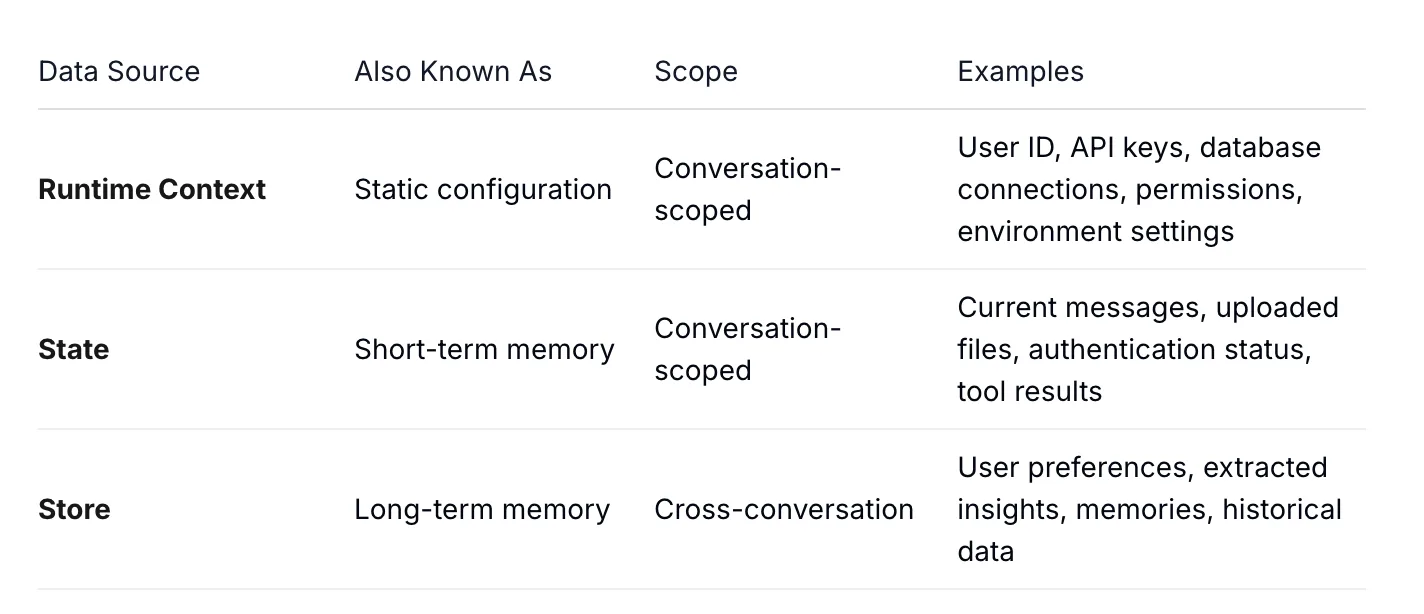
LangGraph splits the context needed into three data sources so that you can control them independently:
-
Runtime context: Immutable settings for one run, like the user ID or environment. It does not change mid-conversation.
-
State: The working memory for the current thread, including the message history and any intermediate results.
-
Store: Durable memory that survives across sessions, such as a user’s saved preferences.
Together, they form the local context layer in LangGraph.
How does it work?
You start by declaring a context schema and attaching a store to the agent. The schema gives you typed, predictable access instead of loose dictionaries passed around by hand.
Step 1. Define a context schema and attach a store
from dataclasses import dataclass
from langchain.agents import create_agent
from langgraph.store.memory import InMemoryStore

@dataclass
class Context:
    user_id: str
    user_role: str

agent = create_agent(
    model="gpt-4.1",
    tools=[...],
    context_schema=Context,   # static, per-run configuration
    store=InMemoryStore(),    # long-term memory across runs
)
This is the foundation to get the schema and store in place. The same pattern is documented in the LangChain context engineering guide, and it scales from a prototype to production without rework.
When the context an agent needs lives across many systems, this local layer is where a platform like Atlan plugs in as the upstream source of governed definitions.
The mechanics come down to reads and writes against those three sources. Tools and middleware receive a runtime object, then pull exactly what they need. Below, a tool reads the user ID from runtime context and a preference from the store.
Step 2. Read context inside a tool
from dataclasses import dataclass
from langchain.tools import tool, ToolRuntime
from langchain.agents import create_agent
from langgraph.store.memory import InMemoryStore

@dataclass
class Context:
    user_id: str

@tool
def get_preference(preference_key: str, runtime: ToolRuntime[Context]) -> str:
    """Fetch a user preference from long-term memory."""
    user_id = runtime.context.user_id          # runtime context
    store = runtime.store                       # long-term memory
    existing = store.get(("preferences",), user_id)
    if existing:
        value = existing.value.get(preference_key)
        return f"{preference_key}: {value}" if value else "No value set"
    return "No preferences found"

agent = create_agent(
    model="gpt-4.1",
    tools=[get_preference],
    context_schema=Context,
    store=InMemoryStore(),
)
You pass the runtime context at invocation, and LangGraph threads it through every step. The agent code never hard-codes the user ID; it arrives as typed context.
Step 3. Pass runtime context at invocation
result = agent.invoke(
    {"messages": [{"role": "user", "content": "What's my preferred style?"}]},
    context=Context(user_id="user_123"),
)
Short-term memory works differently. You attach a checkpointer and pass a thread_id, and the agent persists the full conversation state for that thread. Every time you run the graph with a given thread_id, LangGraph saves the entire state of the conversation, so the next turn picks up where the last one left off.
Step 4. Persist short-term memory with a checkpointer
from langgraph.checkpoint.memory import InMemorySaver
from langchain.agents import create_agent

checkpointer = InMemorySaver()
agent = create_agent(model="gpt-4.1", tools=[...], checkpointer=checkpointer)

config = {"configurable": {"thread_id": "conversation-1"}}
agent.invoke({"messages": [{"role": "user", "content": "My name is Sam."}]}, config)
agent.invoke({"messages": [{"role": "user", "content": "What's my name?"}]}, config)
Together, these three reads and writes are the working context layer. The full set of patterns, including middleware that updates context between steps, is covered in the LangChain runtime documentation.
Step 5. Advanced: long-term memory with persistent stores
The store shown so far is InMemoryStore, which is fine for prototyping but loses everything when the process stops. For production, you swap it for a database-backed store so memories survive restarts and scale across services. The change is essentially one line, since both implement the same store interface.
LangGraph’s open-source PostgresStore accepts an index configuration so you can enable semantic search over stored memories.
from langchain.embeddings import init_embeddings
from langgraph.store.postgres import PostgresStore

store = PostgresStore(
    connection_string="postgresql://user:pass@localhost:5432/dbname",
    index={
        "dims": 1536,
        "embed": init_embeddings("openai:text-embedding-3-small"),
        "fields": ["text"],   # which fields to embed
    },
)
store.setup()  # run once to create the memory tables
Once attached, you write memories and retrieve them by meaning rather than exact keys.
For Data Leaders Evaluating Where to Start
Atlan's CIO guide to context graphs walks through a practical four-layer architecture from metadata foundation to agent orchestration.
Get the CIO GuideWhy a persistent store still isn’t enough
A database-backed store fixes durability, but it leaves the harder problems untouched. Each agent still keeps its own store, so what one agent learns stays invisible to the others, and nothing in a raw store certifies that the memories inside it are correct, current, or safe to use.
The gaps that remain after you add a persistent store:
- Siloed per agent: Five agents mean five separate stores, with no shared definitions and no way to reconcile conflicts between them.
- Content is unvalidated by design: a store keeps whatever an agent writes, so a wrong definition of “revenue” persists exactly as reliably as a correct one.
- No provenance field: the store API records the value and its namespace, not where the memory came from, which makes an agent’s decisions hard to explain or audit.
- Access control lives elsewhere: the store’s documented job is to persist and retrieve namespaced values, so per-memory authorization is something you build around it, and PII can otherwise cross between agents.
- Drift over time: Memories go stale as source systems change, and nothing keeps the store consistent with the truth upstream.
Closing these gaps requires a unified, enterprise-wide context layer that supplies governed, shared memory to agents.
How do you implement a context graph in LangGraph?
A context layer answers “what does this agent know right now?” A context graph answers a deeper question: “what are the entities, relationships, and decisions that govern this domain, and how do they connect?”
LangGraph’s documented primitives are execution and memory: the StateGraph, runtime context, thread-scoped state, and a store. A context graph is a different tier, and you connect one as an external source the agent queries through tools.
In practice, you model the graph outside LangGraph, then expose it to the agent as a retrieval tool. The agent calls that tool to resolve a business term into a governed definition before it reasons, rather than guessing from raw schema. This is the graph-grounded retrieval pattern, and it reduces the “confident but wrong” failures.
However, the cleanest way to wire a governed graph into an agent is the Model Context Protocol, which lets the agent call an external context source as a standard tool.
How Atlan helps implement a context layer in LangGraph
LangGraph gives you the local context primitives, but the harder problem sits above them: building a governed, organization-wide context layer that every agent can trust. This is the layer Atlan implements, and the context graph is one part of it.
Atlan supplies the governed context layer as a set of connected parts an agent can query:
- Enterprise data graph: Holds the knowledge graph (the static map of entities and relationships) and the context graph (the decision-intelligence layer that adds lineage, decision traces, and temporal validity). Helps agents understand what exists and reason from what happened and why.
- Governed definitions: One certified meaning for each business term, so an agent resolves “customer” or “churn” the same way every time.
- Context lakehouse: Atlan’s knowledge architecture that combines a knowledge graph, Iceberg-native storage, vector search, and time travel. The shared, governed enterprise memory lives in and is enabled by the lakehouse’s bidirectional writes.
- Policy enforcement: The same access rules that apply to people apply to agents, so an agent cannot surface data a user is not cleared to see.
- Access over MCP: Agents pull all of the above on demand through Atlan’s MCP server, the same way they call any other tool in LangGraph.
LangGraph runs the agent and manages session memory, while Atlan supplies the governed context layer the agent reasons from, with the context graph as the structural piece that connects entities to their lineage and decisions.
Inside Atlan AI Labs & The 5x Accuracy Factor
Learn how context engineering drove 5x AI accuracy in real customer systems. Explore real experiments, quantifiable results, and a repeatable playbook for closing the gap between AI demos and production-ready systems.
Download E-bookReal stories from real customers building enterprise context layers
How Workday is building an AI-ready semantic layer
"Atlan captures Workday's shared language to be leveraged by AI via its MCP server. As part of Atlan's AI labs, we're co-building the semantic layer that AI needs."
- Joe DosSantos, VP Enterprise Data & Analytics, Workday

How DigiKey built a unified, sovereign context layer for its data and AI estate
"Atlan is our context operating system to cover every type of context in every system including our operational systems. For the first time we have a single source of truth for context."
- Sridher Arumugham, Chief Data Analytics Officer, DigiKey

Moving forward with implementing a context layer in LangGraph
Building a reliable agent is mostly a context problem. LangGraph gives you the three primitives you need to control it. Start there, wire them in with a typed schema, and add middleware only when a real need appears.
You can connect an external graph as a retrieval tool so the agent resolves terms to certified definitions. As more agents come online, you must centralize definitions, lineage, and policies so they share one source of truth rather than drifting apart.
The local context layer you build inside LangGraph and the governed context graph you connect to it solve different problems, and mature agent systems use both.
While LangGraph gives you the primitives to manage one agent’s context, it doesn’t keep definitions, lineage, and policies consistent across every agent and system that relies on them.
Atlan supplies that governed, organization-wide context layer for LangGraph agents to query at runtime. As a result, they reason from certified definitions, real lineage, and enforced policies rather than whatever each agent holds in memory. To move a LangGraph agent from a working demo to something the whole enterprise can trust, a context platform like Atlan is the layer you add.
FAQs about implementing a context layer in LangGraph
1. What is the difference between state and store in LangGraph?
State is short-term memory scoped to a single conversation thread, holding the current messages and tool results. Store is long-term memory that persists across conversations, such as a user’s saved preferences. State resets when the thread ends; store does not.
2. Is a context layer the same as RAG?
No. RAG is one retrieval technique that pulls text chunks into a prompt, while a context layer is the broader set of sources an agent reads from, including configuration, session memory, and long-term memory. RAG can be one input into a context layer, but it is not the whole thing.
3. What is the difference between LangChain and LangGraph?
LangChain is the high-level component library: model abstractions, provider integrations, and the create_agent API. LangGraph is the low-level runtime that handles stateful execution, cyclic graphs, persistence, and streaming. Since October 22, 2025, LangChain’s create_agent function runs on LangGraph’s execution engine under the hood, so most production agents use both.
4. Do I need both LangChain and LangGraph to build a context layer?
Not always. LangChain’s create_agent function runs on LangGraph’s execution engine under the hood, so for many production agents you use both, dropping to an explicit StateGraph when you need node-level control. For simple prototypes, the higher-level agent API is usually enough.
5. How does runtime context differ from a system prompt?
A system prompt is text sent to the model that shapes its behavior. Runtime context is structured configuration, like a user ID or API key, that your tools and middleware read programmatically. You often use runtime context to decide what goes into the system prompt.
6. What is the difference between a context layer and a context graph?
A context layer is the full set of sources an agent reads from, including runtime configuration, session memory, long-term memory, and governed organizational context. A context graph is one structured piece inside that layer: a map of entities, relationships, lineage, policies, and decision traces. Put simply, the context layer is the delivery system and the context graph is one of the richest things it can deliver.
7. Does LangGraph come with a context graph?
LangGraph’s documented context surface is three things: runtime context, thread-scoped state, and a store, which is key-value with optional vector indexing. Its graph is the execution graph, the StateGraph. A governed graph of your business entities, lineage and policies sits at a different tier: you model it externally and connect it as a retrieval tool, often over the Model Context Protocol.
8. How do I keep an agent’s context from going stale?
Treat definitions, policies, and lineage as governed assets with clear ownership, rather than values copied into each agent. When the source updates, every agent that queries it stays current. Connecting agents to a central context source over a protocol like MCP avoids the drift that comes from siloed, copied context.
