

LangGraph is an open-source framework for building stateful, production-grade AI agents, with Python and JavaScript/TypeScript implementations. It exists to solve a specific problem: agents that lose context mid-workflow, repeat steps, or crash without recovery, because the framework underneath them discarded state between steps. The repo carries 41.9k stars and 7.1k forks as of 18 September 2026, and LangChain publishes production case studies for Klarna, Uber, LinkedIn, Elastic and AppFolio.
Key things to understand about LangGraph before reading further:
- It is not a replacement for LangChain. LangGraph is the lower-level runtime; LangChain is the framework built on top of it. LangChain’s own docs put it plainly: LangChain 1.0 is built on top of LangGraph. They are layered, not competing.
- State is the central concept. LangGraph’s value is not that it “uses a graph.” It’s that the graph gives every node access to a shared, persistent state object that survives retries, loops, and interruptions.
- Production runs on PostgresSaver. InMemorySaver works for local development. For production concurrency, the docs point to PostgresSaver and AsyncPostgresSaver; SqliteSaver is documented as local file-based storage for development.
- LangGraph handles orchestration, not accuracy. It manages what the agent does and when. Whether the underlying data your agent reasons on is correct, certified, and up to date requires a governed context layer: a separate tier.
- The framework is actively developed. As of 18 September 2026 the current releases are
langgraph1.2.11 andlanggraph-sdk0.4.4.
Build Your AI Context Stack
Get the blueprint for implementing context graphs across your enterprise. This guide walks through the four-layer architecture, from metadata foundation to agent orchestration, with practical implementation steps for 2026.
Get the Stack GuideWhat is LangGraph?
LangGraph is a low-level orchestration framework that models AI agent architecture as stateful, cyclic directed graphs. It ships in Python as langgraph and in JavaScript/TypeScript as @langchain/langgraph. It enables agents to loop, branch, retry, and pause in ways that linear pipelines cannot support in production.
Where a pipeline executes a fixed sequence of steps and discards intermediate state, LangGraph maintains a shared TypedDict state object that all nodes can read and update. Agents traverse the graph in cycles, branch on conditional logic, and resume from a checkpointed snapshot. This architecture matters when the 27th retry at 3 AM must not lose the entire user conversation.
LangChain announced LangGraph on 22 January 2024, with LangGraph v0.1 and the hosted Cloud service following that June. The problem it was built for is the one every agent team hits second: a workflow that cannot resume where it stopped.
Three things distinguish LangGraph architecturally from earlier approaches:
- Cycles over DAGs. Traditional directed acyclic graphs (DAGs) enforce a top-to-bottom flow. LangGraph’s cyclic graph model lets agents loop back to earlier nodes, which is essential for retry logic, self-correction, and iterative reasoning.
- Persistent shared state. The TypedDict state object is the agent’s memory for a given run. Every node sees the same state; every state update is checkpointed. No more passing context through function arguments or losing it between steps.
- Native human-in-the-loop. A conditional edge can route execution to an interrupt node, pausing the graph until a human approves or modifies the next step. This is built into the framework, not bolted on — and is the primary mechanism for implementing AI agent risks and guardrails in production workflows.
As of 2026, LangChain’s agents run on LangGraph’s runtime, making LangGraph the preferred execution engine for all complex agentic AI workflows in the LangChain ecosystem. The distinction between LangChain (component library) and LangGraph (execution engine) is explored in detail on the LangGraph vs LangChain comparison page.
How does LangGraph work? State, Nodes, and Edges explained
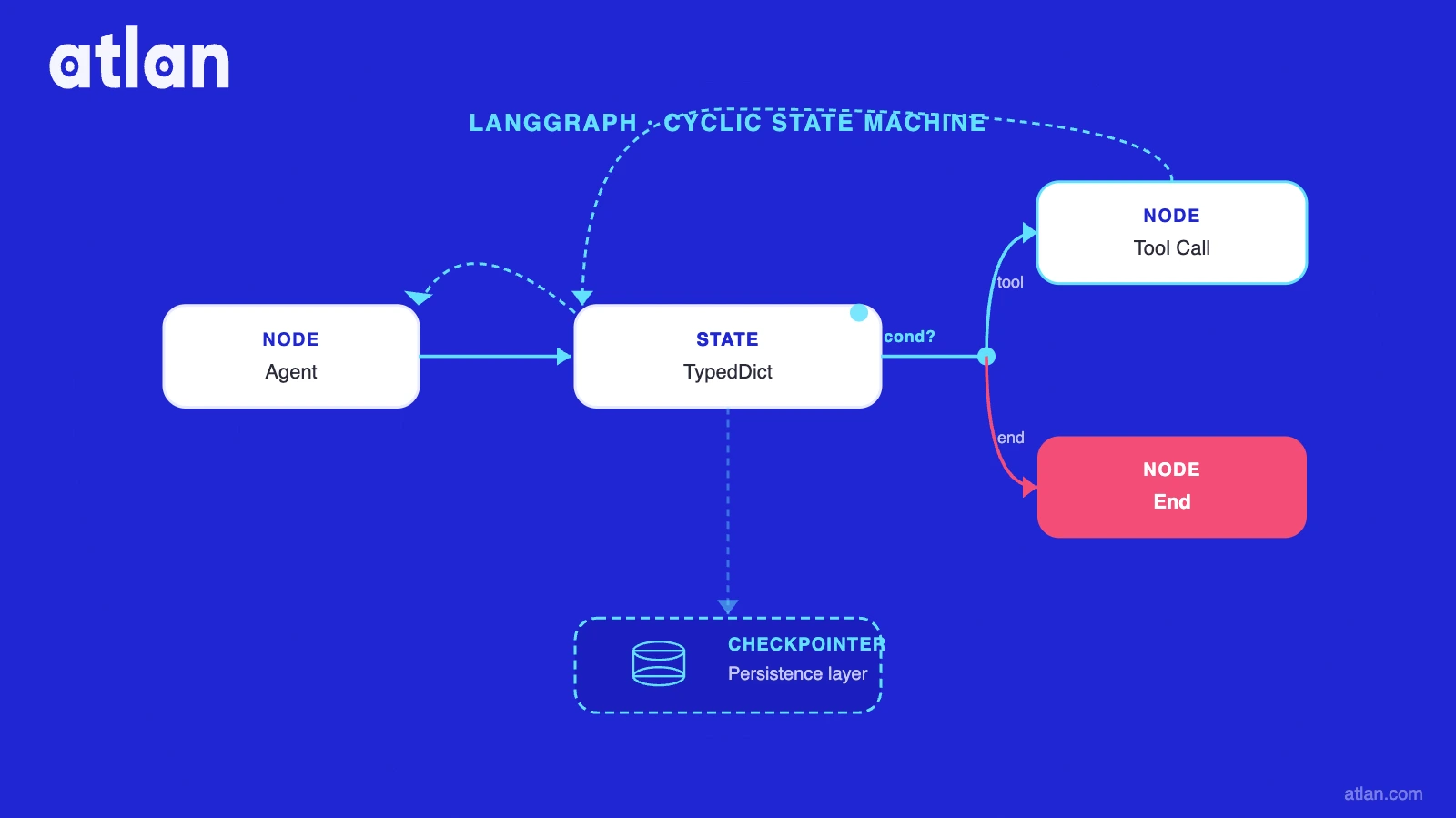
LangGraph organizes agent logic around three primitives: State, Nodes, and Edges. Together they define what the agent knows, what it can do, and how it decides what to do next.
Every LangGraph workflow begins with a StateGraph: a Python class initialized with a TypedDict schema that defines the shared state object all nodes can read and modify. Nodes are Python functions that perform discrete operations (call an LLM, run a tool, validate output) and return state updates. Edges are routing rules: direct edges for fixed sequences, conditional edges for branching logic. A checkpointer (InMemorySaver for development, PostgresSaver for production) persists the state after every node execution, enabling pause, resume, and human-in-the-loop interruption at any graph step.
State: the TypedDict memory bank
The State is a TypedDict-defined Python class. Every node in the graph reads from and writes to this shared object. Reducer functions control how updates merge. The built-in add_messages reducer, for example, appends to a message list rather than overwriting it, preserving conversation history across multiple LLM calls.
Two persistence tiers are available. InMemorySaver stores state in memory, appropriate for development and unit testing only. For production, the docs point to PostgresSaver, with an async variant: it persists state to a PostgreSQL database, handles concurrent executions safely, and enables cross-session state retrieval. SqliteSaver is documented as local file-based storage for development, which is the reason to keep it out of a concurrent production path. This is why agents lose context between sessions without persistent state, and why choosing the right checkpointer before shipping matters more than most teams realize.
Nodes: Python functions as operations
A node is any Python function that accepts the current state and returns a partial state update. Nodes are not restricted to LLM calls. Preprocessing steps, output validation, tool execution, API calls, and human-in-the-loop pause points all qualify as nodes.
The key production pattern: keep nodes small and single-responsibility. A node that calls an LLM, validates the response, and routes the result is three nodes, not one. Smaller nodes are easier to test in isolation, easier to debug from logs, and easier to swap when an LLM provider changes.
Edges: direct and conditional routing
Direct edges connect two nodes unconditionally: Node A always goes to Node B. Conditional edges take a routing function that inspects the current state and returns the name of the next node. This is the mechanism behind retry loops, early exits, and branching logic.
Two special edge types complete the graph: START defines the entry point, and END is the terminal node. A conditional edge that returns END stops execution; it is the equivalent of a success condition. This conditional logic is also how conditional edges enable multi-agent handoffs: a routing function can delegate to a subgraph or a specialized agent node based on the current state.
Pipeline vs LangGraph: architecture comparison
| Attribute | Linear pipeline / DAG | LangGraph state machine |
|---|---|---|
| Execution model | Fixed sequence, top-to-bottom | Cyclic graph with conditional routing |
| State between steps | Discarded or passed manually | Persistent TypedDict, shared across all nodes |
| Branching logic | Limited (if-else hardcoded at build time) | Conditional edges inspecting live state |
| Loops and retries | Not native; requires external orchestration | Native cycles; conditional edge back to any node |
| Human-in-the-loop | Not supported natively | Built-in interrupt mechanism |
| Checkpointing | Not included | InMemorySaver (dev) / PostgresSaver (prod) |
| Multi-agent coordination | Manual handoff code | Native subgraph and node delegation |
| Failure recovery | Restart from beginning | Resume from last checkpointed state |
For teams adding persistent long-term memory to LangGraph agents, the checkpointer is the foundation. The choice between InMemorySaver and PostgresSaver is the single most consequential infrastructure decision at production deployment. See types of memory available to AI agents for how LangGraph’s in-graph state relates to other memory tiers. Teams implementing cross-session recall should also review how to implement long-term memory in AI agents and the comparative guide to agent memory architectures.
Understanding these three primitives makes the LangGraph vs. LangChain distinction much clearer: LangChain provides the components; LangGraph provides the cyclic runtime that orchestrates them.
What makes LangGraph different from LangChain?
LangGraph and LangChain are not alternatives. LangGraph is the lower-level runtime, and LangChain 1.0 is built on top of it. That is why LangChain agents run on LangGraph, and not the reverse.
The architectural distinction is precise:
- LangChain is a high-level component library. It provides LCEL (LangChain Expression Language) for composing LLM pipelines, prompt templates, tool integrations, RAG retrievers, and output parsers. It excels at assembling the components of an LLM application.
- LangGraph is a low-level execution engine for stateful, cyclic agent workflows. It provides the runtime that controls how those components are orchestrated, what state persists between steps, and how the agent decides what to do next.
The practical decision rule: if your agent needs to remember what it has done, loop until a condition is met, or pause for human review, use LangGraph. If you are building a linear RAG pipeline or a single-call LLM chain, LangChain alone is sufficient.
In our reading of how LangGraph compares across the major agent frameworks, the deciding factor for stateful workflows is durable execution: checkpointed state after every node, resume from the last checkpoint, and an interrupt mechanism built into the graph rather than bolted on. LangGraph is the execution engine; LangChain is what it runs.
The full side-by-side breakdown, including when to use each and same-task code examples, is on the LangChain vs LangGraph comparison page.
Inside Atlan AI Labs & The 5x Accuracy Factor
Learn how context engineering drove 5x AI accuracy in real customer systems. Explore real experiments, quantifiable results, and a repeatable playbook for closing the gap between AI demos and production-ready systems.
Download E-BookWhat are the production use cases for LangGraph in 2026?
LangChain publishes production case studies for LinkedIn, Uber, Klarna, Elastic and AppFolio. The outcomes it reports include an 80% reduction in customer resolution time at Klarna and more than 10 hours a week saved per property manager at AppFolio, both vendor-published figures. What these deployments share: complex agent planning loops requiring persistent state, conditional branching, retry logic, and multi-step coordination that linear pipelines cannot handle reliably at scale.
According to LangChain’s State of Agent Engineering report (LangChain, 2026), 57% of organizations now have AI agents in production, and 89% have adopted observability tools as standard practice. LangGraph’s adoption reflects a broader shift toward production-grade agent scaling infrastructure.
LangGraph in 2026: by the numbers
- 41.9k GitHub stars and 7.1k forks on
langchain-ai/langgraph(18 September 2026)- Published production case studies: LinkedIn, Uber, Klarna, Elastic, AppFolio
- 57% of organizations have AI agents in production (LangChain, State of Agent Engineering, 2026, 1,340 respondents surveyed 18 November to 2 December 2025)
langgraph1.2.11 andlanggraph-sdk0.4.4 current as of 18 September 2026- The hosted service is LangSmith Deployment, renamed from LangGraph Platform in October 2025
Klarna: 80% resolution time reduction
Klarna built an AI customer support assistant serving 85 million active users on LangGraph, with LangGraph observability via LangSmith. The multi-step resolution workflow required persistent state across conversation turns, a pattern that linear pipelines could not support reliably. LangChain’s customer page reports an 80% reduction in customer resolution time across millions of interactions.
Uber: automated test generation
Uber uses LangGraph to automate unit-test generation across its codebase, according to LangChain’s customer page, retrieved 18 September 2026. The interesting part for other teams is the shape rather than the savings: a multi-agent pattern with specialized sub-agents for scaffolding, generation, and execution, coordinated by a stateful graph.
LinkedIn: recruiter automation and SQL bot
LinkedIn deployed two distinct LangGraph systems. The first is a hierarchical agent system for AI-powered recruiting: automating candidate sourcing, matching, and messaging. The second is a SQL Bot that gives enterprise teams natural language access to internal data. Both deployments freed technical staff from repetitive, high-volume tasks to focus on higher-judgment work.
AppFolio: 10+ hours per week saved
AppFolio built an AI-powered property management copilot on LangGraph. LangChain’s customer page reports that it saves property managers more than 10 hours a week and increased response accuracy 2x, by giving agents access to persistent, structured context about properties and tenant interactions. Both figures are vendor-published.
Production use cases summary
| Company | What they built | Outcome | Key metric | Year |
|---|---|---|---|---|
| Klarna | AI customer support (85M users) | 80% reduction in resolution time | 80% faster resolution | 2024-2026 |
| Uber | Automated unit-test generation | Test generation across the codebase | Vendor case study, no figures published | 2025-2026 |
| Recruiter automation + enterprise SQL bot | Freed recruiters; natural language data access | Enterprise-wide deployment | 2024-2026 | |
| AppFolio | AI property management copilot | 10+ hrs/week saved per manager | 2x response accuracy | 2024-2026 |
| Replit | Multi-agent AI copilot with HITL | Transparent AI-assisted development | Production HITL deployment | 2024-2026 |
| Elastic | Orchestrated security threat detection | Faster security response times | Production deployment | 2025-2026 |
For teams investing in monitoring LangGraph agents in production, LangSmith is the standard observability layer. The 89% observability adoption rate in the LangChain report confirms this is now a production baseline, not optional. Evaluation benchmarks and metrics for stateful agents are increasingly part of this baseline too.
These outcomes confirm what LangGraph delivers at scale: orchestration that survives real production conditions. But most teams encounter a second question only after their first deployment is live: whether the underlying data the agent acts on is actually trustworthy.
What does LangGraph still not solve?
LangGraph solves the orchestration problem: it tells your agent what it has done, where it is, and what to do next. But it does not solve the accuracy problem: whether the underlying data, definitions, and context your agent is acting on are trustworthy.
State management and governed context are different problems. LangGraph’s documented persistence surface is two primitives: a thread-scoped checkpointer that saves state after every node, and a store, key-value with optional vector indexing, for state that crosses threads. Both hold what your agent wrote. Neither holds what your business means: the definition of “revenue” your CFO would recognize, the certified dataset with verified lineage, the freshness and sensitivity labels that say whether this data is safe to use. Those live a tier below, and without them even a well-orchestrated agent is exposed to agent hallucination risk.
Most teams discover this gap after their first production deployment. The pattern is consistent: a well-orchestrated agent confidently producing outputs based on the wrong definition of a metric, a stale dataset, or an uncertified table.
Three things LangGraph agents typically need from that tier below:
- Shared business definitions. When an agent queries “revenue,” which definition applies? The marketing definition, the finance definition, or the definition the CEO used in the board deck? Without a governed business glossary, the agent picks one arbitrarily.
- Data lineage. Before committing to an output, an agent should know where the data originated, what transformations it passed through, and whether those sources are current. This is the full AI memory system architecture; lineage is a distinct tier from in-graph state.
- Certification and trust signals. Not every dataset in an enterprise is production-ready. Certification status, quality scores, ownership, and sensitivity labels determine whether an agent should use a given asset. Without these signals, agents use whatever they can access, not whatever is correct.
This is what a context layer adds to LangGraph agents: governed truth, rather than more orchestration. Why agents lose context and produce inaccurate outputs is often not a memory problem. It is a context accuracy problem. The agent memory vs governed business context distinction is where most post-deployment surprises originate.
The bridge between LangGraph and governed context is MCP: the Model Context Protocol that lets a LangGraph node call an external context layer without custom integration per data source.
How Atlan works with LangGraph agents
Atlan is not an alternative to LangGraph. It is the governed context layer that LangGraph agents call when they need trustworthy enterprise data: definitions, lineage, certification, and quality signals. Teams running LangGraph in enterprise workflows often pair it with an agent harness — a structured execution wrapper that enforces guardrails, context injection, and governance policies at the agent boundary. Understanding harness engineering is the infrastructure complement to LangGraph’s orchestration primitives.
Atlan’s MCP server exposes its governed metadata catalog as agent-callable tools. A LangGraph node determines it needs enterprise context, calls Atlan’s MCP tools, and receives governed metadata: the certified definition of “active user,” the lineage trace showing where a revenue figure originates, the sensitivity label indicating whether a dataset can be used in an automated workflow. The next node uses that context to reason accurately. No custom integration per data source. MCP decouples the agent context layer architecture from every source system.
The challenge-approach-outcome arc is consistent across teams that have bridged this gap. Data quality in AI agent harnesses is the underlying problem that governed context directly addresses:
- Challenge. A LangGraph agent orchestrating a financial reporting workflow needs to know which definition of “revenue” is authoritative, which tables are certified, and whether last quarter’s data has passed quality checks. Hard-coding that context into the agent does not scale across 50 metrics and 200 tables.
- Approach. The LangGraph workflow includes a node that calls Atlan’s MCP server, searching the business glossary, retrieving certification status, and querying lineage before committing to an output.
- Outcome. The agent produces outputs anchored to governed, certified context, not whatever definition happened to be in its training data or the first table it retrieved.
Use LangGraph for orchestration and Atlan for governed context delivery. LangGraph manages state and decisions; Atlan provides the shared business language, lineage, and AI agent governance those decisions depend on. Teams exploring LangGraph memory options compared to Mem0 find that both memory tools solve recall. Neither solves accuracy. Atlan’s context layer is the third tier, accessible through MCP, that addresses the enterprise accuracy gap. Understanding the distinction between memory layer and context layer is essential before deciding which tier to invest in first.
Real stories from real customers: context-layer impact in production
"We're excited to build the future of AI governance with Atlan. All of the work that we did to get to a shared language at Workday can be leveraged by AI via Atlan's MCP server...as part of Atlan's AI Labs, we're co-building the semantic layer that AI needs with new constructs, like context products."
— Joe DosSantos, VP of Enterprise Data & Analytics, Workday

Workday’s experience illustrates the core pattern: years of investment in shared data language (standardized definitions, governed metrics, agreed-upon business context) can now be exposed to AI agents through Atlan’s MCP server. The semantic layer that took years to build becomes callable infrastructure for every LangGraph workflow that needs it.
"Atlan is our context operating system to cover every type of context in every system including our operational systems. For the first time we have a single source of truth for context."
— Sridher Arumugham, Chief Data Analytics Officer, DigiKey

DigiKey’s framing, “context operating system,” captures what Atlan adds to a LangGraph stack precisely. LangGraph manages the workflow graph. Atlan manages the context that flows through it: what data means, where it came from, whether it can be trusted. Together, they form the infrastructure for agents that are not just capable, but accurate.
LangGraph gives you orchestration: what comes next
LangGraph solves the problem that broke most first-generation production agents: state management failures. With persistent TypedDict state, conditional edges, checkpointing, and native human-in-the-loop support, LangGraph gives engineering teams the runtime primitives to build agents that survive real production conditions: retries at 3 AM, multi-step workflows, concurrent users, and iterative reasoning loops that no linear pipeline can model.
What a checkpointer and a store hold is the agent’s own state. State management tells agents what they have done. It does not tell them whether what they are doing is accurate. The definition of a metric, the certification of a dataset, the lineage of a table: these are not orchestration problems. They are context problems. Atlan’s context layer, exposed through a standardized MCP server, is the layer that closes this gap: callable from any LangGraph node, returning governed metadata that makes agent outputs trustworthy, not just well-orchestrated.
The stack that consistently produces production-grade AI is three-tier: LangGraph for orchestration, LangMem or a checkpointer for cross-session recall, and Atlan’s context layer for governed accuracy. For teams starting from scratch, the step-by-step guide to building an AI agent covers how to sequence these layers from the ground up.
Frequently asked questions about LangGraph
1. What is LangGraph used for?
LangGraph is used to build stateful AI agents that need to loop, branch, retry, and pause mid-workflow. Common production patterns include customer support automation, developer tooling, recruiting automation, property management copilots, and multi-agent systems requiring human-in-the-loop review at specific decision points. Any workflow that cannot be modeled as a fixed linear sequence is a candidate for LangGraph.
2. What is the difference between LangChain and LangGraph?
LangChain is a component library for composing LLM applications: RAG pipelines, prompt templates, tool integrations, output parsers. LangGraph is a lower-level execution engine for stateful, cyclic agent workflows. They are complementary and layered: as of 2026, LangChain’s agents run on LangGraph’s runtime. Use LangChain for components; use LangGraph when those components need to participate in a stateful, cyclic workflow.
3. What is a StateGraph in LangGraph?
A StateGraph is the core class in LangGraph. You initialize it with a TypedDict schema that defines the shared state object, add nodes (Python functions) and edges (routing rules), then compile it with graph.compile(). The compiled graph is executable: it can be invoked synchronously, streamed, interrupted for human input, and checkpointed at every step for production persistence.
4. How does LangGraph handle memory?
LangGraph manages in-graph state: the TypedDict object persisted after every node execution by a checkpointer (InMemorySaver for development, PostgresSaver for production). Cross-session memory, which persists state across separate user conversations, uses a store: LangGraph’s own, LangMem, or Mem0. Neither LangGraph’s checkpointer nor LangMem/Mem0 supply governed business context (certified definitions, lineage, quality signals); that is a separate tier addressed by tools such as Atlan via MCP.
5. Is LangGraph better than CrewAI?
For production systems requiring state persistence, retry logic, human-in-the-loop, and multi-agent coordination, LangGraph is the more mature choice. CrewAI is faster to prototype and has a gentler learning curve for simple multi-agent workflows. Choose CrewAI for quick prototypes; choose LangGraph when production reliability and state management are the priority.
6. How do you add checkpointing to a LangGraph agent?
Pass a checkpointer instance when compiling the graph: graph.compile(checkpointer=PostgresSaver(conn)). For local development, InMemorySaver() requires no database. MemorySaver still resolves as the older name, but the docs use InMemorySaver. For production, PostgresSaver requires a PostgreSQL connection; it handles concurrent executions safely and enables state retrieval across sessions. LangChain documents SqliteSaver as local file-based storage for development, so keep it off a concurrent production path.
7. Does LangGraph replace LangChain?
No. LangGraph and LangChain are complementary layers. LangGraph is the execution engine; LangChain provides the component library. As of 2026, LangChain’s agents run on LangGraph’s runtime. LangGraph extends LangChain’s capabilities for stateful, cyclic workflows. Teams using LangChain for RAG pipelines and tool integrations add LangGraph when they need production-grade agent orchestration. Teams extending beyond basic RAG should also explore advanced RAG techniques before choosing between a pure retrieval approach and a stateful agent loop.
8. What is the difference between LangGraph and LangSmith Deployment?
LangGraph is the open-source library for building stateful agent graphs. The hosted service that runs them is LangSmith Deployment, which LangChain renamed from LangGraph Platform in October 2025. It offers four deployment shapes: LangChain-managed cloud, self-hosted with a control plane, hybrid, and a standalone server. As published on 18 September 2026, LangSmith Developer is $0 for one seat with 5,000 base traces a month; Plus is $39 per seat per month with 10,000 base traces and one free small serverless deployment; Enterprise is custom, and is the only tier with self-hosted and hybrid deployment. Compute and storage meter separately at $1.50 per LangChain Compute Unit and $1.00 per storage unit. Node executions are no longer a published billing unit.
Sources
- LangChain: State of Agent Engineering, 2026 (1,340 respondents, surveyed 18 November to 2 December 2025)
- LangGraph GitHub repository (41.9k stars, 7.1k forks, read 18 September 2026)
- LangChain: Built with LangGraph (customer outcomes, vendor-published)
- LangChain: Is LangGraph used in production?, 4 February 2025
- LangGraph persistence: checkpointers and stores, LangChain docs
- LangGraph Graph API documentation, LangChain docs
- LangGraph overview, LangChain docs
- LangGraph for JavaScript and TypeScript, LangChain docs
- LangSmith Deployment and LangChain pricing, retrieved 18 September 2026
- LangChain: LangGraph

