

Build Your AI Context Stack
Get the blueprint for implementing context graphs across your enterprise. This guide walks through the four-layer architecture—from metadata foundation to agent orchestration—with practical implementation steps for 2026.
Get the Stack GuideWhat are the components of an enterprise agent architecture in Bedrock?
Amazon Bedrock is a set of services that provide access to foundation models and inference.
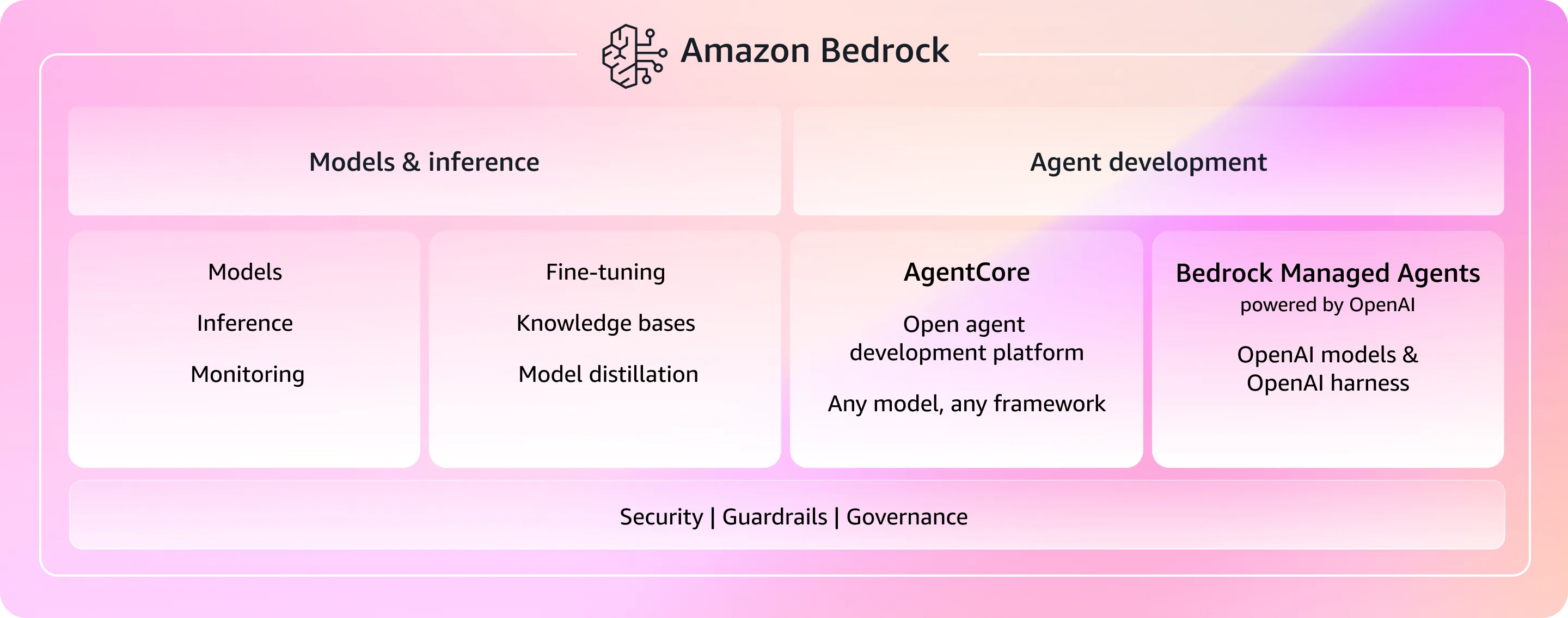
The centerpiece for production agent deployments is Amazon Bedrock AgentCore, which handles the infrastructure concerns that typically block teams from moving agents from demo to production.
With AWS Bedrock AgentCore, you can deploy agents based on the frameworks of your choice with open SDKs like CrewAI, Strands Agents, and LangGraph.
Key components of Bedrock AgentCore:
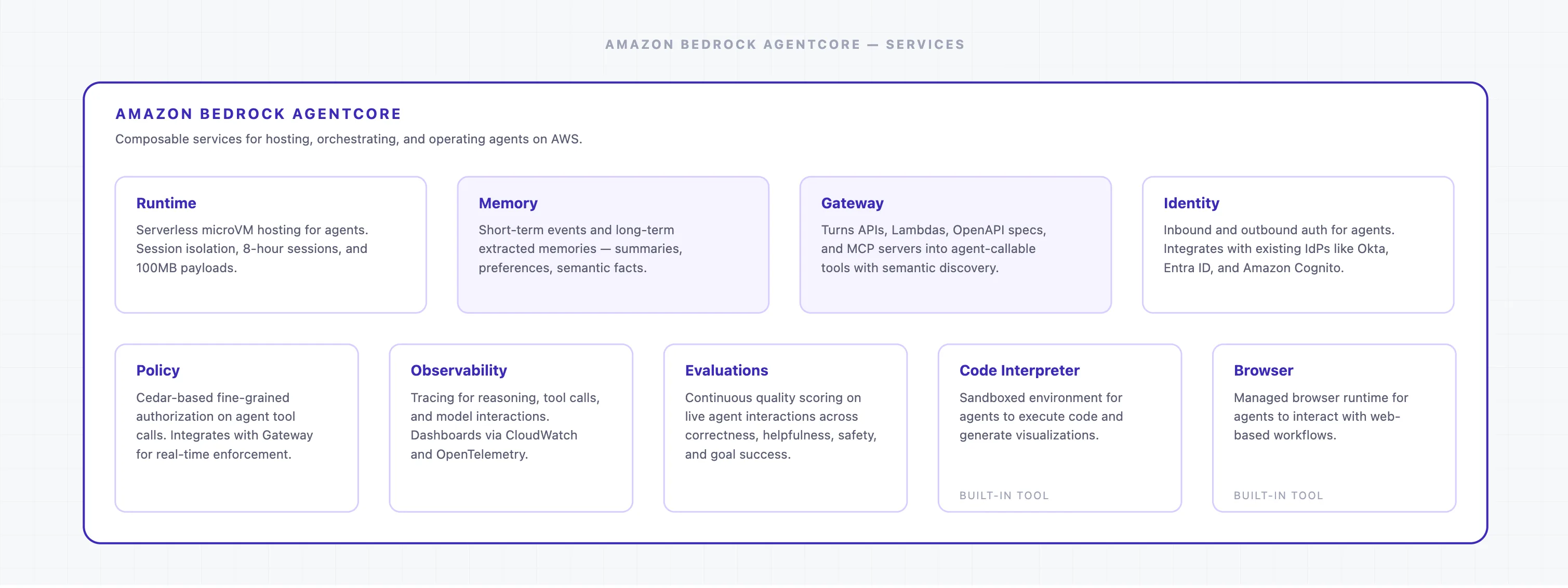
- Runtime: This is where the agents actually run. Agents use microVMs that run via Firecracker on EC2 bare metal in AWS.
- Memory: This is where the agent’s memory gets stored. Agents use this built-in memory management for both short- and long-term memories.
- Gateway: This is how agents access tools. Agents use Gateway to turn APIs, Lambda functions, MCP servers, and Smithy models into tools that they can call.
- Identity: This is how authentication is handled. Agents use the standard inbound and outbound auth using the tools decided by the organization.
- Policy: This is how authorization is handled. Agents use the Cedar-based Policy engine to enforce authorization, deciding what an agent can access, which tools it can call, etc.
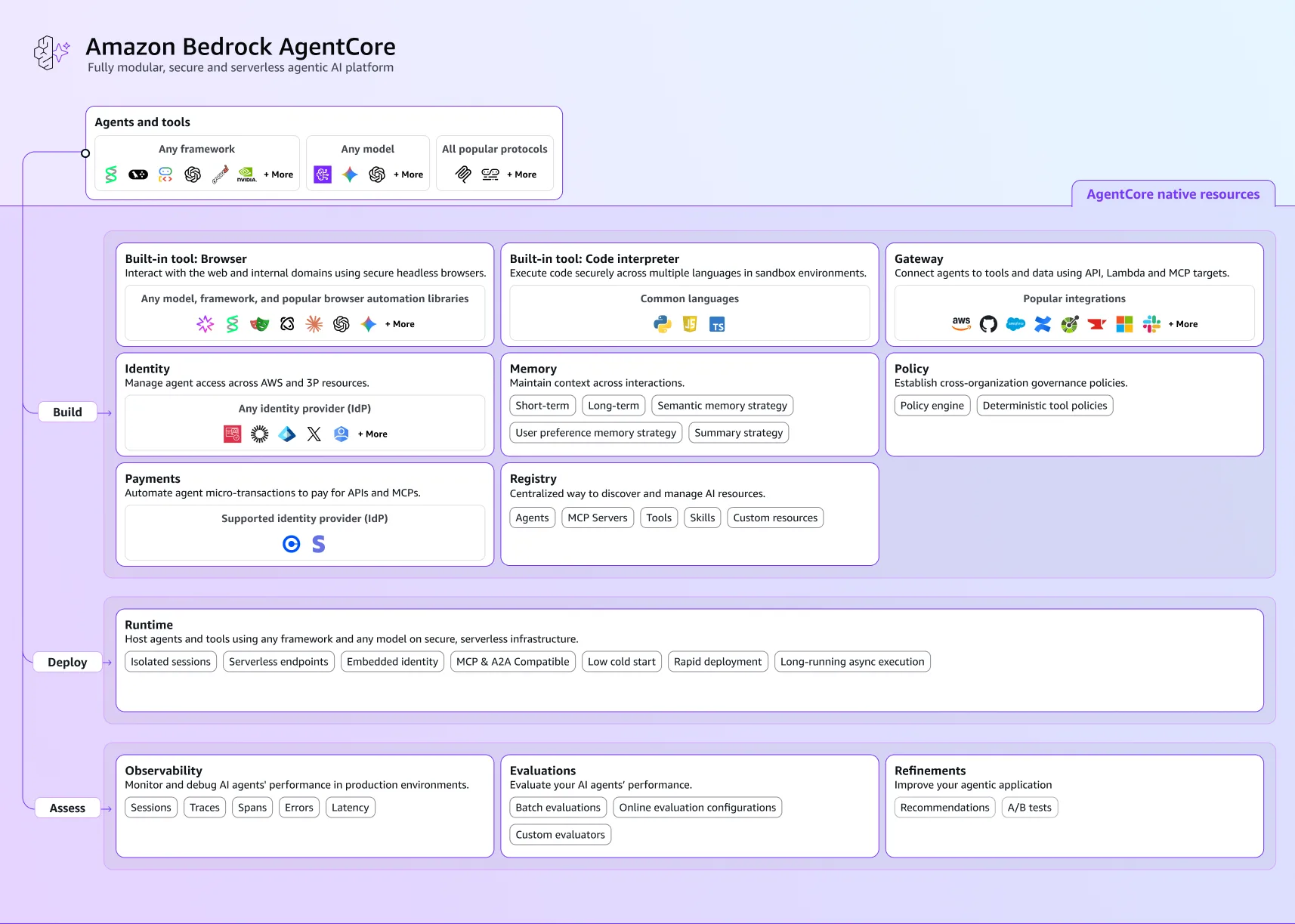
AWS’s component table names thirteen in all. Alongside the five above sit Harness, Registry, Payments, Optimization, and the four production capabilities below.
Harness deserves its own line, because AWS recommends it as the migration target off Bedrock Agents Classic. It is a config-based managed agent loop: you describe the agent rather than write the orchestration code, and AWS states there is no separate orchestration charge for it. Registry is the AWS Agent Registry, generally available since 31 August 2026, where agents, MCP servers, skills and custom resources are catalogued and approved before they become discoverable.
The four capabilities that matter once agents move into production:
- Code interpreter: Agents can write and execute code inside an isolated sandbox, across Python, JavaScript, and TypeScript, without any infrastructure provisioning by the team.
- Browser: Agents can browse the web as part of their reasoning loop, retrieving live information from external sources.
- Observability: AgentCore captures traces across agent sessions, giving teams visibility into what each agent did, in what order, and with what inputs and outputs. This is the inference-layer view: latency, tool calls, errors, and session flow. It does not, on its own, tell you whether the context the agent operated on was accurate or current. That requires a separate context-layer monitoring approach.
- Evaluations: Built-in tooling to test agent outputs against defined benchmarks before promoting to production. Teams can run evaluation sets, score outputs, and document a performance baseline that makes regressions detectable after model or prompt updates.
For Data Leaders Evaluating Where to Start
Atlan's CIO guide to context graphs walks through a practical four-layer architecture from metadata foundation to agent orchestration.
Get the CIO GuideWhat context do enterprise agents need, and what’s missing?
With AgentCore, you can define the persona and have instructions in the system prompt and tool definitions for every agent.
The Runtime retains the session state for up to 8 hours, since that is the maximum time a microVM can remain up. The Memory stores short- and long-term information as context across sessions and can also hold context extracted from external sources.
Finally, there’s a RAG-based component to Bedrock with Knowledge Bases. This allows agents to retrieve information from various Amazon services for databases (Aurora PostgreSQL), search indexes (OpenSearch), and object stores (S3).
While you get a good amount of context from the aforementioned sources, it is nowhere near enough for an agent to be effective at what it does. What an agent needs is context of your business, context across your organization’s stack, context across all your tools and processes.
The two services that help you bring all the context to Bedrock AgentCore agents are Memory and Gateway.
Gateway lets you interact with other tools in your stack and retrieve semantic, ontological, governance, and policy context, among other things. Using Gateway, you can access context from anywhere in your organization, but when you try to do so, the problem is that the context is disorganized and unavailable. That’s where the need for an enterprise context layer comes into the picture.
AgentCore Gateway needs a ready-to-use context layer that doesn’t add to the work the agent has to do to figure out the crucial pieces of context from an information dump. This well-structured, organized context layer can already talk to all the key systems of your organization—a true enterprise context layer.
That’s precisely the problem Atlan solves with its Enterprise Context Layer built on its Context Lakehouse.
How does Atlan organize and provide context to AWS Bedrock agents?
Atlan gets metadata and context from business systems—systems of records, semantics, data, and knowledge. All that metadata flows into an Enterprise Context Layer, which is then represented and organized in various graphs of data, governance, knowledge, and ontology. Then comes the concept of Context Repos, which focus on targeted context for agents doing a specific set of tasks, exactly what Bedrock AgentCore needs via its Gateway.
You can accumulate, organize, build, and share context in Atlan using the following key features:
- Enterprise Data Graph: Accumulated metadata from a wide variety of connectors with lineage, ownership, certification, and usage, on top of the technical and structural metadata.
- Active Ontology: An organized semantic layer capturing glossary terms, domains, products, metrics, and relationships, in compliance with the Open Semantic Interchange standard.
- Context Engineering Studio: An interface within Atlan that allows you to build Context Repos for specific agents, run evaluations on them, and have agents use them.
- Atlan MCP server: All of this context reaches AgentCore Gateway via Atlan’s own MCP server, which becomes the facilitator of metadata and context to any and every agent running on Bedrock AgentCore.
Inside Atlan AI Labs & The 5x Accuracy Factor
Learn how context engineering drove 5x AI accuracy in real customer systems. Explore real experiments, quantifiable results, and a repeatable playbook for closing the gap between AI demos and production-ready systems.
Download E-bookMoving forward with AWS Bedrock for enterprise agents
Amazon Bedrock is a service that gives you access to foundation models and inference without leaving your AWS infrastructure. Bedrock AgentCore is a framework of services built on top of Bedrock for building, deploying, and hosting agents on AWS. These agents run on EC2 instances as Firecracker microVMs. AgentCore provides these agents with features such as Memory, Identity, and Policy to manage agent operations, governance, authentication, and authorization, and to make relevant context available to the agent. The service that does that is AgentCore Gateway.
Gateway is how you bring context for the agents to use, but the key question is: where is the context? Context is usually missing or spread out and siloed in large enterprises, which is why a platform like Atlan is needed to organize it into an enterprise context layer. This provides the context to Gateway via an MCP server hosted by Atlan.
FAQs about AWS Bedrock for enterprise agents
Are Amazon Bedrock and AgentCore the same?
No, they are not. Amazon Bedrock makes foundation models available using an API, hosted on AWS infrastructure. AgentCore is an agentic platform built on top of Bedrock where you can host and deploy agents. It can also work with non-Bedrock services.
Is AgentCore needed for enterprise agents?
For a new project, AgentCore is the only route AWS offers. AWS renamed the original Bedrock Agents service to Amazon Bedrock Agents Classic and closed it to new customers on 30 July 2026, with no new features and a frozen model catalogue. AWS has published no end-of-life date, and existing agents keep running.
Does AgentCore have enough context and context management tools?
While it has some very good features, such as Memory and Knowledge Bases, it doesn’t capture structured, metadata-based semantics, lineage, governance, quality, metrics, and other context from the systems you use across your organization.
Does AgentCore Gateway support MCP?
Yes, AgentCore Gateway supports MCP servers as tool sources. Once an MCP server is registered in Gateway, any agent on AgentCore’s Runtime can call it to fetch the relevant context. All access complies with the authentication and authorization systems in place.
How does the Atlan MCP server work with AgentCore?
Atlan’s MCP server, like any other tool, needs to be registered as a tool source in Gateway. Once it is registered, any agent on AgentCore’s Runtime can call Atlan’s MCP server to fetch the relevant context. All this interaction will, of course, be in compliance with the authentication and authorization systems in place—only agents that are allowed to get context from Atlan will be able to do so.

