

ChatGPT Enterprise and OpenAI agents get governed business context when they read certified definitions, named owners and certificates from a context layer your company owns. Atlan’s MCP server delivers that layer as an OAuth-only ChatGPT app, with results scoped to each user’s Atlan persona. Workspace agents and Agents SDK builds can call the same 41 tools across nine categories.
If you run ChatGPT Enterprise for your company or build on OpenAI’s agent tools, connecting ChatGPT to your systems gives it access. According to OpenAI’s Help Center (2026), Company Knowledge “respects permissions in the connected source”, so who can read which file is settled at each source. Meaning is a separate job. Which of three “revenue” columns is certified? Who owns it? Which table was deprecated in Q3? That is business context for AI, and only your data owners can settle it. Below: the OpenAI surfaces as of November 2026, the control on each, and five steps to serve one set of governed definitions to them.
| Field | Detail |
|---|---|
| Time to complete | Depends on how many definitions you certify. The ChatGPT connection itself is an OAuth sign-in plus any admin approval your workspace requires |
| Difficulty | Intermediate: you need a ChatGPT workspace admin, a data owner and a security reviewer |
| Prerequisites | ChatGPT Business or Enterprise/Edu on web (role-based app access needs Enterprise or Edu); an admin or owner who can publish MCP apps; a short list of business definitions to certify; an Atlan domain for the Atlan path |
| Tools needed | ChatGPT Admin console (plugins, roles); an MCP server for your business context; for builders, the Agents SDK or the Responses API MCP tool |
Why does ChatGPT Enterprise need governed business context?
ChatGPT reaches company data through apps and plugins. Governed business context decides whether the answer it builds is one the business stands behind.
According to McKinsey (2026), nearly two-thirds of enterprises have experimented with agents, but “fewer than 10 percent have scaled them,” and eight in ten companies cite data limitations as a roadblock. Wrong definitions are also why text-to-SQL on enterprise data returns confident, wrong numbers.
| Question your team asks | Handled by source permissions and apps | Handled by a governed context layer |
|---|---|---|
| Can this person read the table? | Company Knowledge and apps apply each source’s permissions | Persona-based access also applies to definitions and assets |
| Which revenue definition is certified? | A source-native semantic layer or glossary can certify metrics inside that source | A certificate (verified, draft, deprecated) on definitions that span sources |
| Who owns this metric? | Recorded per source system | A named owner attached to each definition |
| Is this asset deprecated? | Visible where the source marks it | A status any agent can check before it answers |
| Do ChatGPT and your other AI tools see the same definition? | Configured per app and per workspace | One MCP endpoint serves the same definition to every MCP client |
The gap shows once an agent joins or aggregates across sources, which is when an unlabeled duplicate column does the most damage. ChatGPT is one AI agent harness among several in most companies, and context engineering decides what each one reads. Prukalpa Sankar, Co-founder of Atlan, put it plainly in her opening keynote: “So rent the intelligence but own the context.” Access can come from any connector. Certified meaning has to come from a place the business controls.
Which OpenAI surfaces bring business context into ChatGPT and agents?
As of November 17, 2026, business context reaches OpenAI products through the surfaces below, each with its own admin control. Every status comes from OpenAI’s own documentation on the date shown, so recheck the linked page before a rollout decision.
| Surface | What it brings in | Who controls it | Status (dated) |
|---|---|---|---|
| Company Knowledge plugin | Answers from connected sources, including custom MCP apps with search/fetch | Enterprise and Edu admins set app access by role; source permissions apply | Business, Enterprise and Edu (Help Center, updated October 2026) |
| Apps (formerly connectors) and custom MCP | Your own MCP server’s tools inside ChatGPT | Admins and owners with “Create plugins with MCPs”; “New actions are disabled by default” | Business and Enterprise/Edu on ChatGPT web |
| Workspace agents | Apps, custom MCPs, skills and files for repeatable team jobs | Builders choose “End-user account” or “Agent-owned account”; write actions default to “Always ask” | Generally available May 22, 2026 |
| Agents SDK and Responses API MCP tool | Remote MCP servers inside your own application | Your builders; approvals can be required per tool | Documented runtimes in OpenAI’s Agents guide |
| Agents API | A managed Codex harness that OpenAI runs | Your builders; requests carry the OpenAI-Beta: agents=v1 header |
Public beta since September 10, 2026 (API changelog) |
| Agent Builder | Existing Agent Builder workflows | Your builders | Deprecated; “scheduled to shut down on November 30, 2026”; ChatKit remains available |
| Frontier | “Business Context connects enterprise systems” for AI coworkers | Agent identity and access management | Launched February 5, 2026 to “a limited set of customers”; sold through OpenAI sales |
Private servers connect through Secure MCP Tunnel, which OpenAI’s API changelog lists as released on May 19, 2026 for ChatGPT web, Codex, the Responses API and AgentKit.
OpenAI already carries context natively. Company Knowledge applies source permissions, and OpenAI’s Frontier launch post calls Frontier “a semantic layer for the enterprise.” The open choice is where your certified definitions live. Do the other AI tools your company runs need the same ones? Company Knowledge suits everyday questions inside ChatGPT. A custom MCP app fits your own governed context. Workspace agents fit repeatable team jobs. The Agents SDK or Agents API fit product builds.
Custom MCP apps, workspace agents, the Agents SDK, the Responses API and the Agents API all accept a Model Context Protocol server, whichever agent framework your builders pick. Frontier works at the platform level, so its readiness requirements and its fit with independent AI governance are separate decisions.
OpenAI’s MCP servers guide is direct about vetting. Remote MCP servers “have not been verified by OpenAI.” It also warns: “A malicious server can exfiltrate sensitive data from anything that enters the model’s context.” So every MCP app, Atlan’s included, needs an admin approval and a security review. Keep the approved ones in a short MCP registry.
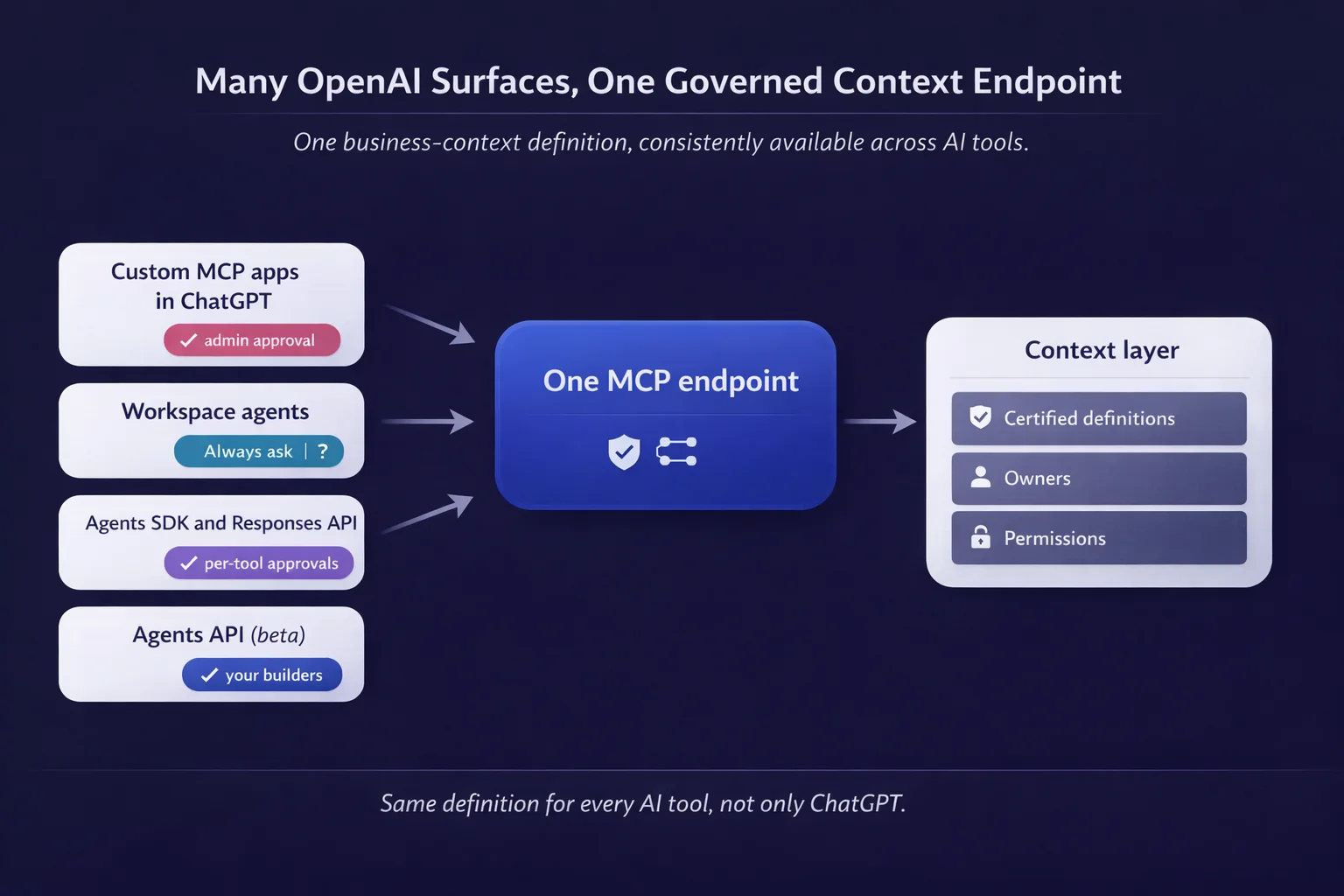
OpenAI surfaces and one governed context endpoint. Source: Atlan.
Step 1: Decide which business definitions ChatGPT must get right
What you’ll accomplish: a short list of the metrics and terms people will ask ChatGPT about. Each gets one certified definition, one owner and one status.
Why it matters: certifying everything stalls the project. The definitions behind the most-asked questions matter first.
How to do it:
- Collect the questions people already ask, from team leads in each domain.
- Map each question to a metric or term with its grain and time basis, for example
net_revenue = gross_revenue - returns - discounts, by fiscal quarter. - Name one owner per definition, recorded where your KPI definitions and business glossary live.
- Mark duplicates and deprecated tables, so “revenue” in each domain points to one live definition.
You’ll know it worked when: every listed metric has one definition, one owner and one status, and each says whether it belongs in a semantic layer or a business glossary.
Common mistakes: certifying a whole glossary before launch, and leaving “revenue” with three live definitions, so ChatGPT answers from whichever one it finds first.
Step 2: Put certified definitions, owners and permissions in one context layer
What you’ll accomplish: one governed home for business meaning. Every OpenAI surface and every other AI tool reads from it, so no agent studio keeps its own copy.
Why it matters: portability. Steven Huang, Lead Enterprise Architect at Verizon, named the cost of per-tool context in a session on Verizon’s context architecture: “If we decide to move away from any of one of these tools, we will lose lots of context objects we have curated for those projects residing in those tools.”
How to do it:
- Attach each definition to the assets it describes, so the business context layer and the data stay linked.
- Set certificates (verified, draft, deprecated) and record owners.
- Carry lineage so a definition points to its source table, and the context graph can answer “where did this number come from”.
- Set persona-based access matched to your ChatGPT roles, using role-based access control in the context layer.
According to McKinsey (2026), the semantic layer “codifies the business meaning of data into a machine-readable form.” A simplified record for two revenue assets:
- asset: revenue_recognized_q4
  certificate: VERIFIED
  owner: finance-data-owner
  definition: net_revenue = gross_revenue - returns - discounts
- asset: revenue_v1
  certificate: DEPRECATED
  replaced_by: revenue_recognized_q4
You’ll know it worked when: a test user sees only the assets their role allows, and each priority metric shows an owner, a certificate and lineage.
Common mistakes: building context separately inside each agent tool, and storing definitions in loose files an agent cannot check for status. Meaning held in a neutral ontology layer survives a change of AI vendor.
Step 3: Connect ChatGPT Enterprise to your context layer through an approved MCP app
Security reviewers will ask about this step first. ChatGPT users start querying governed context from inside ChatGPT, through an app an admin approved, with results scoped to each user’s permissions.
How to do it (Atlan path): the Atlan ChatGPT setup docs say it “Requires a ChatGPT account and your Atlan domain. OAuth only.”
- Install from the Atlan app link, or go to Settings → Apps → Add more → Atlan.
- Select “Sign in with Atlan.” In Enterprise workspaces the app may need workspace or account admin approval, depending on configuration.
- Have each user complete their own OAuth. Per Atlan’s troubleshooting page, empty results can mean an admin, not the user, completed the sign-in.
How to do it (any custom MCP server): follow OpenAI’s custom MCP article. An admin or owner with “Create plugins with MCPs” publishes the app, picks the allowed actions and assigns access by role. You don’t need Developer Mode. A private server, such as one your team built for enterprise data, connects through Secure MCP Tunnel. OpenAI also notes that “Permissions from ordinary roles combine additively,” so check every role a tester holds.
The same article says ChatGPT uses a “frozen” snapshot of an approved server’s tools, so a server-side tool change waits for an admin to refresh and publish it. Company Knowledge includes only apps with search/fetch, so tell users to @mention the Atlan MCP server app when they need a certified definition.
You’ll know it worked when: two test users with different roles get different, correct results, and write actions stay off or ask first.
Common mistakes: approving every action at once, and letting an admin complete OAuth for everyone. Approve read tools first, add write tools one at a time, and route remote servers through an MCP gateway or a security review. Done this way, MCP delivers business context without widening access.
Step 4: Give workspace agents and Agents SDK builds the same endpoint
What you’ll accomplish: agents read the certified definitions ChatGPT users see, under an identity and approval mode you chose on purpose.
Why it matters: two configurations of one definition drift apart. A shared endpoint keeps agent context management in one place.
How to do it:
- Workspace agents: add the custom MCP and pick “End-user account” (the agent sees what the person sees) or “Agent-owned account” (shared access, so use a service account and scope it tightly). Keep write actions on “Always ask.” Per OpenAI, action constraints govern which actions an agent takes, so set data-level agent access control at the MCP server. In the agent’s instructions, tell it to look up the certified definition before it answers a metric question.
- Agents SDK and Responses API: add the remote MCP server, or Secure MCP Tunnel, and set
require_approvalon tools that write. Use per-user OAuth where a person is signed in. For an unattended agent, Atlan’s MCP security docs require a service-account API token with exactly one persona, which scopes everything it reads. The Agents API follows the same pattern in a managed harness. - Agent Builder: move any remaining workflow before November 30, 2026. OpenAI’s deprecations page names the Agents SDK or ChatGPT workspace agents as replacements.
- Atlan write tools: they “propose first” and wait for approval, whichever client calls them.
A simplified tool response the agent should get back:
{"asset": "revenue_recognized_q4", "metric": "net_revenue", "certificate": "VERIFIED", "owner": "finance-data-owner"}
You’ll know it worked when: the same question asked in ChatGPT and in a workspace agent returns the same certified definition, never the deprecated column. An MCP gateway and a context layer split this work: one routes calls, the other supplies meaning.
Step 5: Test answers against certified definitions before rollout
What you’ll accomplish: a small eval set that proves ChatGPT and your agents return the certified answer, rerun each time a definition, permission or MCP tool changes.
Why it matters: the frozen tool snapshot and OpenAI’s changing surfaces mean a setup that passed in October can drift by December.
How to do it:
- Turn the Step 1 question list into test prompts with expected answers, following a method from AI agent evaluation benchmarks and metrics.
- Run them per role, as real users and as each agent identity.
- Log tool calls on both sides. Atlan “logs every tool call as a structured event,” and OpenAI’s Compliance API holds Enterprise and Edu conversations, including those that use apps.
- Rerun after any tool approval or definition change.
A minimal eval set can start with three prompts:
- “How do we define net revenue, and who owns it?” Expected: the verified definition and its named owner. Failure to watch for: the deprecated
revenue_v1, or no owner. - “What was net revenue in Q3?” Expected: a figure computed from the asset the certified definition points to. It runs through your warehouse app under the user’s own grant and cites the definition. Failure: a figure built on
revenue_v1. - The definition question asked by a user whose persona excludes finance assets. Expected: no finance definition returned.
You’ll know it worked when: a pass rate per role is recorded, and each failure traces to a missing or uncertified definition, which feeds your AI-ready data backlog.
| Step | Output | Owner | How you know it worked |
|---|---|---|---|
| 1. Decide definitions | Owned list of priority metrics and terms | AI leader with data owners | One definition, owner and status per metric |
| 2. Govern in one context layer | Certified definitions with owners, lineage and access | Data owner or steward | Test user sees only permitted assets |
| 3. Connect ChatGPT | Admin-approved MCP app, per-user OAuth | ChatGPT workspace admin | Two roles, two correct result sets |
| 4. Extend to agents | Workspace agents and SDK builds on the same endpoint | AI builder | Same answer in ChatGPT and in the agent |
| 5. Test | Eval set per role, rerun on change | AI builder with data owner | Pass rate recorded; failures traced |
Once one domain passes, widen to the next with the same rollout pattern for an enterprise context layer. Review roles each quarter as part of wider AI agent governance, then add the next surface.
How Atlan serves governed business context to ChatGPT and OpenAI agents
Atlan is an AI Context Platform, and its hosted MCP server runs on every tenant with nothing to install.
ChatGPT, workspace agents and Agents SDK builds get one endpoint for certified definitions, owners, lineage and permissions.
Without a shared layer, teams copy definitions into each agent tool, configure permissions twice, and keep no record of what an agent read. The enterprise context layer replaces those copies with one governed source. Per Atlan’s MCP security page:
- The ChatGPT app is OAuth-only. The server forwards each user’s identity to Atlan, so people can search, view or update only what Atlan already lets them access. Customers can request read-only mode, which removes write, admin and lifecycle tools.
- “Tool exposure is controlled by per-tenant allowlisting, and the check is fail-closed.” The server works only with context the signed-in identity is allowed to see, and SQL tools pass a read-only validator.
- Agents get 41 tools across nine categories, from search and lineage to glossary and data quality, each marked Read, Write or Admin. That covers governed metrics over MCP and lineage over MCP.
| What you need to control | OpenAI control | Atlan capability (docs.atlan.com) |
|---|---|---|
| Who sees what | App and plugin access by role | Persona-scoped results from existing Atlan permissions |
| Which tools run | Allowed actions per app; new actions start disabled | Per-tenant tool allowlist, fail-closed |
| What gets written | “Always ask” and tool approvals | Write tools propose first and wait for approval |
| What happened | Compliance API for Enterprise and Edu conversations | A structured log of every tool call |
Other AI tools your company runs connect the same way, as in connecting another AI tool to a context layer.
Real stories from real customers: Shared business language served to AI
Both teams use Atlan to hold shared business language for AI, the same layer a governed ChatGPT setup reads from.
"Atlan captures Workday's shared language to be leveraged by AI via its MCP server. As part of Atlan's AI labs, we're co-building the semantic layer that AI needs."
Joe DosSantos, VP, Enterprise Data and Analytics, Workday

"Context is the differentiator. Atlan gave our teams the shared vocabulary and lineage to move from reactive data management to proactive AI enablement."
Kiran Panja, Managing Director, Cloud and Data Engineering, CME Group

Owning the definitions while OpenAI’s surfaces keep moving
OpenAI’s agent surfaces move fast. Connectors are now apps, and workspace agents went generally available in May 2026.
The Agents API opened in public beta in September 2026, and Agent Builder has a shutdown date. The definitions your business certifies change on a different clock, set by finance close, product launches and reorganizations.
Keep those definitions in one context layer your data owners maintain, and each OpenAI change becomes a connection change while the meaning stays put. Which surface your company adds second is still open for most teams. That choice gets easier once the definitions are settled.
FAQs about ChatGPT Enterprise business context
Short answers to the questions ChatGPT admins and AI leaders ask most.
1. What is ChatGPT Enterprise used for?
ChatGPT Enterprise answers organization-specific questions through Company Knowledge, apps and custom MCP servers, and runs workspace agents for repeatable team jobs. Admins control app access by role. Governed business context makes sure the definitions behind those answers are the ones your business has certified.
2. Does ChatGPT Company Knowledge respect existing permissions?
Yes. OpenAI says Company Knowledge respects permissions in the connected source, and that ChatGPT app access does not override source permissions. In Enterprise and Edu workspaces, admins also set app access by role, so a user sees only what both the source and their ChatGPT role allow.
3. Do I need Developer Mode to connect a custom MCP server to ChatGPT?
No. OpenAI’s current help article says you don’t need to turn on Developer Mode first. An admin or owner with the “Create plugins with MCPs” permission publishes the app and chooses which actions are allowed, and new actions start disabled until approved.
4. What are the prerequisites for connecting ChatGPT Enterprise to governed business context?
You need ChatGPT Business or Enterprise/Edu on the web, an admin or owner who can publish custom MCP apps, a data owner for each priority domain, and a short list of definitions to certify. Role-based app access needs Enterprise or Edu. For the Atlan path, you also need your Atlan domain.
5. What happens to OpenAI Agent Builder on November 30, 2026?
OpenAI’s documentation says Agent Builder is deprecated and scheduled to shut down that day, and that ChatKit remains available. OpenAI’s deprecations page names the Agents SDK or ChatGPT workspace agents as replacements, and the Agents API is in public beta for managed builds.
6. What are the most common mistakes when connecting ChatGPT to business data?
The usual ones are approving every MCP action at once, letting an admin complete OAuth for every user, and connecting sources before any definition is certified. Teams also forget that ChatGPT keeps a frozen snapshot of an approved server’s tools, so a server change needs an admin refresh and a fresh test run.
7. Does the same governed context work outside OpenAI tools?
Yes. Atlan’s MCP server works with any MCP-aware AI tool. ChatGPT, OpenAI agents and the other AI tools in your company can then read the same certified definition, owner and status.
Sources
- Company knowledge in ChatGPT, OpenAI Help Center
- Connecting custom MCP servers in ChatGPT, OpenAI Help Center
- Managing feature access with role-based access control in ChatGPT, OpenAI Help Center
- ChatGPT Workspace Agents for Enterprise and Business, OpenAI Help Center
- ChatGPT Enterprise and Edu release notes, OpenAI Help Center
- Agents, OpenAI API docs
- Agents API quickstart, OpenAI API docs
- Agent Builder, OpenAI API docs
- Deprecations, OpenAI API docs
- MCP servers, OpenAI API docs
- Changelog, OpenAI API docs
- Model context protocol (MCP), OpenAI Agents SDK docs
- Introducing OpenAI Frontier, OpenAI
- OpenAI Frontier, OpenAI
- Building the foundations for agentic AI at scale, McKinsey
- Atlan MCP, Atlan Documentation
- Set up Atlan MCP, Atlan Documentation
- Troubleshoot ChatGPT with Atlan, Atlan Documentation
- Atlan MCP security, Atlan Documentation
- Atlan MCP tools, Atlan Documentation

