

LangChain is the toolkit that gets teams from zero to a working LLM application in hours. LangGraph is the runtime that keeps those applications working reliably in production: with loops, retries, pauses for human review, and state that survives failures. The most common misconception in 2026 is that you need to choose between them. You don’t. Since October 22, 2025, LangChain’s own create_agent function runs on LangGraph’s execution engine under the hood.
That said, “they work together” does not mean every project needs both. create_agent is the right abstraction until you need to intercept state mid-execution, add a human review step, implement conditional retry logic, or build multi-agent handoffs. When you hit any of those, you drop to explicit StateGraph: the intended path, not a workaround.
What this page covers:
- The core architectural difference: why LangChain and LangGraph solve different problems in the same stack
- The 2026 runtime shift: what changed when both libraries reached v1.0 simultaneously
- Same task, both frameworks: the Q&A agent code comparison no other page has
- When to use which: a practical decision table for real use cases
- The fourth layer: what neither framework provides, and where Atlan’s context layer fits
The question is not “LangChain or LangGraph?” The question is knowing when the abstraction of create_agent is sufficient, and when you need the full transparency of a named StateGraph.
LangChain and LangGraph solve different problems in the same agent stack. LangChain is the high-level API: model abstractions, 1,000+ documented integrations, and LCEL composition. LangGraph is the low-level runtime: StateGraph, cyclic execution, persistence, and streaming. The same team at LangChain Inc. built both. In 2026, they are complementary layers, not alternatives.
| Dimension | LangChain | LangGraph |
|---|---|---|
| What it is | Agent framework: integrations, LCEL, prompt abstractions | Orchestration runtime: stateful graph execution engine |
| Workflow type | DAG / linear pipeline (sequential, directed) | Cyclic state machine (loops, branches, conditional routing) |
| State management | Implicit: managed inside the runtime | Explicit: TypedDict schema you define per node |
| Best for | Rapid prototyping, RAG pipelines, broad integrations | Production agents with loops, retries, human-in-the-loop |
| Failure mode | Breaks when workflow needs to branch or loop | Verbose for simple linear tasks; overkill for basic chains |
| Entry point in 2026 | create_agent (runs LangGraph under the hood) |
StateGraph: build graph, compile, invoke |
| Production readiness | v1.0 GA (October 22, 2025) | v1.0 GA (October 22, 2025); used by Klarna, LinkedIn, Uber |
| Complexity | Lower: fewer concepts to learn | Higher: explicit nodes, edges, state schema required |
LangChain vs LangGraph: What is the difference?
The most common misconception is that LangGraph replaces LangChain. It doesn’t. Since October 2025, LangChain agents now run on LangGraph’s execution engine internally. They were never designed to compete.
The architectural distinction is fundamental:
- LangChain uses a DAG model: data flows sequentially through a directed acyclic graph. LCEL’s pipe operator (
prompt | model | parser) is the canonical expression of this pattern. It is clean, composable, and linear. - LangGraph uses a cyclic state machine: nodes are Python functions, edges define routing logic, and the graph can loop back on itself. This enables retries, conditional branching, and durable execution across failures.
LangGraph was built by the same team at LangChain Inc. specifically to solve what LCEL could not: AI agent workflows that need to iterate. A RAG pipeline that retrieves, augments, and generates once is well-served by LCEL. An agent that calls a tool, evaluates the result, decides whether to call another tool, and then routes to a human reviewer if confidence is low needs LangGraph — this kind of multi-step planning is exactly where explicit StateGraph shines.
The October 22, 2025 v1.0 milestone sharpened this boundary formally. LangChain announced simultaneous GA for both libraries with an explicit division of labor. LangChain is the fastest way to build an agent, with a standard tool-calling architecture, provider-agnostic design, and middleware for customization. LangGraph is the lower-level framework and runtime for highly custom, controllable, long-running agents.
With v1.0, create_agent became LangChain’s agent entry point, and it calls LangGraph’s execution engine under the hood. The LangGraph v1 migration guide names the headline change: create_react_agent from langgraph.prebuilt is deprecated in favor of langchain.agents.create_agent. The older AgentExecutor line is a separate story, covered by the LangChain v1 migration guide: legacy chains and AgentExecutor-era code moved out of the langchain namespace into the langchain-classic package at 1.0. This is the source of developer confusion in 2026: syntax from both libraries appears in the same agent, because the boundary between them is now intentionally invisible at the high level.
What is LangChain?
LangChain is an open-source framework for building LLM-powered applications. It provides the integrations, prompt abstractions, and composition primitives (LCEL) that connect models, tools, and data sources into runnable pipelines. Founded in 2022, it became the dominant entry point for LLM application development.
In 2026, LangChain’s create_agent high-level API is the recommended entry point for developers who want agent behavior without managing the StateGraph directly. The v1.0 release formalized LangChain’s role: opinionated, middleware-driven, and focused on breadth of integration rather than depth of execution control.
Core components of LangChain
- LCEL (LangChain Expression Language): pipe-operator composition (
prompt | model | parser) for building linear chains via the Runnable protocol - Model I/O layer: standardized interface for 100+ LLM providers including ChatOpenAI, Anthropic, and Gemini
- Retrieval layer: document loaders, text splitters, vector store integrations, and RAG primitives for retrieval-augmented generation
- Agent primitives:
create_agent, tool binding, andAgentState(v1.0) - LangSmith: tracing, evaluation, and dataset management for debugging chains and agents; the observability layer for the LangChain ecosystem
- LangGraph: the execution runtime for agents (separate library, now the engine behind LangChain agents)
LangChain’s strength is breadth. 1,000+ integrations covering chat and embedding models, tools and toolkits, document loaders, and vector stores mean a developer can prototype a RAG pipeline, add tool use, and deploy an agent with days of effort rather than weeks. The cost of that breadth is that complex execution logic (loops, retries, conditional routing) has to be handed off to LangGraph.
For teams building long-term memory into LangChain agents — starting from a clear understanding of what agent memory is — the v1.0 architecture makes LangGraph the natural persistence layer. The create_agent abstraction handles the common case; dropping to StateGraph handles the rest.
What is LangGraph?
LangGraph is a low-level orchestration framework and runtime for building stateful, multi-actor agents. It models workflows as directed graphs where nodes are Python functions and edges define the routing logic, including conditional edges that branch based on intermediate output.
LangGraph adds what LCEL cannot: loops, conditional routing, persistent state, and durable execution across failures. It reached GA in May 2025 and the v1.0 milestone in October 2025. According to LangGraph’s GitHub repository and official changelog, production adopters include Klarna, LinkedIn, Uber, and Replit.
Core components of LangGraph
- StateGraph: the main graph class; takes a state schema, builds nodes and edges, and compiles to a runnable
- TypedDict state schema: explicit definition of all state keys passed between nodes; every decision point reads from and writes to this shared state
- Nodes: Python functions that receive the current state and return an updated state dictionary
- Edges: fixed or conditional routing between nodes;
add_conditional_edgesenables branching on state values - Checkpointers: persistence layer (SQLite, Postgres) for durable state and resumability; an agent can pause, be reviewed by a human, and resume from the exact saved state
- ToolNode: prebuilt node for executing tool calls from model responses, compatible with any LangChain-bound tool
The core primitive is the StateGraph: you define a TypedDict state schema, add named nodes, connect them with edges, compile the graph, and invoke it. Every decision point is explicit and inspectable, which is what makes LangGraph debuggable at the node level rather than at the chain level.
LangGraph is used in any multi-agent system where one agent calls another, in workflows that need human-in-the-loop review, and in AI agent observability setups where per-node tracing is required. The install docs require Python 3.10 or later.
The LangGraph docs are explicit: “You don’t need to use LangChain to use LangGraph.” LangGraph is a standalone library. You can install it independently and use any model provider directly.
LangChain vs LangGraph: The same task in both
The clearest way to see the architectural difference is to build the same agent (a Q&A agent that decides whether to call a web-search tool) in both frameworks.
In LangChain’s create_agent, the tool-call decision logic is implicit inside the LangGraph runtime that runs underneath. In LangGraph’s StateGraph, every decision point is a named edge you define explicitly. Same agent behavior, opposite transparency. The difference is not capability; it is observability, debuggability, and control.
Code Block A: LangChain create_agent (v1.0)
## LangChain 1.0: create_agent (runs LangGraph under the hood)
from langchain.agents import create_agent
from langchain_core.tools import tool
from langchain_openai import ChatOpenAI

@tool
def web_search(query: str) -> str:
    """Search the web and return the top results."""
    return search_client.run(query)  # your search provider

model = ChatOpenAI(model="gpt-4o-mini")
tools = [web_search]

# The conditional routing (call tool or not) is implicit inside the runtime
agent = create_agent(model, tools, system_prompt="You are a helpful assistant.")
result = agent.invoke({"messages": [("user", "What is LangGraph?")]})
Code Block B: LangGraph StateGraph (explicit)
# LangGraph: StateGraph (every decision point is explicit)
from langgraph.graph import StateGraph, END
from langgraph.graph.message import add_messages
from langgraph.prebuilt import ToolNode
from langchain_core.tools import tool
from langchain_openai import ChatOpenAI
from typing import TypedDict, Annotated

class AgentState(TypedDict):
    messages: Annotated[list, add_messages]

@tool
def web_search(query: str) -> str:
    """Search the web and return the top results."""
    return search_client.run(query)  # your search provider

model = ChatOpenAI(model="gpt-4o-mini")
tools = [web_search]
model_with_tools = model.bind_tools(tools)

def call_model(state: AgentState):
    response = model_with_tools.invoke(state["messages"])
    return {"messages": [response]}

def should_use_tool(state: AgentState):
    last_message = state["messages"][-1]
    if last_message.tool_calls:
        return "tool_node"
    return END

# Build the graph: every decision point is a named node and edge
graph = StateGraph(AgentState)
graph.add_node("agent", call_model)
graph.add_node("tool_node", ToolNode(tools))
graph.set_entry_point("agent")
graph.add_conditional_edges("agent", should_use_tool)
graph.add_edge("tool_node", "agent")

app = graph.compile()
result = app.invoke({"messages": [("user", "What is LangGraph?")]})
What the code reveals:
In create_agent: 4 lines after imports. Routing logic is hidden inside the LangGraph runtime. It is easier to read but impossible to inspect mid-execution.
In StateGraph: 20+ lines. Every node is named, every edge is declared. The should_use_tool function is the key: in StateGraph, this conditional is your code. In create_agent, it exists; you just cannot see or modify it without dropping to LangGraph directly.
The payoff of that verbosity: checkpointing, streaming per-node, human-in-the-loop interrupts, and multi-agent handoffs all require the explicit structure. Why AI agents forget is partly an architecture question, and LangGraph’s explicit state schema is the fix.
Migration path: from LCEL chain to full StateGraph
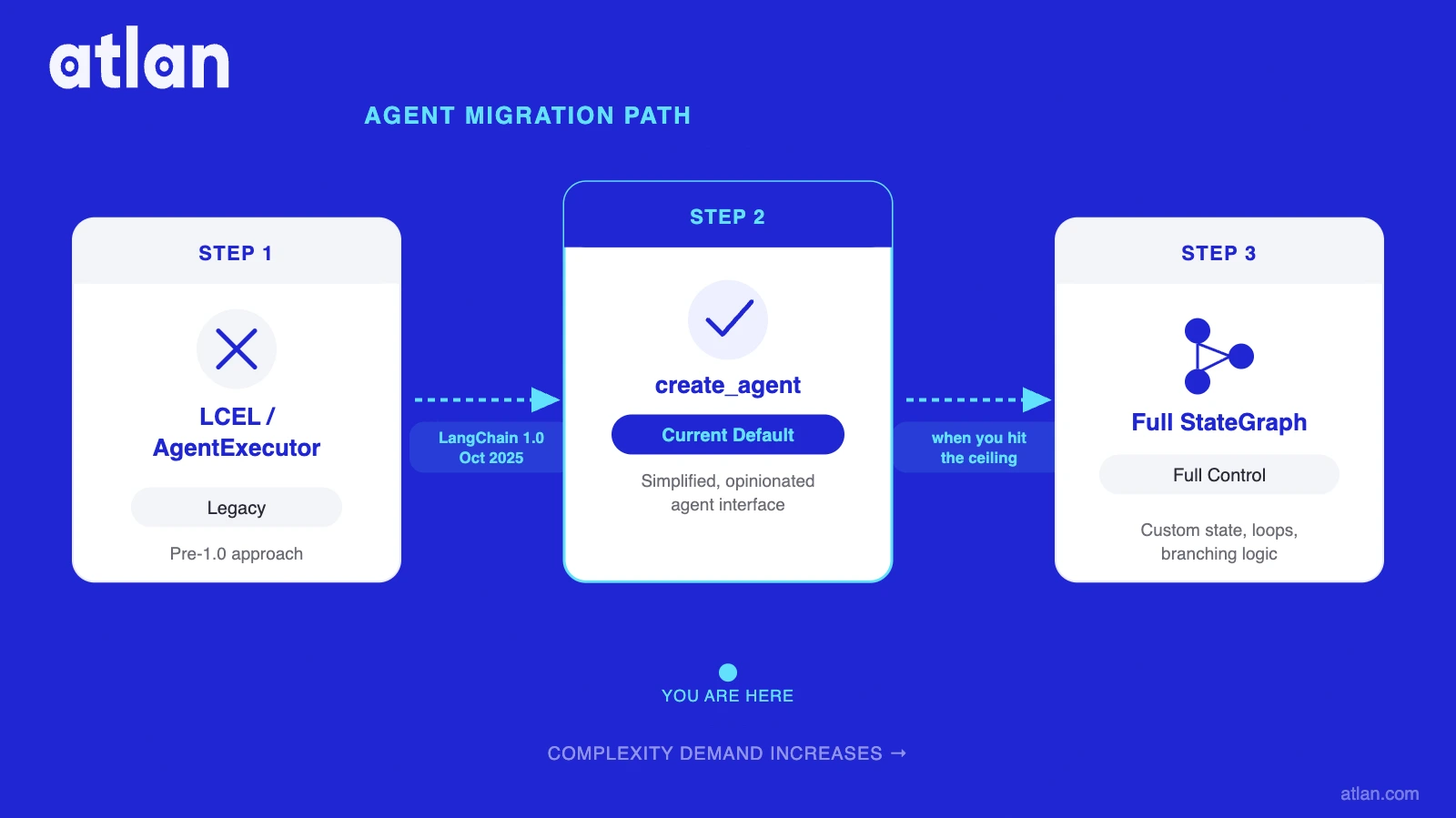
The progression follows the complexity of what your agent needs to do. Start with a simple LCEL chain for linear pipelines (prompt | model | parser, no loops). Move to create_agent when you need tool use; it runs LangGraph under the hood but keeps the decision logic hidden, which is fine for simple agents and the v1.0 default. Move to full StateGraph when you need node-level control: checkpointing, streaming per-node, human-in-the-loop interrupts, and multi-agent handoffs all require the explicit structure.
The LangGraph v1 migration guide documents create_react_agent to create_agent. The separate LangChain v1 migration guide covers older AgentExecutor code, which moved to langchain-classic at 1.0. Start at the level of abstraction you need and move right when you hit the ceiling.
When should you use LangChain vs LangGraph?
LangChain and LangGraph are not competing choices. But not every project needs both, and starting at the wrong level costs re-architecture time. Use LangChain when your workflow is linear (RAG pipelines, single-turn Q&A, rapid prototyping). Use LangGraph when your agent needs to loop, branch, pause for human input, or recover from failures.
| Use case | LangChain | LangGraph | Both |
|---|---|---|---|
| RAG pipeline (retrieve, augment, generate) | Preferred | Optional | Optional |
| Single-turn Q&A with tools | create_agent |
Under the hood | Under the hood |
| Rapid prototype / proof of concept | Faster to build | Overkill | Optional |
| Agent that retries on tool failure | Insufficient | Required | Both needed |
| Conditional branching on intermediate output | Insufficient | Required | Both needed |
| Human-in-the-loop review step | Insufficient | Required | Both needed |
| Long-running agent (resume after failure) | Insufficient | Checkpointer | Both needed |
| Multi-agent system (agent calls agent) | Partial | Preferred | Both needed |
| Production observability (trace each node) | LangSmith | Node-level traces | Together |
| Migrate from AgentExecutor (legacy) | create_agent path |
StateGraph path |
Depends on complexity |
The pattern in production in 2026 is to use both: LangChain supplies the integrations (chat models, search tools, vector store connectors), LCEL handles simple preprocessing chains, and LangGraph runs the agent execution loop. LangChain for everything that is linear, LangGraph for everything that is cyclic. The create_agent function makes this boundary nearly invisible for simple agents; it becomes visible, and necessary, when you hit the four failure modes of the high-level API: state inspection mid-execution, human-in-the-loop interrupts, conditional retry logic, and multi-agent handoffs.
Ankur Bhatt, Head of AI at Rippling, captured the dynamic in the LangChain v1.0 announcement: “We rely heavily on the durable runtime that LangGraph provides under the hood to support our agent developments, and the new agent prebuilt and middleware in LangChain 1.0 makes it far more flexible than before.”
In LangChain’s State of Agent Engineering (2026, 1,340 respondents surveyed 18 November to 2 December 2025), 32% of teams name quality as the top blocker to scaling agentic AI, ahead of latency at 20%. Framework selection is not among the blockers named. The blockers are reliability and accuracy. LangGraph addresses reliability. The AI agent stack still needs something for accuracy, and measuring that accuracy with the right benchmarks and metrics is the next challenge after framework selection.
How Atlan works with LangChain and LangGraph
Atlan does not take a side in the LangChain vs LangGraph question. The platform works with both because it connects via MCP, the open protocol that any LangChain or LangGraph agent can call as a tool.
The LangChain vs LangGraph decision governs execution architecture. Atlan governs what agents know. A LangGraph agent with a checkpointer can resume after failure. But if it hallucinates on a business metric definition or queries a deprecated table, durability does not help. Framework choice is reversible. Context architecture compounds.
Three layers drive most agent stacks in 2026: LangChain (scaffolding and integrations), LangGraph (stateful orchestration), and a memory tool like LangMem or Mem0 (cross-session recall). The gap that surfaces in production is accuracy: agents that answer fluently but incorrectly because they lack certified definitions, current lineage, or ownership context. Atlan’s MCP server exposes four tools callable from any LangGraph agent: asset search, lineage tracing, DSL queries, and metadata updates. Because it is MCP, it works equally with LangChain and LangGraph agents with no custom integration required.
Challenge: A LangGraph agent at a financial services company queries revenue metrics across 12 tables. Two tables were deprecated six months ago. The definitions of “ARR” and “contracted ARR” diverged after a reporting change. The agent answers confidently with stale data.
Approach: The agent calls Atlan’s MCP tool for asset search and certification status before constructing the SQL. Atlan returns certified table names, deprecation flags, the current owner, and the business glossary definition of “ARR” as of the last governance review.
Outcome: The agent’s answer references only certified tables, uses the current ARR definition, and cites the data owner: auditable, accurate, and grounded — a direct outcome of combining orchestration reliability with AI agent governance.
LangGraph solves orchestration — serving as the execution layer of an agent harness that wraps the model loop. Atlan solves what agents need to be right, not just responsive. Context engineering is the practice of making that accuracy layer explicit, and it is the discipline that production teams wish they had built before going live.
For a deeper look at how these layers interact, see LangGraph memory vs Mem0: the comparison that shows where recall ends and governed truth begins.
Real stories from real customers: building with Atlan and agent frameworks
From data ambiguity to auditable AI: How Workday is doing it

"We're excited to build the future of AI governance with Atlan. All of the work that we did to get to a shared language at Workday can be leveraged by AI via Atlan's MCP server…as part of Atlan's AI Labs, we're co-building the semantic layer that AI needs with new constructs, like context products."
Joe DosSantos, VP of Enterprise Data & Analytics, Workday
Read the full storyWorkday’s challenge was the “shared language” problem: years of work to align data definitions needed to be accessible to AI agents, not just human analysts. Atlan’s MCP server exposed those certified definitions directly, making the organizational knowledge in the business glossary callable from any agent workflow. AI agents at Workday now reference the same authoritative metadata that human data teams rely on.
From catalog to context operating system: How DigiKey is doing it

"Atlan is our context operating system to cover every type of context in every system including our operational systems. For the first time we have a single source of truth for context."
Sridher Arumugham, Chief Data Analytics Officer, DigiKey
Read the full storyDigiKey’s path illustrates the progression most enterprises follow: from a data catalog to a context layer that AI agents can actively consume. By connecting Atlan’s MCP server to their agent infrastructure, DigiKey exposed metadata (data quality signals, governance status, lineage) directly to AI models. The “context operating system” framing reflects the architectural reality: an active context source that any agent memory architecture can draw from, not a passive repository.
Framework choice is a starting point, not a destination
LangChain and LangGraph are not competing frameworks. They are two layers of the same agent stack, built by the same team, designed to be used together. LangChain provides the integrations, prompt tooling, and high-level agent API. LangGraph provides the stateful execution runtime that powers LangChain agents and exposes node-level control when you need it. For a hands-on walkthrough of assembling these layers, see the step-by-step guide to building an AI agent.
The question is not which to choose. It is knowing when the abstraction of create_agent is sufficient, and when you need the full transparency of a named StateGraph. For linear workflows and rapid prototyping: LangChain. For loops, retries, human-in-the-loop, and multi-agent systems: LangGraph. For most complex production agents in 2026: both. Teams investing in harness engineering will find LangGraph’s explicit graph structure maps naturally to the control surfaces a good harness exposes.
The framework handles execution architecture. The context layer (certified definitions, lineage, governed truth) is the third tier neither one provides. An agent that can loop, retry, and resume is a capable agent. An agent that can loop, retry, resume, and answer correctly is a production-ready one.
Frequently asked questions about LangChain vs LangGraph
1. Will LangGraph replace LangChain?
No. Since October 2025, LangChain agents run on LangGraph under the hood. LangGraph became the execution runtime for LangChain, not its replacement. LangChain remains the high-level API for integrations and model management; LangGraph handles stateful execution beneath it. The two libraries are maintained by the same team and are designed to be complementary.
2. Can I use LangGraph without LangChain?
Yes. LangGraph is a standalone library. You can install langgraph independently and build StateGraph agents without any langchain-* packages. You will need to source your own model integrations, such as direct OpenAI SDK calls. The official docs confirm: “You don’t need to use LangChain to use LangGraph.”
3. Should I migrate my LangChain AgentExecutor to LangGraph?
If your agent uses AgentExecutor, plan to migrate. At LangChain 1.0 the legacy chains and AgentExecutor-era code moved out of the langchain namespace into the separate langchain-classic package. The path runs AgentExecutor to create_agent (the simplest step, and it runs LangGraph internally) to full StateGraph when you need node-level control. The LangChain v1 migration guide covers the first move and the LangGraph v1 migration guide the second.
4. How does LangGraph handle state that LangChain cannot?
LangChain’s LCEL passes data through a chain sequentially: state is implicit and not persisted across steps. LangGraph’s StateGraph maintains a TypedDict state object that every node can read and update. This explicit state enables loops (returning to a previous node), checkpointing (saving state to disk), conditional routing (branching on state values), and human-in-the-loop pauses (freezing state pending approval).
5. When should I use LangChain chains vs LangGraph StateGraph?
Use LangChain chains (LCEL) when your workflow is linear and stateless: document Q&A, summarization, classification. Use LangGraph’s StateGraph when your workflow needs to loop, branch, or persist state: tool-using agents, multi-step reasoning, human-in-the-loop workflows, multi-agent systems. When in doubt, start with create_agent and migrate to explicit StateGraph when you hit the ceiling of what the implicit runtime provides.
Sources
- LangChain 1.0 and LangGraph 1.0 Announcement, LangChain Inc.
- LangGraph Overview, LangChain Docs
- LangGraph v1 Migration Guide, LangChain Docs
- LangChain 1.0 GA Changelog, LangChain
- LangGraph 1.0 GA Changelog, LangChain
- LangGraph GitHub Repository, langchain-ai
- LangChain v1 Migration Guide, LangChain Docs
- LangChain Overview, LangChain Docs
- LangGraph Graph API Documentation, LangChain Docs
- Long-Term Memory for LangChain Agents, Atlan

