

LangChain is an open-source Python framework for building LLM-powered applications, offering more than 1,000 integrations with model providers, vector stores, and tools. It gives developers a unified interface, LCEL (LangChain Expression Language), to compose chains, RAG pipelines, and AI agents without rewriting code for every new model or service. Since October 2025, LangChain agents run on the LangGraph runtime underneath. LangChain is the scaffolding layer; LangGraph is the engine. For a broader look at how LangChain fits into the AI agent stack, including memory, tooling, and context layers, see the full stack overview.
Quick Facts:
| What It Is | Open-source Python framework for building LLM-powered applications and AI agents |
| Key Benefit | 1,000+ integrations; compose chains and agents via LCEL; LangGraph runtime underneath |
| Best For | RAG pipelines, conversational agents, multi-step automation workflows |
| Implementation Time | Simple chain: minutes; production agent: days to weeks |
| Cost Range | Free (open-source); LangSmith observability has free and paid tiers |
| Core Components | Models and Integrations, LCEL Chains, Agents and Tools, Memory (via LangGraph checkpointer) |
Build Your AI Context Stack
Learn how leading engineering teams structure the three tiers of their AI stack (LangChain scaffolding, agent memory, and governed context) to ship production-ready agents.
Get the Stack GuideWhat is LangChain? A detailed definition
LangChain started in late 2022 as Harrison Chase’s side project; the company was founded in early 2023 by Chase and Ankush Gola. The repository carries over 145,000 stars and 24.5k forks as of 18 September 2026. It provides a standardized interface for connecting large language models to external data sources, tools, and memory, reducing the boilerplate required to build production LLM applications. LangChain is the scaffolding layer: the glue between models and data, giving teams a composable Python API that abstracts provider differences so they can build once and swap components without rewriting integration code.
According to the LangChain State of Agent Engineering survey (1,340 respondents, fielded 18 November to 2 December 2025), 57% of practitioners have AI agents in production, with a further 30.4% actively developing with concrete plans. At that adoption level, LangChain’s abstraction layer, particularly its 1,000+ integrations, is an acceleration tool for teams building across multiple providers and data systems, not just a demo shortcut.
LangChain 1.0 reached general availability on October 22, 2025, alongside LangGraph 1.0. The most consequential change: LangChain agents now run on LangGraph as their underlying runtime. This resolved the core “black box” criticism from 2023-2024; developers can stay at the high-level LangChain API or drop down to LangGraph for full control. The 1.0 cut also moved legacy chains, AgentExecutor-era code and the langchain-community re-exports into a separate package, langchain-classic, which is the migration fact that matters most on an older codebase.
How does LangChain work? Core components explained
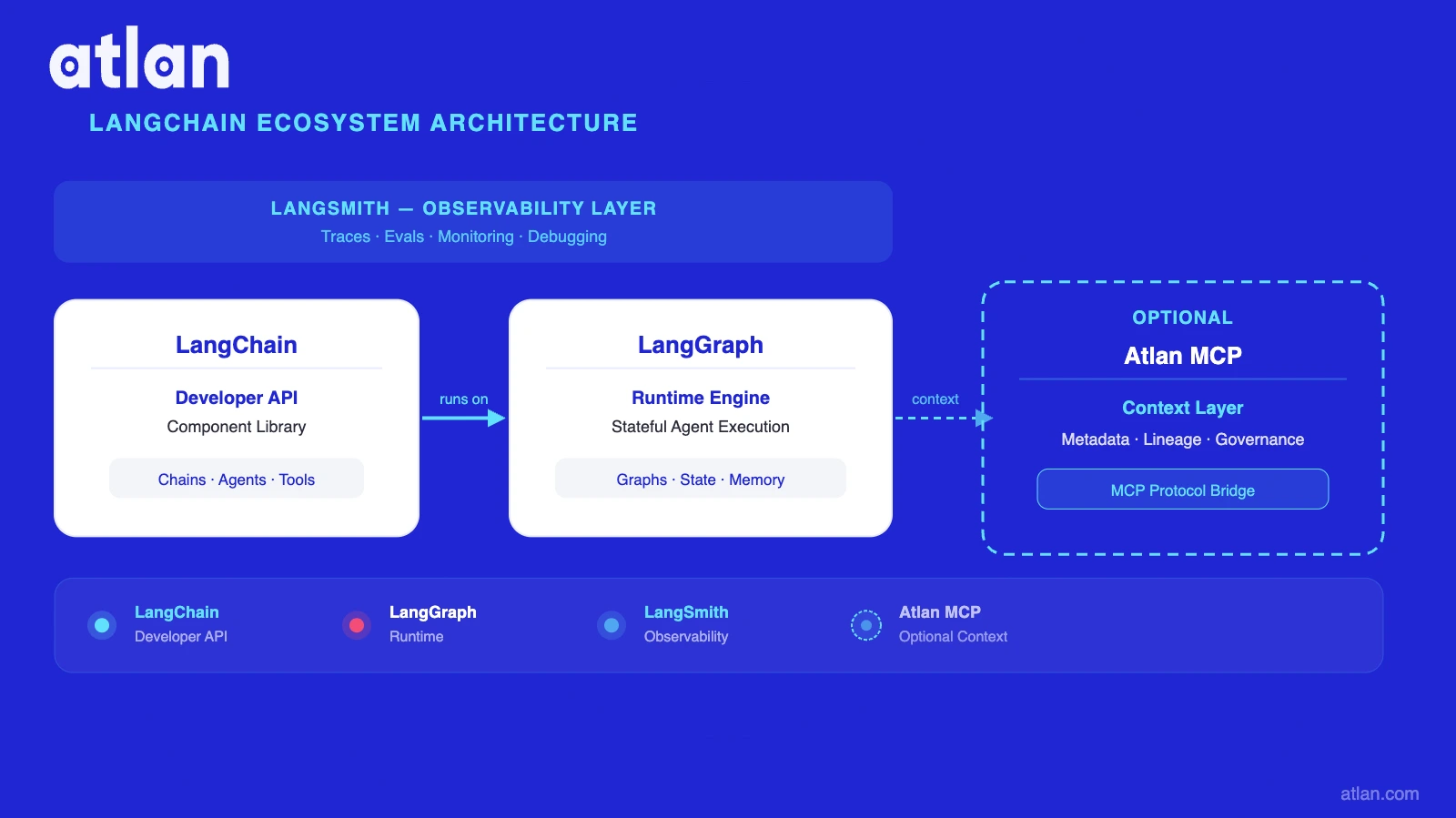
LangChain works through four interlocking layers: Models and Integrations (a unified interface to 1,000+ providers), LCEL (the composition language that chains steps together), Agents and Tools (where the LLM decides what to call next), and Memory (now handled by LangGraph’s checkpointer for production use). Understanding these layers maps directly onto AI agent architecture, where orchestration, tool use, and memory each occupy a distinct tier.
Component 1: Models and integrations
LangChain provides a unified ChatModel and Embeddings interface. Switching from OpenAI to Anthropic, Fireworks, or a local Ollama model requires changing a single line. The integration catalog covers model providers (OpenAI, Anthropic, Google, Mistral, Fireworks), vector stores (Pinecone, Weaviate, pgvector, Chroma), and tools (Tavily search, code execution, SQL). According to the State of Agent Engineering survey, over three-quarters of organizations use multiple models in production or development, which makes the multi-provider interface a practical necessity rather than a convenience.
Component 2: Chains and LCEL
LCEL (LangChain Expression Language) is the composition interface. The pipe (|) operator chains Runnable objects declaratively:
from langchain_core.prompts import ChatPromptTemplate
from langchain_openai import ChatOpenAI
from langchain_core.output_parsers import StrOutputParser

prompt = ChatPromptTemplate.from_template("Answer in one sentence: {question}")
model = ChatOpenAI(model="gpt-4o")
parser = StrOutputParser()

chain = prompt | model | parser
result = chain.invoke({"question": "What is LangChain?"})
This pattern is streaming-native, composable, and replaces the older “chain classes” approach. LCEL supports both simple linear chains and branching logic, and it is the pattern most prompt engineering tutorials now assume as the baseline.
Component 3: Agents and tools
LangChain agents use the LLM as a reasoning engine to decide which tool to call and with what arguments. Built-in support covers function calling, tool schemas, and multi-step reasoning loops. Common tools include web search (Tavily), SQL query, code execution, and custom API calls via the @tool decorator. For a deeper look at how agents select and invoke external systems, see AI agent tool use.
In LangChain 1.0, create_agent builds an agent on LangGraph’s runtime; developers use LangChain’s simplified API and get LangGraph’s state persistence and retry logic underneath. According to the LangGraph 1.0 GA announcement, this is the recommended path for all new agents. For a detailed comparison of AI agent frameworks, including how LangChain agents compare to CrewAI and OpenAI Agents SDK, see the full comparison guide.
Component 4: Memory (deprecated path and LangGraph)
LangChain’s legacy in-process memory classes (ConversationBufferMemory and similar) are deprecated in version 1.0. Production memory now routes through LangGraph’s checkpointer, thread-scoped state that persists across turns without custom state management code.
For cross-session or long-term memory, the two primary options are LangMem (LangGraph-native) and Mem0 (portable). Both solve recall; they help agents remember what happened before. For the distinction between recall and governed truth, see the section on long-term memory for LangChain agents and agent memory architectures. For a foundational explanation of what agent memory is and the different types available, see the dedicated overview.
Traditional LLM app vs LangChain approach:
| Dimension | Raw LLM API approach | LangChain approach |
|---|---|---|
| Model switching | Rewrite client code per provider | Swap one line (LCEL interface) |
| Tool/function calling | Hand-roll per provider format | Unified tool schema and @tool decorator |
| Prompt management | Hardcoded strings | Prompt templates and LangChain Hub |
| Agent runtime | Build custom loop from scratch | create_agent and LangGraph runtime |
| Observability | Custom logging and tracing | LangSmith traces, out of the box |
| Memory | Custom state management | LangGraph checkpointer (thread-scoped) |
What you can build with LangChain
With LangChain, teams build RAG pipelines, conversational agents, and multi-step automation workflows. According to the State of Agent Engineering survey, 57% of practitioners have these patterns in production. Quality (32%) and security (about 25% among enterprises with 2,000+ employees) are the primary blockers, not orchestration.
RAG pipelines
RAG is LangChain’s most common production use case. The pattern: load documents, embed them, store in a vector database, retrieve on query, augment the LLM prompt, and respond. LangChain’s document loaders, text splitters, and retriever interfaces make each step modular and swappable. Key integration targets (Pinecone, Weaviate, pgvector, Chroma, and Qdrant) are all first-class retrieval-augmented generation integrations; switching from one requires changing a single line. For a concise explanation of what RAG is and why it matters, see the dedicated guide. Teams looking to push beyond basic retrieval can also explore advanced RAG techniques such as re-ranking, hybrid search, and query decomposition.
The 32% quality blocker finding maps directly to the RAG problem: retrieval quality is the top differentiator in production systems. Chunking strategy, embedding model choice, and data freshness are the variables that move production accuracy, not the orchestration layer.
Conversational AI agents
LangChain agents maintain conversation history, call tools, and route between tasks. The version 1.0 pattern, create_agent plus LangGraph runtime, gives agents state persistence, retry logic, and human-in-the-loop support without building a custom state machine. LangChain publishes that 35% of Fortune 500 companies use it, a vendor self-report, alongside more than a billion open-source downloads.
Multi-step automation workflows
LangChain supports sequential and branching workflow patterns: research, draft, review, and publish pipelines; data extraction; automated report generation. LCEL’s composability makes it easy to mix LLM calls with Python logic, API calls, and database writes in a single pipeline. When workflows grow stateful or need human checkpoints, dropping down to LangGraph directly is the natural next step, with an optional governed context layer reachable via MCP.
Inside Atlan AI Labs and The 5x Accuracy Factor
See how enterprise teams using governed context layers report up to 5x improvement in AI answer accuracy, and why orchestration alone does not close the gap.
Download E-BookHow has LangChain changed in 2026
The most consequential change in LangChain’s history arrived on October 22, 2025, when LangChain 1.0 and LangGraph 1.0 reached general availability simultaneously, making LangGraph the execution runtime for all new LangChain agents.
Since LangChain 1.0 (October 22, 2025): All LangChain agents run on the LangGraph runtime. You do not need to migrate existing code. AgentExecutor remains in maintenance mode through December 2026. For new agents,
create_agentroutes to LangGraph automatically. When you need more control (branching, state persistence, human-in-the-loop), you can drop down to LangGraph directly without leaving the ecosystem.
What changed and why
Before version 1.0, LangChain used AgentExecutor as its runtime, a sequential loop the community criticized as opaque and hard to debug. The Hacker News thread “Why we no longer use LangChain” by the Octomind team captured the dominant criticism: too many abstraction layers and APIs that broke with every release.
The response was structural. LangGraph exposes the state graph, making it inspectable. LangSmith provides distributed tracing for every step. create_agent in LangChain 1.0 generates a LangGraph state machine under the hood, giving developers streaming, persistence, and observability without writing graph code directly. The LangChain/LangGraph 1.0 announcement frames the result as a layered choice: start with LangChain’s high-level APIs, drop to LangGraph when you need full control.
What this means for developers
The practical rule: use LangChain’s high-level API for the 80% case, chain composition, RAG, and simple agents. Drop to LangGraph directly for multi-agent coordination, stateful branching, human-in-the-loop, and production-grade persistence.
LangSmith has become more useful as a result, not less. According to the State of Agent Engineering survey, 89% of agent practitioners have implemented observability, and LangSmith is the native tracing layer for both frameworks. The “LangChain is dead” narrative from 2023-2024 did not materialize. The ecosystem unified, simplified, and the version 1.0 GA signals organizational stability. For teams evaluating production deployments, AI agent observability and agent evaluation benchmarks and metrics are the two areas most worth investing in after orchestration is settled.
LangChain vs alternatives: when it makes sense
LangChain is not always the right choice. The answer depends on use case breadth, team familiarity, and how much state complexity the agent needs to manage.
Honest practitioner context
The pre-version 1.0 criticisms were real. The Octomind team publicly switched back to direct API calls, citing too many abstraction layers and opaque internal state, a valid choice for narrow, stable, single-model use cases. Post-version 1.0, the picture is more nuanced: LangChain simplified its surface area and made LangGraph the explicit runtime. The trade-off remains, though: abstraction equals faster ramp and less transparency. For teams that need maximum debuggability with a single model, raw API calls are still faster to trace.
Decision guidance
| Use case | LangChain | LangGraph | Raw API |
|---|---|---|---|
| Simple RAG pipeline | Best choice: pre-built loaders, retrievers, splitters | Overkill | Viable but more boilerplate |
| Multi-step agent, simple branching | Good starting point with create_agent |
Better for complex state | Hard to maintain at scale |
| Production stateful agent with branching | Start here, graduate to LangGraph | Best choice for full control | Very complex to build |
| Maximum transparency / debuggability | Use LangGraph (now underneath anyway) | Best choice | Best if single-model |
| Fast prototype, any use case | Best choice: fastest path | Steeper initial curve | Fastest if you know the API |
| Enterprise: multi-provider, multi-modal | Best choice: 1,000+ integrations | Build integrations yourself | Build integrations yourself |
For a detailed technical comparison, including when the LangChain-to-LangGraph migration makes sense and what the same agent looks like in both frameworks, see LangChain vs LangGraph.
How Atlan works with LangChain
Once orchestration is settled, a separate class of problems becomes visible. Teams with agents in production report that inconsistent answers are the top quality failure mode: the agent doesn’t know what “active customer” means, which revenue metric is certified, or whether the data it’s retrieving is reliable. The State of Agent Engineering survey confirms this: quality (32%) and security (about 25% among enterprises with 2,000+ employees) are the top production blockers. Related concerns include AI agent hallucination and AI agent governance; both become more pressing as agents move into enterprise workflows.
That is the problem the Atlan context layer addresses. Atlan is not a replacement for LangChain; it is an additive layer that exposes governed metadata, business glossary, and lineage to agents that already exist. Any LangChain agent can call Atlan’s MCP server through LangChain’s built-in MCP support, installed as langchain[mcp], gaining certified definitions, lineage, and policy without bespoke integration code. The standalone langchain-mcp-adapters package is archived; MCP moved into LangChain itself under the langchain.mcp namespace.
The recall vs. accuracy distinction
LangMem and Mem0 solve the recall problem: they help agents remember what happened in prior sessions. That is a different problem from accuracy, knowing which definition of “revenue” is certified, or whether a table has passed data quality checks. Memory tools persist conversation state; a governed context layer exposes the business meaning and lineage of the data the agent reasons about. Teams building production agents for enterprise use typically need both. For a direct comparison of these two approaches, see memory layer vs context layer. The Atlan MCP server is callable from any MCP-compatible framework, and from LangChain through langchain[mcp].
How it works
Atlan exposes a standard MCP server. LangChain agents connect through LangChain’s built-in MCP support (langchain[mcp]) and can call search, lineage retrieval, business glossary lookup, certification check, and policy query without a bespoke integration. The same MCP endpoint serves LangChain, CrewAI, OpenAI Agents SDK, or any Model Context Protocol-compatible framework, a portable context layer that survives orchestration framework changes.
Real stories from real customers: enterprise AI context in production
Workday and DigiKey both built production AI systems and then added Atlan’s context layer via MCP to expose certified definitions and lineage to their agents.
"We're excited to build the future of AI governance with Atlan. All of the work that we did to get to a shared language at Workday can be leveraged by AI via Atlan's MCP server...as part of Atlan's AI Labs, we're co-building the semantic layer that AI needs with new constructs, like context products."
— Joe DosSantos, VP of Enterprise Data and Analytics, Workday

"Atlan is our context operating system to cover every type of context in every system including our operational systems. For the first time we have a single source of truth for context."
— Sridher Arumugham, Chief Data Analytics Officer, DigiKey

Why context is the missing piece for LangChain agents
LangChain gives teams the scaffolding to build LLM-powered applications quickly, abstracting provider differences, composing chains via LCEL, and routing all agent execution through LangGraph’s durable runtime. For the majority of use cases, it is the fastest path from prototype to production.
The pattern enterprise teams report is consistent: agents perform well in testing and produce inconsistent answers in production. According to the State of Agent Engineering survey, quality (32%) is the top reported blocker. The orchestration layer is rarely the variable; the data context the agent reasons from is.
Three layers have emerged as the practical production stack: orchestration (LangChain), cross-session recall (LangMem or Mem0), and governed context for certified definitions and lineage. The first two are well-established; the third is what teams add after reaching production scale. Atlan’s context layer addresses that third tier, callable via MCP from any LangChain agent. Framework choice is reversible; context architecture tends not to be. For teams ready to move from prototyping to deployment, how to build an AI agent step by step provides a practical walkthrough of the full build process.
Frequently asked questions about LangChain
1. What is LangChain used for?
LangChain is used to build three main types of LLM applications: RAG pipelines that ground LLM answers in live data, conversational AI agents with tool-calling and memory, and multi-step automation workflows. It is particularly popular for teams that need to connect multiple models, vector stores, and APIs without rewriting integration code for each provider. According to the State of Agent Engineering survey (1,340 respondents, fielded 18 November to 2 December 2025), 57% of practitioners now have agents in production. LangChain is the most commonly cited orchestration layer.
2. What is the difference between LangChain and LangGraph?
LangChain is the high-level developer interface for building LLM applications: chains, agents, and integrations. LangGraph is the stateful execution runtime that powers LangChain agents under the hood since version 1.0 (October 2025). LangGraph also exists as a standalone framework for developers who want full control over state machines, branching, and persistence. Think of LangChain as the entry point and LangGraph as the engine; both layers are part of the same ecosystem and can be used simultaneously.
3. Is LangChain still relevant in 2026?
Yes. LangChain 1.0 reached general availability on October 22, 2025, alongside LangGraph 1.0, signaling ecosystem maturity, not deprecation. With 1,000+ integrations, and LangChain’s own published claim that 35% of Fortune 500 companies use it, LangChain remains the most widely adopted LLM orchestration framework. That figure is a vendor self-report. The community criticism of earlier versions (over-abstraction, opaque state) drove meaningful changes in version 1.0; the “LangChain is dead” narrative did not materialize.
4. How does LangChain work with RAG?
LangChain provides a full RAG stack: document loaders (PDF, web, SQL, APIs), text splitters, embedding models, vector store integrations (Pinecone, Weaviate, pgvector, Chroma), and retriever interfaces. The standard LCEL pattern chains retrieval and generation: retriever | prompt | model | output_parser. Switching from one vector store to another requires changing one line. RAG remains LangChain’s most common production use case as of 2026.
5. What replaced LangChain?
Nothing replaced LangChain; it evolved. The 2023-2024 criticism focused on over-abstraction and opacity, which led to LCEL and the LangGraph runtime adoption in version 1.0 (October 2025). Some teams moved to raw API calls for narrow use cases; others adopted LangGraph directly for production stateful agents. LangChain 1.0 positions itself as the high-level entry point with LangGraph as the underlying engine; both frameworks are now part of the same general availability ecosystem.
Sources
- LangChain official product page: “Build agents faster, your way”, LangChain
- LangChain and LangGraph v1.0 GA announcement, LangChain blog
- State of Agent Engineering survey (1,340 respondents), LangChain
- LangGraph 1.0 generally available, LangChain changelog
- LangChain GitHub repository: activity and integrations, GitHub (read 18 September 2026)
- About LangChain: funding, adoption and scale figures, LangChain (vendor self-reported)
- LangChain v1 migration guide and
langchain-classic, LangChain docs - MCP support in LangChain, LangChain docs
- LangChain integrations catalog, LangChain docs

