

Extending an existing data catalog for AI readiness takes seven steps, run once per agent use case: name the use case, inventory what your catalog already holds for the assets it touches, diff that against what the agent needs, fill only the gaps, have owners certify, deliver through MCP, and test with known-good questions. Atlan’s context layer supports this sequence on the catalog you already have, so your second use case starts from the certified context the first one built.
Your catalog already records owners, glossary terms, certificates and lineage, at uneven depth. Gartner’s AI-ready data guidance (Gartner) gives the reason to start from a use case: “There is no way to make data AI-ready in general or in advance.” In Atlan, Context Agents draft descriptions only where they are missing, owners set Verified certificates, column-level lineage traces dependencies, and the Atlan MCP server delivers context under the caller’s Atlan permissions.
| Step | What you do | Output | Who owns it |
|---|---|---|---|
| 1 | Name one use case | Question set | AI lead, business owner |
| 2 | Inventory the catalog | Asset list with current metadata | Governance lead |
| 3 | Diff against needs | Gap list per asset | Governance lead |
| 4 | Fill gaps by mechanism | Drafted and migrated context | Data team |
| 5 | Certify | Verified assets | Domain owner |
| 6 | Deliver through MCP | Agent reads certified context | Platform engineer |
| 7 | Test and repeat | Pass rate; next use case | AI lead, owner |
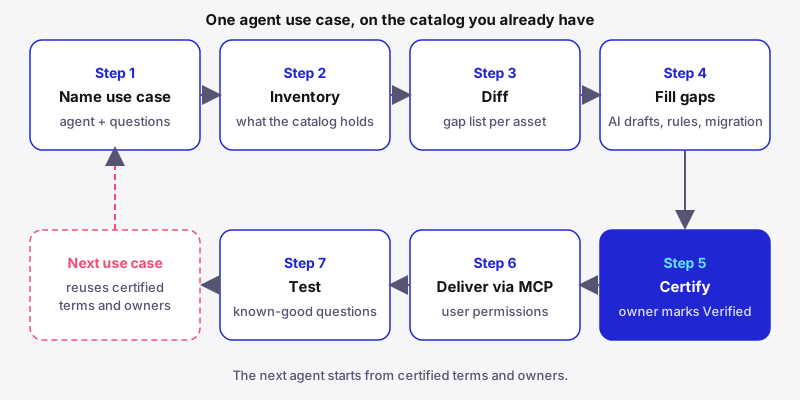
Why extend the catalog you already have into a context layer, one use case at a time?
Extending per use case turns metadata you already maintain into context an agent can use, without restarting a program that took years to build.
Much of what a catalog holds was written for people browsing, who filled the gaps from memory: which column is canonical, what a metric excludes. An agent has no memory to fall back on. Forrester analysts Boris Evelson, Indranil Bandyopadhyay, Charlie Dai and Noel Yuhanna describe what happens next in Build Meaning Before Machines (Forrester, 2026): “Without explicit context, they guess. And when agents guess, they get joins wrong, misinterpret metrics, and act on flawed assumptions.”
That gap separates AI-ready from analytics-ready data: the analyst carried the meaning, and the agent has to be given it. In February 2025, Gartner (2025) predicted that through 2026 “organizations will abandon 60% of AI projects unsupported by AI-ready data.” According to McKinsey (2026), the objective is “to define what ‘good enough’ means for each use case based on business needs and the risk profile of the data.”
The properties of AI-ready data are old catalog work; the use case sets the order. With no catalog yet, start with AI-ready data from day zero or preparing enterprise data for AI agents. If your metadata lives in a platform catalog, a catalog that sits on top of existing catalogs reads it in place.
Atlan’s documentation states, “Readiness is per-use-case, not a single certification an estate passes once.” Grow the enterprise context layer one use case at a time; see data catalog vs context layer for why catalogs changed.
What do you need before you extend your catalog for AI?
Before step one you need a funded use case, a connected catalog, a named owner per domain, and a way to put context in front of the agent.
| Category | Requirement |
|---|---|
| Organizational | One agent use case with a sponsor; a domain owner who can certify |
| Technical | Catalog connected to the warehouse, pipelines and BI tools the use case reads; lineage extraction; an MCP-capable agent runtime |
| Team | AI lead, governance lead, domain owner, platform engineer |
The steps below assume a read-only analytics agent. Per Atlan’s FAQ, an agent that takes actions “also needs write-permission metadata and a clear policy on what it’s allowed to change.”
To size the work, multiply the columns the agent reads by the owner’s review minutes per column. AI-ready data owners and stewards covers who certifies, and who owns the context layer covers the split between data and AI teams. Name the certifier before drafting starts, so every draft has a reviewer from day one.
Step 1: Name one agent use case and the questions it must answer
The output is one use case, its owner, and real questions it must answer. Gartner’s guidance explains why: “The readiness of data for AI depends on how the data will be used.”
- Tie the use case to an active business need. Atlan’s enrichment guidance names three: “an agent build, a domain rollout, an onboarding wave”.
- Collect questions from the people who will use the agent. Start with 15 to 30, add one each time a user reports a wrong answer, and hold a few back for the final check.
- Record a reference answer for each: the value, the as-of date and the tolerance, agreed with the business owner.
use_case: quarterly-revenue-agent
questions:
  - ask: "What was net_revenue for EMEA last quarter?"
    reference: "Certified Revenue dashboard, EMEA tile"
    expected_value: 4120000
    as_of: 2026-10-01
    tolerance: 0.5%
Scope one agent. Text-to-SQL for the enterprise, the talk-to-data agent blueprint and AI-ready data for talk-to-data show scoped examples.
Step 2: Inventory what your catalog already holds for those assets
The output lists every table, column, metric and dashboard the use case touches, with the descriptions, owners, glossary links, certificates and lineage already recorded.
- Start from the Step 1 dashboards and trace upstream through lineage, only as far as the tables the answers depend on.
- Prioritize the consumption layer. Atlan’s guidance ranks “the gold / BI-consumption layer” first, then “the most-queried SQL assets (last 30 days)”.
- Read platform catalogs as inputs. Atlan connects to Databricks to crawl Unity Catalog metadata; see the context layer for Databricks. Descriptions held in another catalog’s own store move over through the SDK in Step 4.
Atlan’s column-level lineage traces a column’s dependencies across warehouses, pipelines and BI tools. Every question should map to at least one asset. Do not rebuild metadata in a new tool, the distinction drawn in active metadata vs context layer.
Step 3: Diff your catalog against what the use case needs
Step 3 produces a gap list per asset: the work plan, limited to assets the agent reads.
Atlan’s AI-ready data FAQ frames the check: “whether a business-meaningful description exists at the asset and column level, whether columns map to glossary terms, whether ownership is assigned, whether lineage is traceable, and whether a domain expert has certified the asset for the intended use case.” It also lists an access policy the agent can inspect at runtime.
| Context element | What this use case needs | Gap signal |
|---|---|---|
| Descriptions | Meaning for every column the agent reads | Asset described, columns blank |
| Glossary mappings | Each metric linked to its definition | net_revenue not linked to Net Revenue |
| Join paths | The approved key between tables | Two candidate keys, none documented |
| Owner | A person who answers for the asset | Empty, or someone who left |
| Lineage | Path from dashboard to source | Stops at a staging table |
| Quality signal | Checks on the assets the agent reads | No checks, or failing ones |
| Certification | Approved for this agent | Draft or none |
| Access policy | Rules the agent can inspect | Not set for the agent’s users |
The same FAQ’s maturity ladder puts most teams at L2 (asset descriptions, columns blank) or L3 (column descriptions, glossary links and owners) for their busiest domains. Give each gap an owner; the AI-ready data checklist, AI readiness assessment and types of metadata AI agents need go deeper.
Step 4: Fill only the gaps, by mechanism
Each gap gets the cheapest reliable fill. Atlan’s enrichment guidance pairs mechanism to metadata type:
| Metadata type | Fill mechanism | Who signs off |
|---|---|---|
| Missing asset descriptions | Context Agents draft them | Domain owner |
| Owners, tags, certificates, domains, glossary links | Playbooks (rules) | Governance lead |
| Descriptions in a legacy catalog or README | SDK migration | Data team |
| Column descriptions, join keys and metric definitions | Written by the owner or migrated | Domain owner |
Atlan’s agent documentation states, “Agents only enrich assets that are missing the target metadata attribute.” Existing values are never overwritten, except that keep fresh regenerates text an agent wrote, and per the enrichment guidance, “Every AI-generated description carries a badge.”
Enrichment reads metadata, lineage and SQL history, which is how tribal knowledge in query history becomes a first draft. Drafts can be fluent and still wrong, so every one goes to Step 5. For high-risk metrics, such as revenue recognition, the owner writes the definition.
Step 5: Certify each asset for the named use case
The domain owner reviews drafted and migrated context and marks assets Verified for this use case.
Atlan’s enrichment guidance defines “Trust = description + owner + certificate + quality signal”. Atlan’s certificate documentation sets Verified “for ready to be used”, Draft “for work in progress”, and Deprecated “if the asset no longer exists”.
- Route badged drafts to the named owner, who corrects each one, then sets Verified.
- A certificate is one status per asset, so record the use case it was reviewed for where that use case lives. Context Engineering Studio assembles a context repository “for one use case from the governed context in your Atlan catalog and glossary.”
- Leave everything else as Draft.
Never bulk-approve AI drafts, and never let a central team certify data it does not own. Data quality for AI agents supplies the quality signal.
Step 6: Deliver the certified context to the agent through MCP
The agent reads certified context at runtime through an MCP server or an API, under the caller’s permissions. Copies pasted into each AI tool drift.
The Model Context Protocol dates from its open-source release in November 2024, and the MCP specification (2026) says it “provides a standardized way to connect LLMs with the context they need”. Atlan’s MCP security documentation states that with OAuth, “each MCP tool call executes with the signed-in user’s identity and Atlan permissions.”
- Connect the agent runtime to the Atlan MCP server.
- For a scheduled agent with no signed-in user, use a service-account token. Atlan MCP “requires exactly one persona attached to the token,” which becomes that identity’s scope, so the persona sets which assets the agent can see.
- Test it: the agent should return the
Net Revenuedefinition and owner forfct_orders.net_revenue, and a user without access should get no restricted asset.
Atlan permissions govern the metadata the agent sees, so check the warehouse grants its SQL runs under. See AI-ready data and MCP and the MCP-connected data catalog.
Step 7: Test with known-good questions, fix the context, then start the next use case
You finish with a pass rate on the Step 1 questions, a list of context fixes, and a second use case.
- Run the questions, compare each answer with its reference, and classify each failure: missing context, retrieval, SQL generation or permissions. An agent joining
orderstocustomersonaccount_idinstead ofcustomer_idneeds the approved join documented on both columns. - Fix the context first, and change the prompt only when the context is right and the answer is still wrong. Rerun, then score the held-back questions before you call the use case ready.
- Start use case two, reusing certified terms and owners and diffing only what is new.
In Atlan’s own benchmark of 174 queries (Atlan AI Labs), the query win rate rose from 16.1% to 22.2% when governed metadata was added: 6.1 points, a 38% relative lift. The win rate stayed low, so test on your own questions.
Testing an AI agent harness and building one cover test design, and context engineering covers what the agent receives.
What are the most common mistakes when extending a catalog for AI?
A common root cause is scoring readiness across the whole estate, when the agent only needs the assets its use case reads.
Enriching the whole estate before naming a use case
Teams work the backlog top to bottom, and months later no agent is ready.
Scoring readiness by catalog coverage percentage
Coverage rewards describing assets nobody reads. Atlan’s guidance notes that “typically only a small fraction of assets are actively viewed in a given month, and many of those still lack a description.”
AI drafts with no named certifier
Badged drafts pile up when nobody owns the queue. Name the certifier in Step 1.
A second catalog inside every AI tool
Teams paste definitions into each agent’s prompt, and the copies drift. Serve one certified source through MCP and rebuild any vector index from it. An agentic data catalog keeps the catalog and changes what it serves; see is the data catalog finally dead.
What are the best practices for extending a data catalog for AI?
Scope narrowly and make certification someone’s named job.
- Tie scope to an agent build.
- Enrich the consumption layer first.
- Certify per use case, so the next team knows what was reviewed.
- Fill blanks only, badge every AI draft, and send stale human descriptions back to their owner.
- Reuse certified glossary terms, so definitions match from one agent to the next.
The certified terms and owners become nodes in a context graph; implementing an enterprise context layer covers the wider rollout.
How does Atlan extend an existing catalog into a context layer for AI?
Atlan works on the catalog and platform metadata you already have and adds the per-use-case drafting, certification and delivery an agent needs.
The challenge
Owners cannot hand-write every description an agent needs, and each AI tool keeps its own copy of the context.
The approach
- Connectors crawl existing systems, including platform catalogs, with column-level lineage.
- Context Agents draft missing descriptions, badged, without overwriting what people wrote.
- Playbooks apply owners, tags, certificates and glossary links by rule.
- Context Engineering Studio scopes a context repository to one use case.
- The MCP server serves it under each caller’s Atlan permissions.
The outcome
Owners review and certify drafts instead of writing from a blank field, and each agent reads one certified source. Context layer ROI covers the business case.
What comes after your first AI-ready use case?
Track two numbers: the pass rate on your known-good questions, and how much smaller the diff gets for each new use case.
Pick use case two where its assets overlap certified ones, so reuse shows early. When a source changes, use lineage to find the certified assets downstream and send them back to their owner for recertification.
The best AI-ready data platforms and the semantic layer for AI agents cover what to evaluate next. The open question is how many use cases it takes before a new agent’s diff is close to empty.
FAQs about extending a data catalog for AI readiness
1. How do you extend an existing data catalog for AI readiness?
Work one agent use case at a time. List the assets it reads, check what your catalog already records, and fill only the gaps. A domain owner certifies the result, MCP delivers it, and known-good questions confirm the agent answers correctly.
2. Is an existing data catalog enough for AI agents?
It holds most of the raw material: assets, owners, glossary terms and lineage. An agent also needs column-level meaning on the assets it reads, certification for its use case, and runtime access through MCP or an API.
3. Does AI readiness differ by use case?
Yes. Gartner states that readiness depends on how the data will be used. Atlan’s documentation agrees: retrieval, analytics and action-taking agents need different context, so one asset can be ready for one use case and not another.
4. Can AI-generated metadata be trusted?
Use it once a named owner has reviewed and certified it, and recertify when its sources change. In Atlan, AI drafts fill only blank fields, never overwrite descriptions people wrote, and carry a badge. The owner edits each draft, then sets the certificate.
5. How do AI agents use data catalog metadata?
Agents read descriptions, glossary definitions, owners, certificates and lineage at runtime through MCP or an API. In Atlan, an MCP call runs with the signed-in user’s identity and Atlan permissions, so the agent sees only the metadata that user may see.
6. Do I need to replace my data catalog to make data AI-ready?
No. Treat the catalogs you run as inputs. Atlan crawls existing systems, including platform catalogs, and adds per-use-case drafting, certification and delivery, so the owners, terms and lineage you maintain stay in use.
7. How do you test whether a catalog is ready for a specific agent?
Run the agent against real questions with reference answers, such as numbers from a certified dashboard. Classify every miss, fix the missing description, glossary link or certificate behind it, and rerun. Your pass rate on held-back questions is the readiness signal.
8. How long does it take to make one use case ready?
It depends on how many assets the use case reads and how much review time the domain owner has. Certification is usually the constraint. Later use cases move faster because certified terms and owners carry over.
Sources
- AI-Ready Data Essentials to Capture AI Value, Gartner
- Lack of AI-Ready Data Puts AI Projects at Risk, Gartner (February 26, 2025)
- AI data readiness: The key to scaling impact, McKinsey (June 23, 2026)
- Build Meaning Before Machines: Why Semantics, Ontologies, And Knowledge Graphs Matter For Agentic AI, Forrester (June 2, 2026)
- Introducing the Model Context Protocol, Anthropic (November 25, 2024)
- Specification, Model Context Protocol (version 2026-07-28)
- AI-ready data, Atlan Documentation
- AI-ready data FAQ, Atlan Documentation
- Enrich metadata at scale and feed context to AI, Atlan Documentation
- Understand context agents, Atlan Documentation
- Add certificates, Atlan Documentation
- Column Level Lineage, Atlan Documentation
- Set up Databricks, Atlan Documentation
- What is Context Engineering Studio?, Atlan Documentation
- Atlan MCP security, Atlan Documentation
- Research Shows How Enhanced Metadata Delivers 38% Better AI Accuracy, Atlan

