























You’ve checked all the boxes for AI readiness. Data quality is improving. Data governance is in place. Cloud infrastructure is up-to-date. Data products are launching. Your roadmap shows you’ll be “AI-ready” within a quarter or two.
Then comes the question from the C-suite: “If we’re AI-ready, why are none of our AI pilots making it to production?”
This pattern is playing out across enterprises. In conversations with data leaders at Fortune 500 companies, we’re hearing the same story: 6-9 months in, there are still zero AI production deployments. What’s missing?
Many companies are turning to knowledge graphs. But the truth is, knowledge graphs are neither a silver bullet nor a prerequisite for deploying AI. And while you spend time building the perfect knowledge graph, your competitors are deploying AI features and iterating fast.
It comes down to this: AI readiness isn’t about having perfect infrastructure in place before deployment. It’s about building context infrastructure through deployment – one use case at a time. Knowledge graphs are part of that context layer. But treating them as a prerequisite? That’s what keeps teams stuck.
What it means to be “AI-ready”
Permalink to “What it means to be “AI-ready””Most enterprises think about being AI-ready in terms of data maturity – data quality and governance, cloud platforms, metadata management, and data products. But when they try to deploy AI agents, they realize that the data might be ready, but the AI isn’t.
3 gaps between “AI-ready data” and “AI-ready business”
Permalink to “3 gaps between “AI-ready data” and “AI-ready business””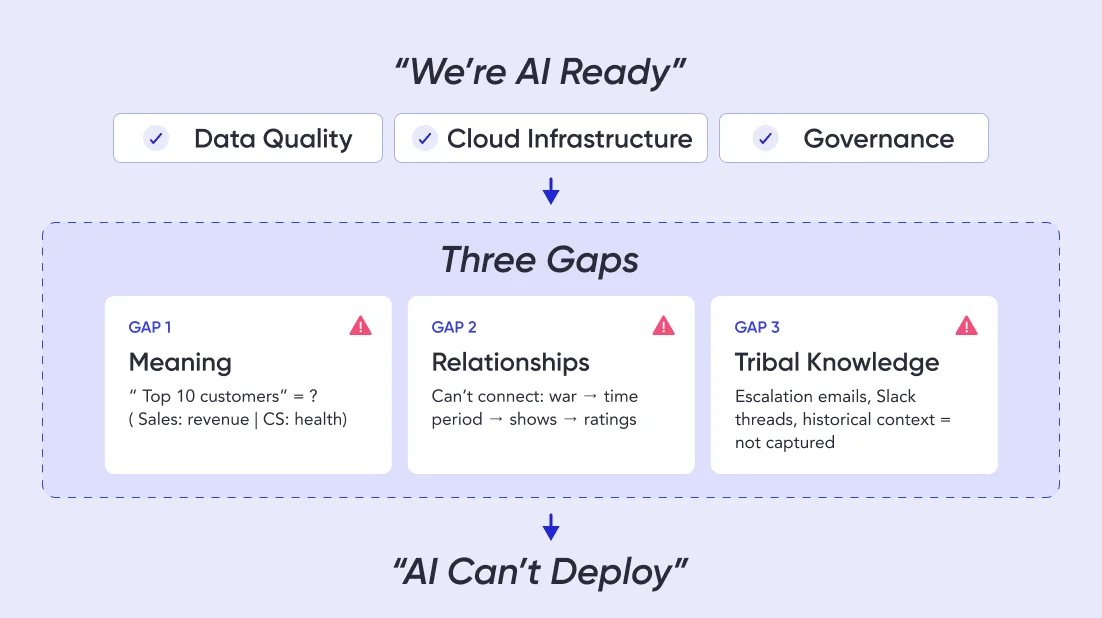
Gap 1: Your data is clean, but AI doesn’t understand it
Let’s say you deploy an AI analyst for Sales teams. You tell it: “Show me our top 10 customers.” And the AI fails.
It’s not that the data quality is poor, but rather that “top 10” is ambiguous. When Sales refers to “top customers,” they mean revenue. When Customer Success says it, they mean health score. And for Product, it’s usage.
Data catalogs document all these definitions, but they don’t encode the decision logic. So the AI doesn’t know that when someone from Sales asks a question, it should use the Sales definition to answer.
AI readiness requires more than clean data. It requires context that helps AI understand business meaning.
Gap 2: Your systems are integrated, but AI can’t connect the dots
A media company executive asks their AI analyst: “How did the war impact our political programming?”
The AI needs to:
- Map “the war” (a real-world event) to a time period
- Infer “political programming” (not an official category) from host names and topics
- Connect ratings data with engagement metrics and advertiser response
- Compare to baseline metrics to measure “impact”
All this data exists in well-governed data products, which the AI can access. But it can’t make the intuitive leaps that connect “war happened” → “time period” → “political shows” → “ratings changed.”
AI readiness requires more than data integration. It requires relationships that help AI reason across domains.
Gap 3: Your documentation is comprehensive, but AI can’t access tribal knowledge
A risk analyst asks: “Has this customer ever been flagged for suspicious activity?”
The formal answer lives in the compliance database. But the complete answer includes escalation emails, Slack threads, call notes, and historical context. In other words, this knowledge is scattered everywhere – including in people’s heads – but AI-ready data platforms capture none of it.
AI readiness requires more than documentation. It requires operational context that captures how decisions actually get made.
Let’s not forget that beneath these technical debates, there’s organizational politics. Who owns this? Does it live with the data team, the AI center of excellence, or the business units deploying agents?
Without clear ownership, every architectural decision requires cross-functional alignment that adds weeks to timelines.
Why building a knowledge graph can stall AI deployments
Permalink to “Why building a knowledge graph can stall AI deployments”Once enterprises recognize these gaps, a knowledge graph seems like the obvious solution. They capture relationships. They encode business logic. They help AI reason about business concepts.
So teams start planning – and that’s where many organizations’ efforts stall.
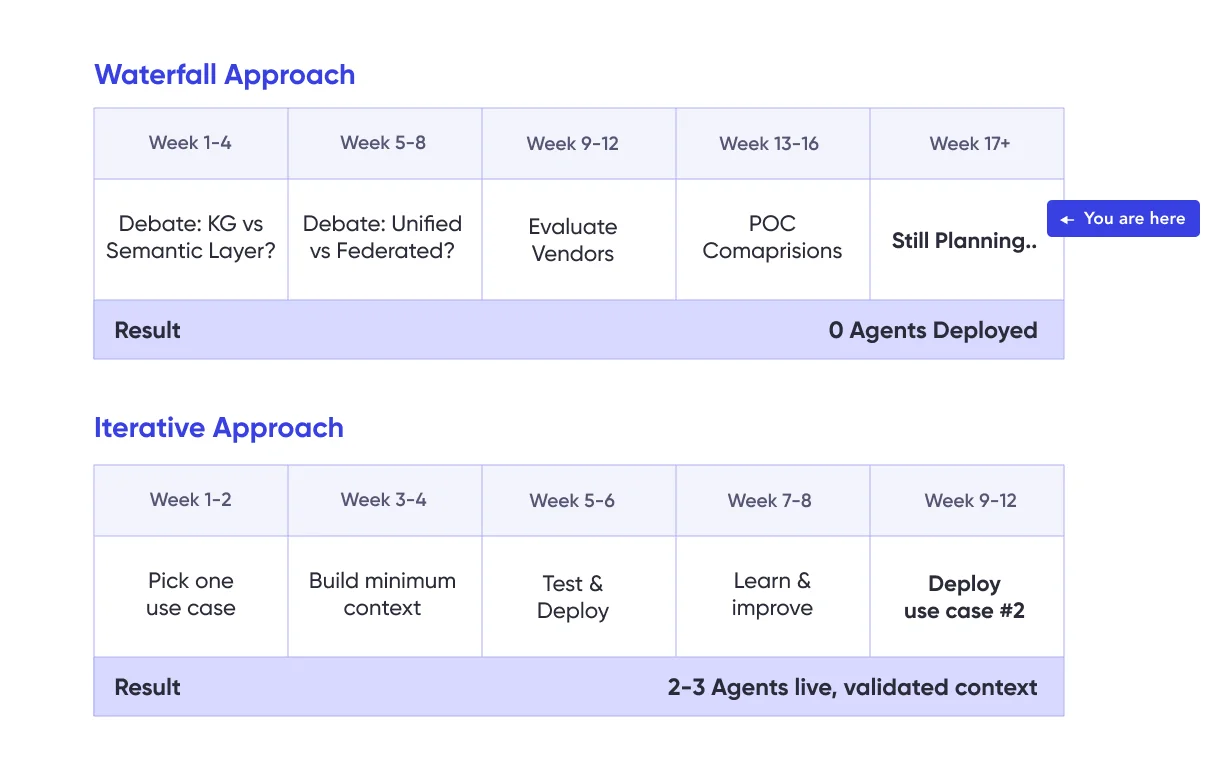
This is the pattern we’re seeing: Teams treat knowledge graphs as a prerequisite for AI readiness instead of an artifact of AI deployment. They spend weeks debating the details. Meanwhile, competitors (who may have messier data) are shipping AI features – not waiting to be perfectly AI-ready.
The debates that can delay readiness
Permalink to “The debates that can delay readiness”Every “how do we build a knowledge graph?” conversation tends to spiral into endless questions – none of which has an obvious right answer, but all of which can keep teams stuck in planning mode.
“Is our semantic layer enough, or do we need a knowledge graph?”
Semantic layers like Looker and Tableau seem sufficient because they define business metrics and logic. But they were built for BI dashboards, not AI reasoning. They define what metrics mean, but not when to use them.
AI needs more – specifically, the decision logic about when to apply which definition. Knowledge graphs can provide structured meaning for semantic understanding, but they’re still relatively static and not optimized for enabling AI analysts.
Betting all your cards on knowledge graphs may ultimately be unnecessary – but you won’t know for sure without clarity on what AI actually needs from your first use case.
“Do we need one unified graph or federated graphs by domain?”
AI agents need to reason across domains in order to achieve enterprise-wide consistency and accuracy. But domains define concepts differently. Forcing one canonical definition across the company creates a governance nightmare.
The unified and the federated approach both have merit. But you can’t make architectural decisions without knowing your actual AI use cases. Will your agents need cross-domain reasoning, or will they operate within domain boundaries? You can’t know until you try deploying one.
“Which implementation makes us most AI-ready: graph database, virtualized, or something else?”
Weighing implementation options can take an unexpected amount of time and input. Teams evaluate multiple options – visualization engines, graph databases, and vendor platforms like Palantir.
But without knowing your query patterns, scale requirements, or most important use cases, any evaluation you do is optimizing for theoretical AI scenarios instead of actual deployments.
The bottom line: Your AI use case should come first
Permalink to “The bottom line: Your AI use case should come first”The incorrect assumption across all these debates is that you need to answer the questions before deploying any AI use case.
- “Knowledge graph or semantic layer?” → Depends on what your first AI agent needs to do
- “Unified or federated?” → Depends on whether your use cases cross domains
- “Which technology?” → Depends on your query patterns and scale
- “Build or buy?” → Depends on your team’s capabilities and timeline
These are reasonable questions. But when you try to answer them comprehensively before shipping anything, you get analysis paralysis.
The enterprises deploying AI successfully aren’t waiting to resolve these debates or spending months building a knowledge graph. They’re picking one use case, building what that specific use case needs, and letting the answers emerge from production experience.
The hidden readiness gap: The cold start problem
Permalink to “The hidden readiness gap: The cold start problem”Let’s say you pick an architecture. You commit to building a knowledge graph. Now you face the problem that often gets underestimated: How do you actually create the ontology?
You can’t be AI-ready without capturing institutional knowledge in an ontology. But you can’t capture the right institutional knowledge without deploying AI and learning what breaks.
This is the cold start problem. Traditional readiness approaches assume you can document everything and build the perfect knowledge graph before deployment. But the only way to know what to document is often through deployment itself.
Take the example of a financial services firm deploying an AI analyst for credit risk assessment. Instead of building a comprehensive ontology of all financial concepts, they asked: What does this specific agent need to assess commercial loan risk?
The answer: Customer financial history (last 3 years), industry risk factors (from external data), internal loan performance (from existing dashboards). That’s it. They extracted test cases from their existing risk dashboards, built context for just those queries.
Six weeks later, the agent was live. Three months later, they’d deployed a second use case (consumer credit), reusing 60% of the context they’d already built.
Where to look for AI-ready context
Permalink to “Where to look for AI-ready context”For AI to be truly useful in your business, it needs to understand concepts and relationships that exist in several places:
Senior analysts’ heads — From the domain-specific definitions to the edge cases, their knowledge is ingrained. The catch? They can’t always articulate it on demand.
BI assets and semantic layers — They contain metrics and business logic, but they’re optimized for specific BI questions – not general reasoning. Extracting that logic into reusable ontology isn’t straightforward.
Tribal knowledge and historical decisions — This context exists only in institutional memory. Context is king – and in many enterprises, it lives in people’s heads.
Documentation — Maybe there are SOPs in SharePoint or process flows in Confluence. More likely, there’s outdated documentation that doesn’t reflect current business logic.
Why “document everything” can fail as a readiness strategy
Permalink to “Why “document everything” can fail as a readiness strategy”The traditional approach is to document all business concepts, map all relationships, build comprehensive ontologies, and then deploy AI. But this often fails because:
Scope explodes. You start with a single definition but quickly need to document three variations, plus conflict resolution rules. The sprawl continues and months later, you’re still mapping concepts.
Experts can’t always transfer tacit knowledge. When an analyst is asked how they define a metric, they often don’t mention all the caveats that come with it. Trying to articulate information that’s muscle memory leaves significant gaps.
Readiness is built in a vacuum. You document what you think AI needs and deploy it, only to discover that you missed critical relationships, captured irrelevant ones, or documented the ideal process instead of the actual process.
Instead of trying to document everything and treating readiness as a prerequisite, start thinking of it as an iterative capability built through shipping.
How to build readiness by deploying AI
Permalink to “How to build readiness by deploying AI”AI-ready enterprises aren’t necessarily the ones with the most comprehensive knowledge graphs. They’re the ones who figured out how to get their first AI use case to production quickly – and used that deployment to identify what readiness actually requires.
Reframe readiness as a journey, not a milestone
Permalink to “Reframe readiness as a journey, not a milestone”Instead of asking “What do we need to be AI-ready?” successful teams are asking “What does our first AI use case need to work?”
Thinking back to our financial services example in the previous section, focusing solely on credit risk assessments allowed the team to hone in on the exact three metrics they needed and start building fast. Instead of waiting to deploy their agent until they had the perfect knowledge graph, they committed, shipped, iterated, and moved on.
Use testing to reveal readiness gaps
Permalink to “Use testing to reveal readiness gaps”If you’re deploying an AI analyst to replace BI dashboards, those dashboards are your readiness test. The queries behind dashboard tiles represent real questions users asked, validated business logic, and approved definitions and metrics.
Extract those queries as test cases. Run your AI agent against them. When it fails, you’ve identified a readiness gap. Close the gap, re-test, and when you hit 80-90% accuracy, you’re ready to deploy.
Now you have proof of readiness – not a theoretical checklist, but validated performance against real business questions.
Build readiness through production feedback
Permalink to “Build readiness through production feedback”After you deploy your first use case, you get the most valuable readiness signal: actual usage. Which questions do users ask? Which go unanswered? Which edge cases break the AI?
Each gap reveals what your readiness still needs. You can then add that context, test that it doesn’t break existing queries, and redeploy.
This is iterative readiness: Each deployment cycle makes you more ready for the next use case. Over time, instead of “trying to achieve AI readiness,” you’re validating context that progressively increases your readiness.
Scale readiness through reuse
Permalink to “Scale readiness through reuse”After 2-3 deployed use cases, patterns emerge. That’s when you can build reusable readiness components. You’re no longer guessing what “customer” means theoretically – you have three agents that use it, and you can see exactly how each uses it differently.
This is when architectural questions naturally resolve themselves:
- Unified or federated? You see whether cross-domain reasoning matters.
- Which implementation? You see actual query patterns and scale needs.
- External standards or custom? You see what’s generic vs. business-specific.
The architecture decisions answer themselves once you have real readiness requirements – not theoretical ones.
Moving from planning to deployment
Permalink to “Moving from planning to deployment”Execs are right to push on readiness. But the question isn’t “Are we AI-ready?” It’s “Which AI use case are we committing to ship this quarter?”
Pick one. Not the biggest, not the most strategic – pick one you can get to production in 6-8 weeks. Build only the context that use case needs. Test it against your existing BI queries, ship to 20 users, and learn what breaks. And, don’t get hung up on building a perfect, comprehensive knowledge graph – it will only slow you down.
After your second use case, you’ll see patterns. After your third, you’ll have reusable components. After your fourth, you’ll be more AI-ready than companies that spent a year designing the perfect knowledge graph.
That’s the difference between planning readiness and building it.
Your competitors aren’t waiting to be AI-ready. They’re already on their third use case. Now it’s your move. Join us at Atlan Activate to see how teams are deploying AI agents in weeks, not months.
AI readiness and knowledge graph maturity both feed into a broader context layer strategy — explore all the components at the Enterprise Context Layer Hub.
Share this article
