

TrustGraph is the open-source project a team reaches for when its agents need answers drawn from a pile of documents, with a trail back to the page each fact came from. It does not supply the business meaning behind the warehouse tables, dashboards, and pipelines that agents also have to read. That second job belongs to a context layer, and the two can run side by side.
What is TrustGraph?
TrustGraph is an open-source context graph project under the Apache 2.0 license, led by co-founders Daniel Davis and Mark Adams. Its documentation describes it as a context orchestration layer that stores knowledge in a context hypergraph next to vector embeddings. A hypergraph connects several entities into one event, beyond a simple A-to-B edge. The latest release, version 2.9, shipped on September 23, 2026.
In context graph terms, TrustGraph covers four things:
- Knowledge graph and vector storage in one system
- GraphRAG-style retrieval
- Ontology-guided extraction
- Context bundles your team versions and deploys
How the TrustGraph architecture fits together
TrustGraph’s architecture is built around HyperFlows, custom agentic workflows whose modular services connect through a pub/sub messaging fabric. The main components are:
- Extraction: an LLM reads documents and writes entities and relationships into the hypergraph, optionally guided by an ontology you supply, as the retrieval documentation explains.
- Storage: Cassandra holds the graph in three named graphs, one for extracted knowledge, one for provenance, and one for retrieval reasoning traces. Qdrant stores embeddings, and Garage stores source documents.
- Context management: workspaces isolate data for users, agents, and flows, and collections split knowledge bases inside a workspace and combine at query time. Context Cores package knowledge into portable units.
- Messaging: the integrations page lists Apache Pulsar and RabbitMQ.
- Inference: cloud LLM APIs, or self-hosted models served through vLLM, Ollama, TGI, LM Studio, and Llamafiles, per the same integrations page.
- Access: a CLI and a web Workbench, plus MCP support for agent tooling.
What does TrustGraph do for AI pipelines?
In a typical pipeline, TrustGraph replaces the chunk-and-embed step of standard RAG with fact extraction into a graph. Qdrant’s engineering case study describes the query path in four moves: embed the question, find the nearest entities, expand them into a subgraph of related facts, and pass only that subgraph to the LLM, which answers from that context.
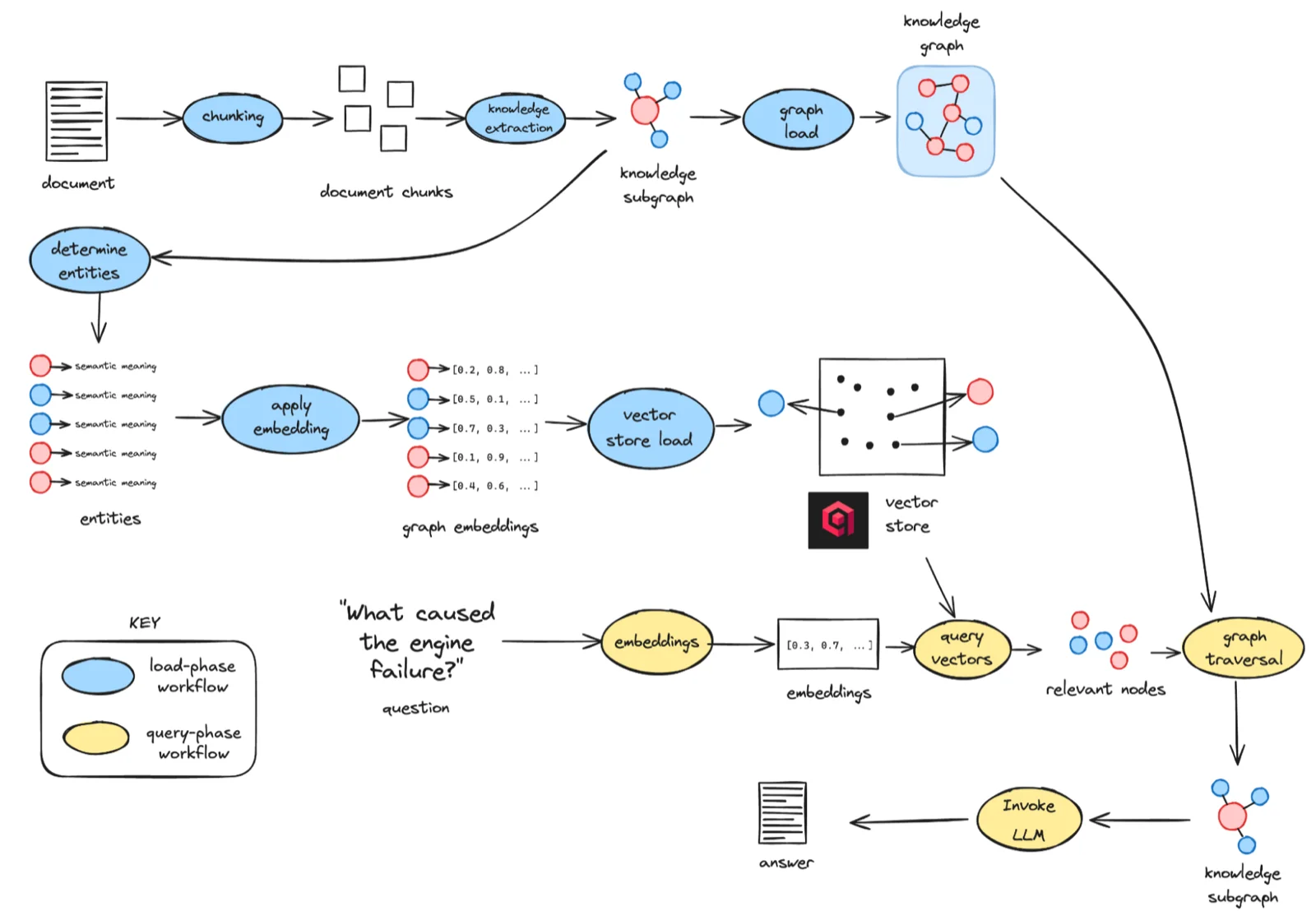
Graph traversal lets an agent follow causal links that plain chunk similarity may never surface, the idea behind GraphRAG.
The jobs TrustGraph takes on in an AI pipeline
- Turning documents into facts: LLM extraction converts documents into typed entities and relationships instead of loose text chunks.
- Grounding answers in a subgraph: retrieval hands the model a connected set of facts, which suits questions that span several documents.
- Scoping context per agent: workspaces and collections isolate data by user, agent, or flow, according to the how-it-works page.
- Explaining outputs: since TrustGraph 2, extraction emits PROV-O provenance and queries record reasoning traces.
- Reusing context: Context Cores let another agent or environment load extracted knowledge without re-running extraction.
For wider build decisions, see knowledge graph construction for AI and how to build a knowledge graph for AI agents and context graph tools for AI agents for peers.
What are the key capabilities of TrustGraph for AI pipelines?
The capabilities group by the pipeline stage they serve.
1. Ingestion and knowledge extraction
- LLM-based extraction of entities and relationships into the graph.
- Bring your own ontology, so ingested data matches your domain model. See ontology vs. knowledge graph for how the two relate.
- Structured data loading: the GitHub project page lists CSV, JSON, and XML among the formats it processes, alongside PDFs.
2. Retrieval
TrustGraph’s retrieval documentation describes three strategies.
| Strategy | How it works | Best for |
|---|---|---|
| Graph RAG | An LLM extracts entities and relationships into the context hypergraph, with vector embeddings alongside | Relationship-rich questions that span several documents |
| Ontology RAG | Your domain schema guides extraction, so the hypergraph reflects your model | Defined domains that need consistent extraction |
| Document RAG | Document chunks are embedded in a vector database, with keyword and vector search fused through Reciprocal Rank Fusion | Broad semantic search over unstructured content |
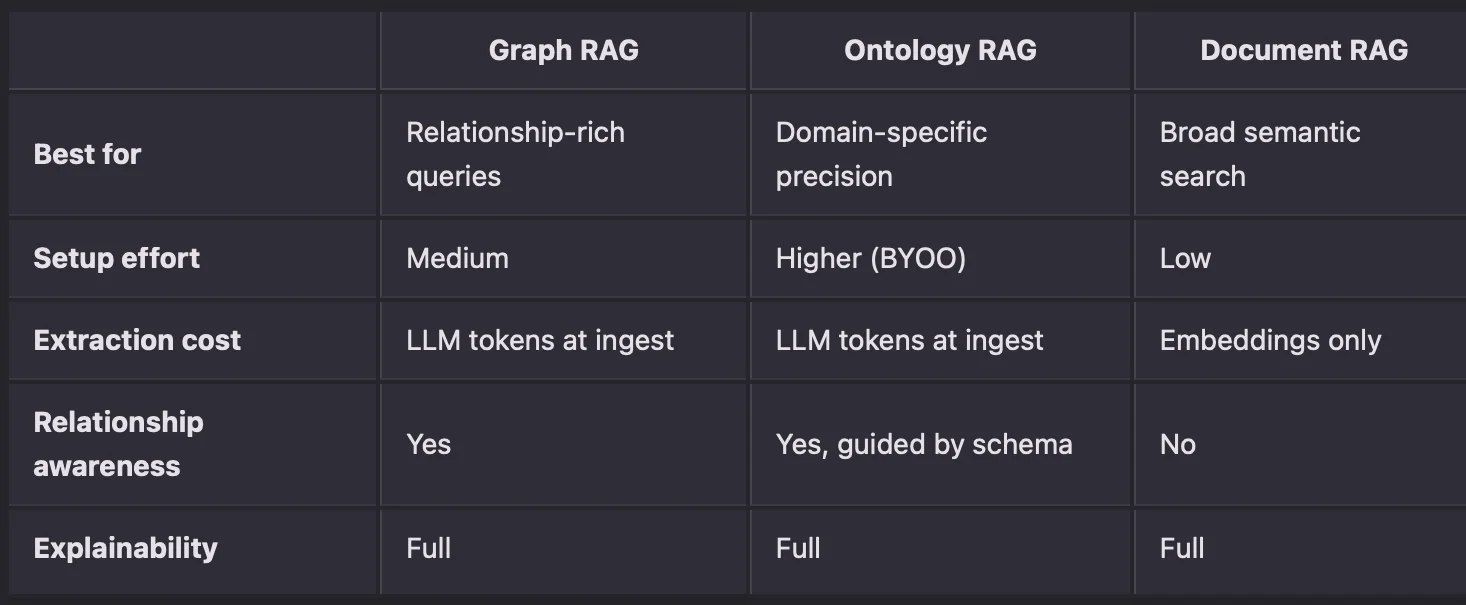
If you are weighing graph retrieval against plain vectors, context graph vs. vector database walks through when each one wins.
3. Context management
- Workspaces: programmatic data isolation for users, agents, and HyperFlows.
- Collections: separate knowledge bases inside a workspace, partitioned and combined at query time.
- Context Cores: modular, portable units that, per the docs, load in a fraction of the time it took to create the original knowledge. A core holds graph edges, schema information, and graph embeddings, and you can download it as a file and upload it to another instance.
4. Agents and orchestration
- HyperFlows: configurable workflows that chain processing steps and assign a specific LLM and graph scope to each step.
- MCP integration: TrustGraph’s MCP client gained streamable HTTP transport in version 2.9. Its MCP integration guide calls the capability a release for early adopters and flags production deployment and authentication as possibly not ready. For the protocol itself, read what MCP is and the MCP architecture deep dive.
- Model choice: the integrations page lists Anthropic, AWS Bedrock, Azure AI, Azure OpenAI, Cohere, Google AI Studio, Google Vertex AI, Mistral, and OpenAI, plus self-hosted open models.
5. Explainability and provenance
- Extraction provenance: PROV-O records how knowledge entered the system. The chain has four levels: document, pages, chunks, and subgraphs.
- Reasoning traces: query-time traces capture the question and grounding concepts, graph exploration, edge selection, and final synthesis.
- Visual inspection: the TrustGraph 2 release added an Explainability Panel to the Workbench.
6. Deployment and operations
- Hosting: Docker, Podman, or Kubernetes on your own infrastructure, or on clouds the integrations page names: AWS, Azure, Google Cloud, OVHcloud, Scaleway, and Alibaba Cloud.
- Guided configuration:
npx @trustgraph/configgenerates a deployment bundle for Docker Compose or Kubernetes, with configuration for Grafana and Prometheus. - Hardware and monitoring: inference on NVIDIA, AMD, or Intel accelerators, with Prometheus and Grafana for observability.
When does a DIY context layer with TrustGraph make sense?
A self-hosted context graph gives a team control over what goes in. It also hands that team the whole stack.
TrustGraph is a strong fit for document-heavy domains where a team already has ontology skills in OWL, RDF, and SPARQL. It also asks for platform engineering capacity: a team that already runs Kubernetes, Cassandra, and message brokers can absorb the operating load.
Weigh three costs before you build on it:
- Upgrades carry engineering work. Releases arrive often, from version 2.1 in March to version 2.9 in September, and 2.9 removed LangChain from the flow and embeddings packages. Each upgrade means configuration and code your team tests and rolls out.
- Warehouse and BI context needs its own path. The integrations page lists none of Snowflake, Databricks, dbt, or Power BI, so a live link to them is a custom processor that your team writes, packages as a container, and maintains.
- The stack is yours to run. Cassandra, Qdrant, Garage, Pulsar or RabbitMQ, and inference services all need sizing, patching, and monitoring, per the storage architecture.
TrustGraph is a credible foundation when one domain’s documents feed agents your team controls. The picture changes when every team’s agents need shared, trusted context from the warehouse, pipelines, and dashboards. Then the work shifts from building a graph to operating an enterprise context layer. Enterprise knowledge graph pitfalls covers where that shift tends to hurt, and graph database vs. metadata layer covers the foundation choice. For a head-to-head view, see Atlan vs. TrustGraph.
Why adopt an enterprise context layer that reads your estate?
A graph built from the documents one team feeds it stays that team’s asset. Context that agents across the company should share needs to be versioned, portable, and readable by every agent through its whole lifecycle, from build to review to deploy. A static graph falls behind a live estate.
Atlan is the Context Layer for AI. It sits between the data estate and the agents, mines context from existing systems, builds and certifies it with humans, and delivers it through MCP, A2A, and APIs. It reads column-level lineage, SQL, BI semantic logic, and usage from the live estate.
A vendor-agnostic layer like Atlan adds:
- Context Agents: nine specialist agents mine context from lineage, SQL, annotations, usage, and BI semantic logic, and bootstrap an ontology from signals that already exist.
- Context Engineering Studio: the full lifecycle of build, test, review, approve, deploy, and learn, with a human on the loop. See context engineering for AI agents.
- Context Repos: versioned, bounded, portable units of context, published to engines such as Snowflake semantic views, Databricks Genie, and Claude agents, with approval and ownership attached.
- Context Lakehouse: Iceberg-native storage with vector search and time travel, so a team can reconstruct what an agent saw when it answered.
- Connectors and lineage: 100+ connectors across systems of record and data assets, covering the warehouse and BI half of the estate that a document-extraction pipeline does not see.
- MCP delivery: one context source that any MCP client can read, with OAuth or API key sign-in. Read what Atlan MCP is for the setup.
These pieces reach what a document graph cannot: business context for AI, tribal knowledge that never reached a document, and a model-agnostic context layer. For how the categories differ, see context layer vs. data catalog vs. semantic layer and the semantic layer for AI agents.
Real stories from real customers building enterprise context layers

How Workday is building an AI-ready semantic layer
"Atlan captures Workday's shared language to be leveraged by AI via its MCP server. As part of Atlan's AI labs, we're co-building the semantic layer that AI needs."
Joe DosSantos, VP, Enterprise Data and Analytics
Workday
Workday's data, AI-ready
Watch the session
How DigiKey built a unified, sovereign context layer for its data and AI estate
"Atlan is our context operating system to cover every type of context in every system including our operational systems. For the first time we have a single source of truth for context."
Sridher Arumugham, Chief Data Analytics Officer
DigiKey
DigiKey on context readiness
Watch the sessionMoving forward with TrustGraph for AI pipelines
TrustGraph is open source, grounds extraction in an ontology you supply, offers three retrieval strategies, and records provenance from source document to final answer. A capable platform team can run it for document-heavy or sovereignty-sensitive work.
Its limits show at enterprise scale. Releases move quickly, structured data arrives through file loads or custom processors, and the graph reflects whatever a team chose to load. An enterprise context layer fills the gap by reading the live estate and serving every agent over MCP, A2A, and APIs.
The two can coexist: keep TrustGraph for deep document retrieval while agents read certified business context from the enterprise layer through MCP. For durable recall, how to connect a context graph to agent memory and agent memory architectures are the next reads, and AI agent governance covers the controls around them.
FAQs about using TrustGraph for AI pipelines
1. What is TrustGraph, in one paragraph, without marketing language?
TrustGraph is Apache 2.0 open-source software that uses an LLM to extract entities and relationships from documents, stores them in a context hypergraph alongside vector embeddings, and retrieves connected facts to ground LLM answers. It ships with its own storage, messaging, workflow services, APIs, and a web Workbench, deployed as containers that your team operates.
2. What is the difference between a context graph and a context layer?
A context graph is a data structure: entities, relationships, and often decisions, organized so an AI system can pull the relevant subgraph into its context window. A context layer is the wider system around that structure. It sources context from across the enterprise, keeps it current, routes it through owner review and approval, versions it, and delivers it to every agent. A context graph is usually one component inside a context layer.
3. Can TrustGraph connect to Snowflake, Databricks, dbt, or Power BI?
TrustGraph lists LLM APIs, model servers, storage, messaging, observability, GPU, and cloud platforms on its integrations page, and names none of those four tools. Its documentation describes custom processors, Python components that run as containers on the message bus, as the route for adding your own data sources. Your team writes and maintains that processor. A context layer with prebuilt connectors reads these systems without custom code.
4. How long does it take to reach production with TrustGraph?
A local evaluation is quick, because a configuration tool generates Docker Compose or Kubernetes files and you can then load documents and query with Graph RAG. Production timelines depend on your deployment target, data sources, and ontology work. The documentation pages we reviewed do not state a typical duration. Its Scaleway and OVHcloud guides describe production-ready Kubernetes environments provisioned with Pulumi.
5. Does TrustGraph give you data lineage, or something else?
TrustGraph provides knowledge provenance. Since version 2, it records PROV-O triples that trace each extracted fact through subgraphs, chunks, and pages back to its source document, and it stores query-time reasoning traces in a named graph. That answers which document a fact came from and how the agent used it. It does not describe how a warehouse column or dashboard metric is derived through SQL, pipelines, and BI models, which requires a system that parses lineage from the data estate itself.
6. Is TrustGraph open source and free to use?
Yes. The core platform is on GitHub under the Apache 2.0 license, which permits commercial use, modification, and redistribution. Your costs come from the infrastructure it runs on, any paid LLM APIs, and the engineering time to operate it.
7. Does TrustGraph work with MCP and agent frameworks?
TrustGraph supports MCP, and its MCP client gained streamable HTTP transport in version 2.9. Its MCP integration guide describes the capability as released for early adopters and warns that production deployment and authentication may not be ready, so review any third-party MCP server before you connect it. HyperFlows let you assign a different LLM and graph scope to each workflow step.
Sources
- Apache License, Version 2.0, Apache Software Foundation. https://www.apache.org/licenses/LICENSE-2.0
- Meet the Team, TrustGraph. https://trustgraph.ai/team/
- What is TrustGraph?, TrustGraph Documentation. https://docs.trustgraph.ai/learn/what-is-trustgraph.html
- How does TrustGraph work?, TrustGraph Documentation. https://docs.trustgraph.ai/learn/how-it-works
- TrustGraph 2.9: A Config-Driven Workbench, Leaner Core, and Smarter Catalog Loading, TrustGraph, September 23, 2026. https://trustgraph.ai/news/release-2-9
- TrustGraph Launches Version 2: End-to-End Explainability and Context Graph-Native AI Infrastructure for Production, TrustGraph, March 28, 2026. https://trustgraph.ai/news/release-2-1/
- Retrieval, TrustGraph Documentation. https://docs.trustgraph.ai/learn/retrieval
- Storage architecture, TrustGraph Documentation. https://docs.trustgraph.ai/architecture/storage.html
- Working with Context Cores, TrustGraph Documentation. https://docs.trustgraph.ai/guides/context-cores/
- Explainability, TrustGraph Documentation. https://docs.trustgraph.ai/architecture/explainability
- Integrations, TrustGraph. https://trustgraph.ai/integrations/
- Adding your own processing, TrustGraph Documentation. https://docs.trustgraph.ai/guides/building/custom-processing.html
- MCP Integration, TrustGraph Documentation. https://docs.trustgraph.ai/guides/mcp-integration/
- CLI Configuration Tool, TrustGraph Documentation. https://docs.trustgraph.ai/deployment/cli-configuration.html
- Scaleway Deployment, TrustGraph Documentation. https://docs.trustgraph.ai/deployment/scaleway
- OVHcloud Deployment, TrustGraph Documentation. https://docs.trustgraph.ai/deployment/ovhcloud
- trustgraph-ai/trustgraph, GitHub. https://github.com/trustgraph-ai/trustgraph
- How TrustGraph Built Enterprise-Grade Agentic AI With Qdrant, Qdrant Blog. https://qdrant.tech/blog/case-study-trustgraph/
- PROV-O: The PROV Ontology, W3C Recommendation. https://www.w3.org/TR/prov-o/
- What is a Context Repository?, Atlan Documentation. https://docs.atlan.com/product/capabilities/governance/context-engineering-studio/concepts/whats-in-a-context-repository
- Atlan MCP, Atlan Documentation. https://docs.atlan.com/product/capabilities/atlan-ai/how-tos/atlan-mcp-overview
