

Quick answer: How do you build an agent with Azure AI Foundry?
Azure AI Foundry became Microsoft Foundry at Ignite in November 2025. Microsoft describes the lineage as Azure AI Studio to Azure AI Foundry to Microsoft Foundry, so the current name is the third, not a single rebrand. It is the Azure service to build and run agents and agentic applications within Azure. Foundry has an Agent Service, which you can use to manage the runtime, identity, observability, and scalability of agents.
With Foundry, you can deploy agents in two different ways:
-
Prompt Agents: Deploy agents that are fully managed and prompt them to get things done without the hassle of having to manage agent code or compute. Pay only for token usage and tool use, and not runtime costs.
-
Hosted Agents: Deploy agents by writing, managing, packaging and maintaining your agent code yourself. Pay for the runtime, tokens, build process, and every other service that the agent uses separately.
How do you build a prompt agent using Azure AI Foundry?
The simplest way to create a prompt agent is to use the Foundry portal, where you get a step-by-step process to add instructions, select a model, add tools, and complete the agent build without worrying about where and how the code is deployed.
To create a prompt agent, follow these steps:
-
Create a Foundry project, which acts as the isolation boundary.
-
Go to the model catalog and choose one of the models, and deploy it.
-
Once you deploy it, go to the Build section, select Agents, and then the Create agent option; map your deployment to that agent.
-
Write instructions for your agent explaining its core job, goals, constraints, and boundaries.
-
Set up tools from the tool catalog that the agent can use, such as semantic search, code interpretation, web search, or image generation. Once tools are set, the agent is ready to be tested.
-
Test and work with the agent in the Foundry playground.
Once you are done with initial testing of the agent, you can continue to edit and improve your agent within the playground. Every edit to the agent is version-controlled and snapshotted. This means that you can compare different versions of your agent and evaluate its performance over time.
When the agent is ready, you can publish it to an endpoint. Publishing automatically assigns the agent a Microsoft Entra agent identity, which shows up for governance and visibility in the Microsoft 365 admin center’s agent registry, a separate management surface, not something you add the agent to manually. That registry entry is a governance primitive, not a context one, which is why agent context layer design decisions, what context that identity can actually pull once the agent is live, still need to happen separately.
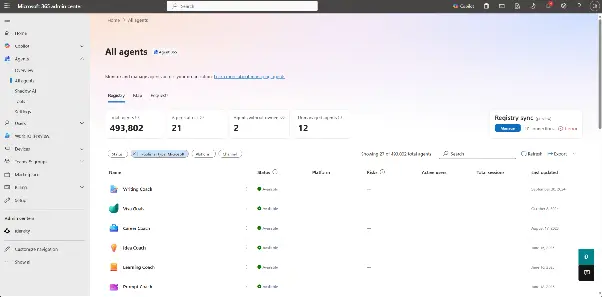
Source: Microsoft Learn, https://learn.microsoft.com/en-us/microsoft-365/admin/manage/agent-registry?view=o365-worldwide
This is the fully managed path for creating an agent using Foundry. It saves you the headache of managing the runtime and infrastructure, building the agent image, and pulling and pushing the image to and from an image registry.
But there are times when you need customizability and flexibility in your agent to add capabilities that aren’t available in the prompt agent option. That’s when you look towards a hosted agent. Let’s see how a hosted agent works in Foundry.
Get the blueprint for your AI context stack
See the four-layer architecture, from metadata foundation to agent orchestration, with practical implementation steps for 2026.
Get the Stack GuideHow do you build a hosted agent using Azure AI Foundry?
The basic agent harness that prompt agents provide doesn’t suffice for complex production-grade use cases, especially when you need to control the agent loop and write your own orchestration logic. In such cases, you might choose an agent framework other than Microsoft Agent Framework, such as LangGraph, CrewAI, Anthropic Agent SDK, OpenAI Agents SDK, or Mastra.
When you create agents using an agent framework of your choice, you also get to package and push them to an agent image registry. This is the registry that Foundry will use to spin up micro VMs for running your agents. The easiest way to spin up your own agent is by using the Azure Developer command-line tool. Once you do, the steps aren’t that different from prompt agents.
After setting up a Foundry project, you need to create a scaffold for your agent harness. This scaffold is defined and driven by an azure.yaml config file. Once that’s done, go through the following steps:
-
Provision the infrastructure needed using
azd provision. You’ll need to provision a resource group, a model deployment, an Azure Container Registry, a Log Analytics Workspace, an Application Insights resource, and a managed identity for the agent. -
The scaffold will have a basic agent definition, without any instructions or tools defined. However, you can add some once you have the scaffold tested. Test your agent locally with
azd ai agent run --no-inspector. -
Open another terminal window and try to run this:
azd ai agent invoke --local "Is this thing working?" -
Then you can deploy your agent to build the container image and push it to ACR. To do this, use the
azd deploycommand. -
After publishing the agent, you can check the status of the agent with the
azd ai agent showcommand.
Hosted agents, just like prompt agents, can use the same tool catalog and model catalog. The tools are available through the Foundry Toolbox, which is exposed using an MCP endpoint that the hosted agent can interact with directly. Hosted deployments that orchestrate more than one agent add a further wrinkle: context engineering for multi-agent systems has to keep every sub-agent working from the same facts, not just calling the same tools.
Irrespective of which path you take to create your agents in Foundry, you need context beyond instructions and toolsets. You need organizational context. Let’s look at how to get that context and why, despite the tool catalog having over 1,400 options, there’s a better alternative to make context available to agents.
Find your context gaps before Foundry does
Run the Context Gap Calculator to see where an agent's context is thin before you wire tools into a hosted agent.
Try the Gap CalculatorHow do you get relevant context for Azure AI Foundry agents?
Both prompt and hosted agents have access to the same set of tools from the tool catalog and also Microsoft services that facilitate context via specialized storage and retrieval, such as Azure AI Search, Cosmos DB, Azure Blob Storage, and Foundry IQ.
Despite having many tools in the tool catalog, agents can hit a wall when trying to get context in a typical enterprise. That’s because enterprises comprise hundreds of systems, including systems of record, cloud platforms, external integrations, documentation systems, and communication systems.
Getting context from these systems alone isn’t enough. The context itself has to be contextualized in relation to other systems, which is why you need information about lineage, governance, quality, ownership, and policy. Each system’s context stops at its boundary, which is why you need an enterprise context layer to stitch everything together and present a cogent, coherent, searchable and queryable layer where an agent can get the context it needs to do its work.
That connective-tissue gap is why a dedicated agent context layer has become its own category, separate from a general-purpose context graph, which itself gets confused with a knowledge graph or an ontology often enough that teams end up debating vocabulary instead of shipping. Some teams try combining knowledge graphs with LLMs directly to close that gap, but it still leaves the freshness and ownership problem unsolved.
That’s exactly where Atlan comes in. It saves you from having a ridiculous number of integrations, auth setups, and tool namespaces. Let’s see how.
How does Atlan enrich Foundry agents with an enterprise context layer?
Built on the Context Lakehouse architecture, Atlan is the Context Layer for AI. At the core is Atlan’s MCP Server, which delivers context to agents at runtime.
At the same time, Atlan connects to all the enterprise systems; a Foundry agent only has to act as the MCP client and ask Atlan for relevant context, thereby offloading a heavy piece of work that the agent would otherwise have to take up.
Atlan can be added as a remote MCP tool to a Foundry agent, using which agents can search assets, get context around them, traverse lineage, check governance and policy rules, and also write context back to Atlan.
Core capabilities include:
-
Enterprise Data Graph: A graph that contains the entity relationships between systems, assets, code, and products.
-
Active Ontology: Active Ontology distills organizational language and knowledge into glossary terms, domains, metrics, and relationships as a semantic layer, aligned with Open Semantic Interchange.
-
Context Engineering Studio: Use the Context Engineering Studio to build Context Repos for your projects, run evaluations based on different contexts, and deploy the best version for your agents to use.
The enterprise context layer offloads the complexity of gathering, accumulating, and organizing context. Atlan handles that work, while your Foundry agents communicate with Atlan’s MCP server to get the most relevant and up-to-date context for any given task.
This is the same architecture regardless of which words a team reaches for. Whether you frame it as context engineering, as the difference between an ontology and a semantic layer, or as a straightforward Model Context Protocol integration, the job is the same: one governed context source instead of agents assembling their own from scratch. It is also why analysts increasingly frame the problem as a context graph challenge rather than a catalog one, and why context engineering for AI governance treats policy as something that travels with the context instead of a review step bolted on afterward.
See Atlan's context layer in action
Watch a live walkthrough of how Atlan delivers context to AI agents at runtime.
Watch Atlan in ActionMoving forward with building an agent using Azure AI Foundry
Azure AI Foundry gives you two options to deploy agents into production: prompt agents and hosted agents. Prompt agents don’t need you to manage the underlying infrastructure, agent loops, or any code. They are configuration-only and hassle-free. Hosted agents provide flexibility and customizability to address specific agentic needs, like using an agent framework, a runtime, or a container registry of your choice.
Irrespective of which type of agent you deploy using Azure AI Foundry, the important bit is the context, which is usually scattered across hundreds of systems in a typical enterprise setting.
The context of each of those systems stops at their own respective boundaries. That’s where the need for Atlan arises, as it acts as the Context Layer for AI. Atlan’s enterprise context layer stitches context from multiple systems and gives agents a unified view. Because of this, rather than maintaining one integration per system, you can point your agents to Atlan, and the context problem gets solved. Solving it organizationally still means deciding whether data teams or AI teams should own the context layer, since that call shapes how fast a Foundry rollout can move.
FAQs about how to build an agent with Azure AI Foundry
1. What is the difference between prompt agents and hosted agents?
Prompt agents are fully managed, no-code agents where you only have to manage the configuration. Hosted agents, on the other hand, let you deploy your own containerized code, run by Foundry on infrastructure that it manages.
2. Which agent frameworks can I use for hosted agents?
You are free to choose almost any agent framework, including Microsoft Agent Framework, LangGraph, Anthropic Agent SDK, OpenAI Agents SDK, CrewAI, and AutoGen.
3. How do Foundry agents interact with Atlan’s MCP server?
To use Atlan’s MCP server, you need to add it as a remote MCP tool in Foundry. This allows a Foundry agent to act as an MCP client and send requests to the MCP server to get relevant context when it’s working on a task.
4. What is a Foundry Toolbox?
A Foundry Toolbox is a curated set of tools that is available through a single MCP endpoint for a Foundry agent to use. The agent can access a wide range of tools, including web search, vector search, code interpretation, and more, from this single endpoint.
5. How much does it cost to run agents in Azure AI Foundry?
Prompt agents don’t get charged separately for infrastructure. The only charge is based on token consumption and tool usage. Hosted agents, on the other hand, are charged based on the container infrastructure, token usage, and other Azure services they use.
Sources
- Microsoft Foundry, Microsoft Azure. https://ai.azure.com/home
- Quickstart: Create a Prompt Agent, Microsoft Learn. https://learn.microsoft.com/en-us/azure/foundry/agents/quickstarts/prompt-agent?tabs=python
- Overview of Microsoft Foundry Models, Microsoft Learn. https://learn.microsoft.com/en-us/azure/foundry/concepts/foundry-models-overview
- Types of Tools in Foundry Agent Service, Microsoft Learn. https://learn.microsoft.com/en-us/azure/foundry/agents/concepts/tool-catalog
- Microsoft Foundry Playgrounds, Microsoft Learn. https://learn.microsoft.com/en-us/azure/foundry/concepts/concept-playgrounds
- Manage Agent Registry in Microsoft 365 Admin Center, Microsoft Learn. https://learn.microsoft.com/en-us/microsoft-365/admin/manage/agent-registry?view=o365-worldwide
- Create and Manage a Toolbox in Foundry, Microsoft Learn. https://learn.microsoft.com/en-us/azure/foundry/agents/how-to/tools/toolbox?pivots=python
- Connect Agents to Model Context Protocol Servers, Microsoft Learn. https://learn.microsoft.com/en-us/azure/foundry/agents/how-to/tools/model-context-protocol?pivots=python
- Choose How to Build With Microsoft Foundry, Microsoft Learn. https://learn.microsoft.com/en-us/azure/foundry/concepts/choose-build-approach
- What Are Hosted Agents?, Microsoft Learn. https://learn.microsoft.com/en-us/azure/foundry/agents/concepts/hosted-agents
