

Azure AI Foundry, now rebranded as Microsoft Foundry, is a platform for building, deploying, and running agents and agentic applications. It does so by providing access to foundation models, agent frameworks, and knowledge maintenance and retrieval engines, spanning the Agent Service, Foundry Models, the tool catalog, Foundry IQ, and the Foundry control plane. Enterprise teams increasingly pair Foundry with a context layer such as Atlan to connect these catalogs to the rest of their data stack, mirroring what’s happening as OpenAI’s own data agent pushes enterprises toward the same context requirements.
| Quick facts | |
|---|---|
| Vendor | Microsoft |
| Current name | Microsoft Foundry (rebranded from Azure AI Foundry, November 2025) |
| Model catalog | 10,000+ models |
| Tool catalog | MCP-enabled, built-in and OpenAPI tools; Microsoft publishes no count |
| Agent types | Prompt agents (fully managed) and Hosted agents (bring your own container) |
| Surfaces | Agent Service, Foundry Models, tool catalog, Foundry IQ, Foundry control plane |
How does the resource model work in Azure AI Foundry?
A Foundry resource lives in the Cognitive Services namespace, which is shared by other AI services like Azure OpenAI, Vision, Speech, and Language.
Azure AI Foundry manages resources by implementing a hierarchy at the top of which lies a top-level Foundry resource for governance that isolates one resource from another.
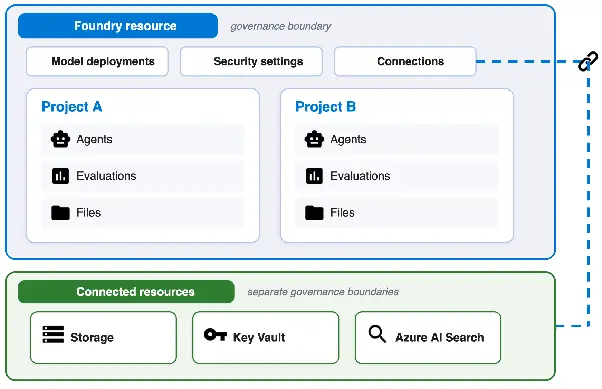
Source: Microsoft Learn
Within this top-level resource, model deployments, projects, security, networking, and connections are configured. You can also connect the resource to other Azure services, such as Azure Storage and Azure Key Vault.
What are the key components in the Azure AI Foundry hierarchy?
Here’s a table that explains the key components in a bit more detail.
| Component | What it does |
|---|---|
| Foundry resource | The top-level Azure resource in the Foundry hierarchy. This is the resource within whose boundary you manage the network, model deployments, and security, among other things |
| Projects | Development and isolation boundary for any given project. It gives you a unique endpoint for the project with your own RBAC controls and assets |
| Project assets | Agent definitions, files, evaluations, and any other related artifacts scoped to the project and needed by other assets in it |
| Connected resources | Connections to other resources are configured here. These connections can be scoped to the whole resource or to an individual project |
Model deployments are not a tier in this hierarchy. A deployment is what makes a model callable from another application, and it sits on the Foundry resource alongside projects rather than beneath them. It is where you configure the model’s residency and availability.
When talking about agents, think of the resource model as the place where:
- The agent is defined and run
- A model is called
- Agent conversations are stored
- Tools and secrets are stored
With that in mind, let’s take a look at how to build agents in Azure AI Foundry.
What is an agent in Azure AI Foundry? Understanding the basics
Before starting to build Azure AI Foundry agents, let’s understand what agents comprise. Agents contain access to a model from the model catalog, instructions of use, and tools.
Source: Microsoft Learn
There are two types of agents in Azure AI Foundry:
-
Prompt agent: Prompt agent is a fully managed agent run by Foundry with no code or compute for you to manage.
-
Hosted agent: Hosted agent is where you bring your own code packaged as a container. This agent type is exposed using a managed endpoint.
As prompt agents don’t need you to bring code, they don’t have agent definition frameworks. On the other hand, for hosted agents, you can bring your own framework, such as Microsoft Agent Framework, LangGraph, and Anthropic Agent SDK, especially once you’re coordinating multi-agent systems rather than a single agent working alone.
An agent has the following three components:
-
A model powered by the Foundry model catalog: This model is made callable by a deployment. You can also configure model routing per prompt based on the task you want it to accomplish.
-
Instructions: The instructions are authored, stored, and versioned in the Agent Service. For hosted agents, there exists an automatic improvement of instructions with the agent optimizer.
-
Tools: Tools that the agent can use at runtime are powered by Foundry Tools. These tools can be built-in tools, MCP tools, OpenAPI tools, or even knowledge tools from Foundry IQ.
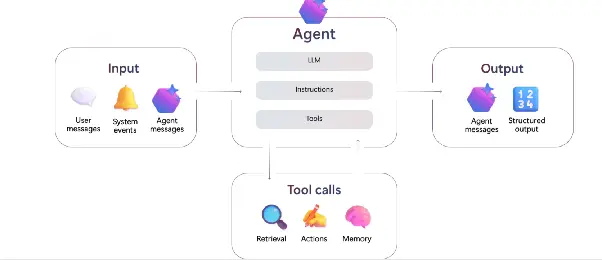
Source: Microsoft Learn
The CIO's Guide to Context Graphs
See how a context graph turns scattered enterprise metadata into something agents like Foundry's can actually reason over.
Get the CIO GuideHow do you ground Azure AI Foundry agents in enterprise knowledge?
The accuracy and efficiency of agents highly depends on the knowledge they can access. In an enterprise, there are often hundreds of systems of record, documentation tools, code repositories, communication tools, and external integrations.
What’s required is a framework and tools that support the grounding of agents in enterprise knowledge. Azure AI Foundry has the following features built in for this purpose:
-
Foundry IQ: Foundry IQ knowledge bases support the RAG agentic pattern, the same combining knowledge graphs with LLMs approach many enterprises use, that allows you to search and use knowledge for reference and citation purposes from sources like OneLake, SharePoint, and the internet. Agents and external tools reach a knowledge base through its MCP endpoint.
-
Tool catalog: Tool catalog enables you to find knowledge tools, including vector-powered file search, connectors to Fabric services, and integration with other Azure cloud services that might have the knowledge or context relevant for the agent.
-
Managed memory: A feature that is currently in preview. You can have managed long-term, short-term, and procedural memory for agents to remember and recall context without scouring through external sources all the time.
The aforementioned features won’t cover every integration and knowledge or context source that you might want your agent to access. In such cases, Azure AI Foundry allows you to write custom tools that can be exposed via MCP.
This is how a lot of the relevant context comes to the agent. Let’s understand when and why these custom MCP servers come in handy.
How do Azure AI Foundry agents work with MCP servers?
One of the key questions when dealing with enterprise context is: why can’t you use Foundry-provided MCP?
Here’s why: all of your organization’s knowledge can’t realistically be stored, indexed, and retrieved directly via Foundry IQ. To get up-to-date information, you must go to the systems with business context, such as what a certain metric means, who owns any given dataset, or what business rules apply to a calculation.
In such cases, Foundry becomes the client and connects to remote or custom MCP servers.
Having this is necessary because context usually stops at the system boundary for any given system like Snowflake, Databricks, dbt, Power BI, or Tableau. While Foundry has a built-in MCP-based mechanism to reach native Microsoft services like SharePoint and Fabric, the same isn’t true for the external tools listed earlier.
But having separate MCP servers, one per system, stops being a very efficient and maintainable solution at an enterprise level really fast. That’s why you need an enterprise context layer that abstracts away the complexity of individual MCP integrations with every tool, while still getting the context an agent needs.
Essentially, what you need is a context layer that spans across the enterprise that your agent can speak to via MCP. However, rather than going to each underlying system individually, it just uses the context layer. This is precisely the problem that Atlan solves, and it’s a trend analysts have flagged too, see Gartner on context graphs for what’s pushing enterprises toward this kind of architecture.
| One MCP server per system (traditional) | One enterprise context layer (modern) | |
|---|---|---|
| Integration effort | A new MCP server for every system: Snowflake, Databricks, dbt, Power BI, Tableau, and so on | One MCP server fronts every connected system |
| Context boundary | Stops at each system’s boundary | Spans the enterprise, reachable by any Foundry agent |
| Maintenance | Grows with every new tool you add | Centralized; new sources connect once |
| What the Foundry agent sees | A fragmented, system-by-system view | A single MCP client relationship |
Context Maturity Assessment
Find out how ready your enterprise context actually is before you wire up another MCP server.
Take the AssessmentHow does Atlan give Azure AI Foundry agents an enterprise context layer?
Atlan is the Context Layer for AI. Powered by a Context Lakehouse architecture, Atlan creates an enterprise context layer that sits across all key enterprise systems, bringing context from everywhere along with enrichments such as lineage, policy context, and quality.
Rather than needing an MCP server per system, Atlan brings those systems in through pre-built connectors and serves their context through Atlan’s own MCP server, which, in turn, can be used by a Foundry agent acting as the client.
The Context Lakehouse rests on the following key constructs:
-
Enterprise Data Graph: The Enterprise Data Graph offers context from a wide variety of connectors with additional information regarding lineage, ownership, certification, and usage, functioning as the context graph beneath everything else Atlan does.
-
Active Ontology: Active Ontology is an organized semantic layer capturing glossary terms, domains, products, metrics, and relationships, in line with the Open Semantic Interchange standard. It sits on a different layer of the stack than a raw context graph, the same split covered in context graph vs. ontology and in ontology vs. semantic layer.
-
Context Engineering Studio: The Context Engineering Studio is an interface within Atlan built for context engineering that allows you to build Context Repos for agents, run evaluations on them, and have agents use them.
Using the context layer, you can offload the complexity of context gathering, accumulation, and organization to Atlan, and have your Foundry agents do the work they’re designed to do without worrying about how and from where they’ll get the context they need.
Real stories from real customers: MCP and context at enterprise scale
"Atlan captures Workday's shared language to be leveraged by AI via its MCP server. As part of Atlan's AI labs, we're co-building the semantic layer that AI needs."
Joe DosSantos, VP Enterprise Data & Analytics, Workday

"Atlan is much more than a catalog of catalogs. It's more of a context operating system…Atlan enabled us to easily activate metadata for everything from discovery in the marketplace to AI governance to data quality to an MCP server delivering context to AI models."
Sridher Arumugham, Chief Data & Analytics Officer, DigiKey

Atlan in Action: Live Context Layer Demos
Watch how Atlan's context layer feeds a working AI agent, end to end, the same way it does for Workday and DigiKey.
Watch the DemoMore on building agents in the Microsoft stack
- How to build an agent with Azure AI Foundry, prompt agents and hosted agents side by side.
- Azure AI Foundry agent blueprints: credentials, scopes and sponsors for a class of agents.
- Azure AI Foundry vs. Google Vertex AI.
- Microsoft Agent Framework, the SDK that merged Semantic Kernel and AutoGen, and Semantic Kernel itself.
- Microsoft Copilot Studio agents, for low-code builds priced in Copilot Credits.
- Fabric IQ vs. Work IQ vs. Foundry IQ and Purview’s controls for AI agents.
The data side of the same estate is covered in the Microsoft Fabric guide and Microsoft data governance tools.
Moving forward with Azure AI Foundry
Azure AI Foundry is Microsoft’s platform for building agents with specific models, runtimes, and knowledge bases, and running them on Azure, backed by MCP servers, Foundry IQ, and the rest of the Foundry ecosystem. Its resource hierarchy, model and tool catalogs, and Foundry IQ knowledge bases give a Foundry agent everything it needs to reason well inside the Microsoft estate, from picking the right model to citing the right document.
For an agent to act efficiently and accurately, having access to relevant context for the task at hand matters as much as the model behind it. Getting that context is exactly what an enterprise context layer does. The same question of who owns and maintains that context inside an enterprise, covered in who should own the context layer, applies just as much to a Foundry deployment as to any other agent platform, and it only gets harder to answer as more teams stand up their own agents on their own slice of the estate.
Atlan builds that layer on a Context Lakehouse, giving agentic platforms like Azure AI Foundry an enterprise-wide context layer they can readily use, with Foundry as the client talking to Atlan’s MCP server. That single relationship replaces the alternative: a separate integration for every system a Foundry agent might eventually need to reach, maintained by whoever built it, updated whenever that system changes.
With Atlan, you can avoid having to integrate separately with hundreds of different MCP servers, and every Foundry agent, prompt or hosted, draws on the same governed context instead of whatever a given team happened to wire up. Book a demo to know more.
FAQs about Azure AI Foundry
1. What is Azure AI Foundry and is it the same as Microsoft Foundry?
Azure AI Foundry is an enterprise platform where you can build, run, and govern production-grade agentic applications and workflows. Azure AI Foundry was rebranded as Microsoft Foundry in November 2025.
2. Does Azure AI Foundry support MCP?
Yes, Foundry’s Agent Service allows you to connect to remote MCP servers. The Agent Service runtime accepts remote MCP server endpoints only, so a local MCP server has to be self-hosted on Azure Container Apps or Azure Functions first. Foundry also works the other way, exposing a curated tool set through Toolbox as one managed MCP-compatible endpoint.
3. Is Foundry the MCP client or the MCP server?
Foundry can act both as the client and the server with respect to MCP. When an agent interacts with a remote MCP server, the Agent Service runtime takes the form of a client.
4. Which models are available in Azure AI Foundry?
Azure AI Foundry lists more than 10,000 models available from top model providers like Microsoft, Azure OpenAI, Anthropic, Cohere, DeepSeek, Mistral, Meta, Hugging Face, and NVIDIA, among others. Microsoft says roughly 50 new models are published each month.
5. How can Foundry agents use the Atlan MCP server?
To use Atlan’s MCP server with Foundry agents, add it as a remote MCP tool. Once the connection is made, all the context in Atlan that is sourced from hundreds of different places across the organization will be available to the agent.
6. What is the Foundry control plane used for?
The Foundry control plane is where you operate and govern your entire Azure agent fleet from a single interface. It centralizes compliance, inventory, observability, and security, letting you monitor, govern, and optimize every agent, model, and deployment within your subscription. Every agent created in Foundry is issued a Microsoft Entra Agent ID at build time to trace ownership and access across its lifecycle. You can create and assign guardrail policies, with integrations into Azure Policy, Defender, and Microsoft Purview. You can also set token-based rate limits for model deployments and track cost trends.
Sources
- What is Microsoft Foundry? Microsoft Learn. https://learn.microsoft.com/en-us/azure/foundry/what-is-foundry
- Microsoft Foundry architecture. Microsoft Learn. https://learn.microsoft.com/en-us/azure/foundry/concepts/architecture
- Microsoft Foundry Models overview. Microsoft Learn. https://learn.microsoft.com/en-us/azure/foundry/concepts/foundry-models-overview
- What is Microsoft Foundry Agent Service? Microsoft Learn. https://learn.microsoft.com/en-us/azure/foundry/agents/overview
- Choose how to build with Microsoft Foundry. Microsoft Learn. https://learn.microsoft.com/en-us/azure/foundry/concepts/choose-build-approach
- What are hosted agents? Microsoft Learn. https://learn.microsoft.com/en-us/azure/foundry/agents/concepts/hosted-agents
- Model router for Microsoft Foundry. Microsoft Learn. https://learn.microsoft.com/en-us/azure/foundry/openai/concepts/model-router
- Types of tools in Foundry Agent Service. Microsoft Learn. https://learn.microsoft.com/en-us/azure/foundry/agents/concepts/tool-catalog
- What is Foundry IQ? Microsoft Learn. https://learn.microsoft.com/en-us/azure/foundry/agents/concepts/what-is-foundry-iq
- Connect a Foundry IQ knowledge base to Foundry Agent Service. Microsoft Learn. https://learn.microsoft.com/en-us/azure/foundry/agents/how-to/foundry-iq-connect
