

Databricks AI/BI Genie turns natural-language questions into SQL, but only when it can see the right context. Genie Agents (renamed from Genie Spaces in July 2026) draw on two structured layers inside Databricks: Unity Catalog metadata and a space-level knowledge store, plus dedicated compute and permissions to run the queries that result. This guide breaks down exactly what Genie needs to work, where its context stops, and what closing that gap requires for enterprises running more than a Databricks lakehouse.

Databricks Genie context requirements: quick facts
Databricks AI/BI Genie requires two layers of structured context to translate natural language into accurate SQL: Unity Catalog metadata and a space-level knowledge store, backed by dedicated compute and end-user permissions on every registered object. Unity Catalog supplies the foundational layer, whereas the knowledge store fills what Unity Catalog wasn’t designed to capture. Context from outside the Databricks boundary, including BI tools, orchestration engines, and transformation layers, needs an external unified context layer for AI like Atlan to reach Genie.
| Databricks Genie Context Requirements: Quick Facts | |
|---|---|
| Core context layers | Unity Catalog metadata (foundational) + space-level knowledge store (enrichment) |
| Compute | Pro or Serverless SQL warehouse assigned per Genie Agent (formerly Genie Space, renamed July 2026) |
| Table limit | Up to 30 tables/views per agent (5 recommended for optimal results) |
| Rate limits | 20 questions/minute per workspace (UI); 5 questions/minute (API free tier) |
| Conversation limit | Up to 10,000 conversations per agent, 10,000 messages per conversation |
| Context boundary | Genie can’t see BI tools, orchestration engines, or pipelines outside Databricks |
Is your data estate AI-agent ready? Assess Your Readiness
Build your AI context stack
Get the blueprint for implementing context graphs across your enterprise. This guide walks through the four-layer architecture, from metadata foundation to agent orchestration, with practical implementation steps for 2026.
Get the Stack GuideDatabricks Genie: An overview of context availability
Databricks AI/BI Genie is a compound AI system and conversational analytics tool that uses LLMs to let users interact with data in natural language rather than SQL. It’s fully integrated into the Databricks ecosystem and removes barriers for analysts, BI users, and general business users working with data.
Genie works on context, both structured and unstructured. Structured metadata is available in Unity Catalog, the technical foundation Databricks built its governance model around. But Genie needs more instructions and knowledge to translate natural-language questions into meaningful SQL that returns the right data. That gap is exactly where the context layer for AI agents conversation starts, and why enterprises increasingly treat context, not the model, as the constraint on agent accuracy.
How does AI/BI Genie use Unity Catalog metadata?
For AI/BI Genie to work, a workspace needs a Genie Agent. Every Genie Agent connects to Unity Catalog, which it reads to retrieve metadata for tables, views, materialized views, and more. This metadata primarily contains:
-
Table and column descriptions: The first point of information for natural language to SQL translation, since it helps the LLM understand table and column meaning.
-
Data types, primary and foreign keys: Genie uses data types for accurate joins, and keys to understand constraints and relationships between tables.
-
Data profile: Structure alone isn’t always enough to understand the shape and behavior of data. Genie looks at the actual data for more context, and that’s where data profiling helps.
-
Existing queries: Query history and saved queries, especially with comments, help Genie validate which patterns will work.
Genie only works with structured metadata. PDFs and other unstructured content require Chat in Genie, which connects to sources like Google Drive or SharePoint. On top of Unity Catalog metadata, teams can also set up Genie-agent-level metadata in knowledge stores, covered next. Databricks’ own live context engine for the wider Genie family, Genie Ontology, builds on this same Unity Catalog foundation to rank the most authoritative definitions across the lakehouse.
How do you set up context with the Genie Agent knowledge store?
Unity Catalog isn’t designed to capture a lot of business and operational enrichment, so Databricks added the knowledge store feature to Genie Agents, where teams can capture agent-level context in various shapes and forms. Some of the context that can be captured includes:
-
Agent-level table and column descriptions: Without touching the canonical metadata from Unity Catalog, teams can overlay their own commentary and descriptions, which remain limited to that agent’s audience.
-
Synonyms and SQL expressions: Business terms often mean different things across teams. Teams can create synonyms for tables and columns, and define SQL expressions as reusable measures, filters, and dimensions, the same job a semantic layer does at the BI-tool level.
-
Prompt matching: Teams provide reference data with a translation layer, helping Genie map messy inputs, typos, and shorthand to the real field value used in a SQL query.
-
Join relationships: If foreign key relationships aren’t defined, even if they aren’t enforced, the knowledge store can define them based on the query and join patterns observed at different levels of granularity.
There are generous limits on all of these features at the agent level. Anything added to the space becomes part of the context when Genie gets to work.
The best way to use the knowledge store is to keep it high-signal and low-noise, so it doesn’t unnecessarily occupy the context window or inflate token costs. That discipline matters more as Context Agents increasingly take over the job of writing descriptions at scale, rather than leaving it to whoever happens to configure a given agent. Next, the infrastructure Genie needs to run.
What are Databricks Genie’s infrastructure requirements?
Genie Agents need their own compute to run. Teams choose either Pro or Serverless SQL warehouses, and the author configuring the agent needs at least CAN USE on the selected warehouse. Agents run with the author’s credentials.
Despite that, end users need SELECT on every object registered in Unity Catalog, plus CAN VIEW or CAN RUN on the agent. Teams also need the Databricks SQL workspace entitlement, and partner-powered AI features must be enabled at the account level by an admin, alongside the governance controls the Unity AI Gateway applies to every agent’s runtime behavior.
The author’s embedded compute credentials run the queries, but each user’s own permissions still apply, so users only see data they’re allowed to see, and restricted-data questions return an empty result.
Teams can also export an agent’s semantic context as a metric view to reuse elsewhere, overlapping with what Unity Catalog Metrics standardizes platform-wide. That’s the infrastructure required, but Genie also carries usage limits. Teams can:
- Have up to 30 tables or views per agent.
- Ask up to 20 questions per minute per workspace through the UI.
- Ask five questions per minute on the Genie API free tier.
- Let every agent hold up to 10,000 conversations, each with up to 10,000 messages.
With Unity Catalog and Genie’s knowledge store powered by this infrastructure, teams have a solid amount of context for business questions inside Databricks.
Genie, Agent Bricks, and the wider Databricks AI stack
Genie doesn’t sit alone. Databricks announced a broader Genie family and supporting infrastructure at Data + AI Summit 2026, and understanding where each piece fits clarifies what “Genie context” spans. Databricks Genie One is the business-facing agentic coworker built on the same context foundation described here, while Agent Bricks is Databricks’ platform for building and evaluating custom agents on that context. Both draw on the same Unity Catalog and knowledge-store pattern this page covers, for different audiences, and both were part of a wider set of Data + AI Summit 2026 announcements that made context the headline theme of the event.
Teams standing up a Genie Agent for the first time often ask how to bring existing context into the space rather than re-entering it by hand. The practical path is covered in how to add Atlan context to a Databricks Genie space, which walks through merging what’s already captured with what Genie expects natively.
Unity Catalog alone vs. an enterprise context layer for Genie
Atlan brings all the context from an organization into a unified, well-organized Context Lakehouse to power the enterprise context layer. The comparison below shows what changes once Unity Catalog is paired with a cross-stack context layer instead of running alone.
Unity Catalog alone vs. Unity Catalog with an enterprise context layer
| Aspect | Unity Catalog Alone | Unity Catalog + Atlan Context Layer |
|---|---|---|
| Metadata scope | Databricks-only | Cross-stack: BI tools, orchestration, pipelines |
| Business context | Manual knowledge-store entries, per agent | Centralized, reusable Active Ontology across agents |
| Lineage | Within Databricks | Cross-system lineage across the full estate |
| Governance | Per-agent enrichments | Unified policy and certification across every tool |
| Maintenance | Re-entered separately for each Genie Agent | Maintained once, served everywhere via MCP |
However, context stops at the Databricks boundary because most business context lives elsewhere in the data stack, in orchestration engines, transformation tools, and BI tools. This is where the need for a unified context layer comes into the picture, and why the core components of a context layer matter as much as any single connector.
Get the CIO Guide to Context Graphs
See how enterprise and AI leaders are building a portable context graph across every cloud and platform, including Databricks, and what it takes to keep that graph open, governed, and query-ready for any agent.
Get the Context Graph GuideHow does Atlan’s enterprise context layer empower Databricks Genie?
The approach is to unify structural metadata, lineage, quality, policy context, business definitions, and every other kind of semantics into a single layer. This works with Unity Catalog, along with catalogs from other tools in the stack, organizing context across enterprise graphs and storing it in a Context Lakehouse, the unified context layer approach a growing share of enterprises are standardizing on.
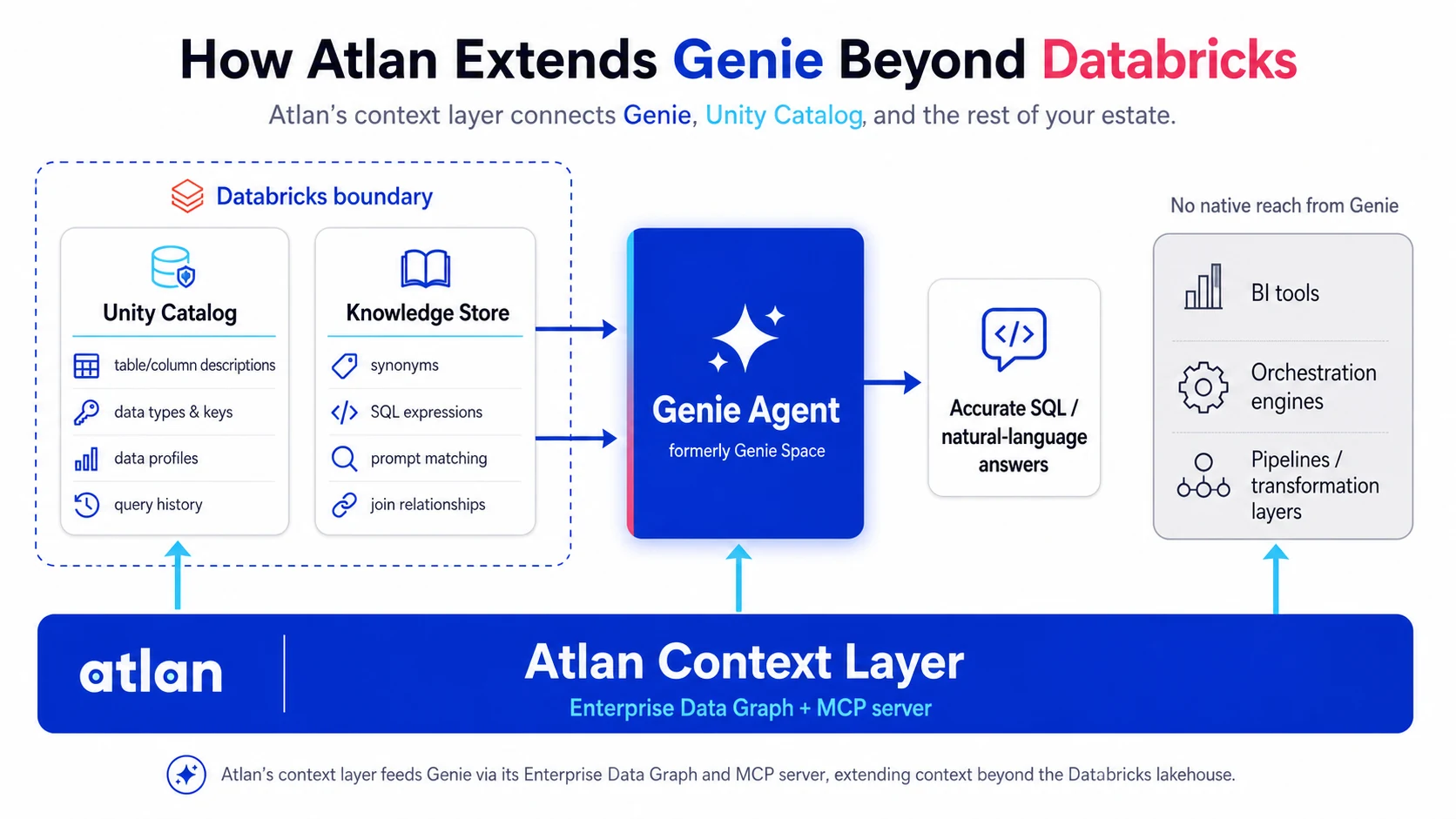
The integration with Databricks runs on API and MCP. Once in place, Genie can draw on metadata from other tools in the data stack through:
-
Enterprise Data Graph: Accumulated metadata from a wide variety of connectors with lineage, ownership, certification, and usage, layered on top of technical metadata.
-
Active Ontology: An organized semantic layer capturing glossary terms, domains, products, metrics, and relationships, aligned with the Open Semantic Interchange initiative, co-designed alongside Snowflake, dbt Labs, and Salesforce.
-
Context Engineering Studio: An interface for building Context Repos for specific agents, running evaluations on them, and having agents use them.
-
MCP Server: All of this context reaches Genie and other MCP clients via a single MCP server, and why MCP matters for AI agents is exactly this: one governed delivery point instead of one-off integrations per agent.
The strategic partnership with Databricks enables bi-directional sync with Unity Catalog, and covers launch partnership for Databricks Managed Iceberg.
Where an enterprise context layer fits beyond Unity Catalog
The distinction between what Unity Catalog does and what a full context layer for AI agents does matters here. A data catalog vs. context layer comparison makes the point directly: a catalog indexes assets, while a context layer adds meaning, lineage, and delivery on top. The same logic applies to ontology vs. semantic layer questions that surface once teams compare Genie’s knowledge store to a governed semantic layer or an active ontology: a knowledge store is agent-scoped, an ontology is estate-wide.
The reach question shows up again in how definitions travel between systems. A context graph vs. knowledge graph sits underneath both, connecting metrics, tables, and business terms into a structure any agent, not just Genie, can traverse. Enterprises running Snowflake alongside Databricks face the same problem; Snowflake Horizon Context and the Atlan context layer shows the identical better-together pattern for that platform, and it’s why AI agents need an enterprise context layer in the first place: no single vendor’s native tooling covers a multi-platform estate.
None of this is theoretical for teams already running Genie in production. The step-by-step version of how to implement an enterprise context layer for AI walks through the sequencing: connect the estate, build the graph, generate certified definitions, then serve them back to every agent, Genie included, through MCP.
Real stories from real customers: Building enterprise context layers for Databricks Genie
How Workday is building an AI-ready semantic layer
"Atlan captures Workday's shared language to be leveraged by AI via its MCP server. As part of Atlan's AI labs, we're co-building the semantic layer that AI needs."
Joe DosSantos, VP Enterprise Data & Analytics, Workday

How DigiKey built a unified, sovereign context layer for its data and AI estate
"Atlan is our context operating system to cover every type of context in every system, including our operational systems. For the first time we have a single source of truth for context."
Sridher Arumugham, Chief Data & Analytics Officer, DigiKey

See this built at enterprise scale
Workday and DigiKey run this context layer across estates bigger than a single Databricks lakehouse, kept current without manual re-entry per space.
Download the EbookMoving forward with Databricks Genie context requirements
AI/BI Genie boosts productivity for teams working with data in Databricks. It uses Unity Catalog’s metadata, lets teams extend it with space-level enrichments in a knowledge store, needs its own compute to run, and carries usage limits per agent.
Genie doesn’t have all the context it needs to function effectively on its own. Context outside Databricks lives in individual tools across the stack. To support Genie, an enterprise needs a unified context layer for enterprise AI that integrates context from across the stack into a single Context Lakehouse that Genie and other products can draw on directly.
Learn how Atlan unifies this context into a single layer.
FAQs about Databricks Genie context requirements
1. What does Genie need to function properly?
Genie needs structured metadata of tables, views, materialized views, and other objects. It can’t query unstructured data directly. For unstructured data stored in file systems, such as Google Drive and SharePoint, Chat in Genie handles retrieval separately.
2. What is the Genie Agent knowledge store?
Every Genie Agent has a knowledge store, populated with descriptions, prompts, join relationships, and SQL expressions. These enrichments are agent-level: they read metadata from Unity Catalog but don’t write back to it.
3. How many tables can a Genie Agent support?
Databricks recommends up to five tables for optimal results. If more are needed, it’s best to wrap, aggregate, or join tables before adding them to the agent. The official limit is up to 30 tables or views.
4. How does Atlan extend Databricks Genie’s context?
Atlan goes beyond Databricks’ context boundary, working with every tool in the stack to unify metadata, lineage, policies, and business metric definitions. These capabilities are powered by Atlan’s Context Lakehouse, the open, Iceberg-native foundation beneath the Enterprise Data Graph, Context Agents, and Context Engineering Studio.
5. Is Genie limited to tables added to a Genie Agent?
No, Genie isn’t limited to tables explicitly added to the agent. If a prompt references external tables not yet added, it can still refer to them, because Unity Catalog controls access directly.
Sources
- Set up a Genie Agent, Databricks Documentation. https://docs.databricks.com/aws/en/genie/set-up
- Genie Agent knowledge store, Databricks Documentation. https://docs.databricks.com/aws/en/genie/knowledge-store
- Chat in Genie, Databricks Documentation. https://docs.databricks.com/aws/en/genie-ui/genie-chat
- SQL warehouse types, Databricks Documentation. https://docs.databricks.com/aws/en/compute/sql-warehouse/warehouse-types
- Create a metric view, Databricks Documentation. https://docs.databricks.com/aws/en/metric-views/create/
