



























How does Microsoft Fabric’s architecture unify data workloads?
Permalink to “How does Microsoft Fabric’s architecture unify data workloads?”Microsoft Fabric’s architecture centers on OneLake, a unified data lake that serves as the foundation for all analytics workloads. Unlike traditional approaches where each tool maintains separate data copies, OneLake provides a single storage layer that all Fabric experiences access directly. This architecture reduces data movement, eliminates duplicate storage costs, and ensures consistency across analytics pipelines.
The platform organizes around three structural elements: tenants, capacities, and workspaces. A tenant represents your organization’s Fabric environment linked to your domain. Capacities are compute resource pools measured in Capacity Units (CUs) that power all Fabric operations. Workspaces function as collaborative environments where teams create and manage data assets, similar to project folders that multiple users can access.
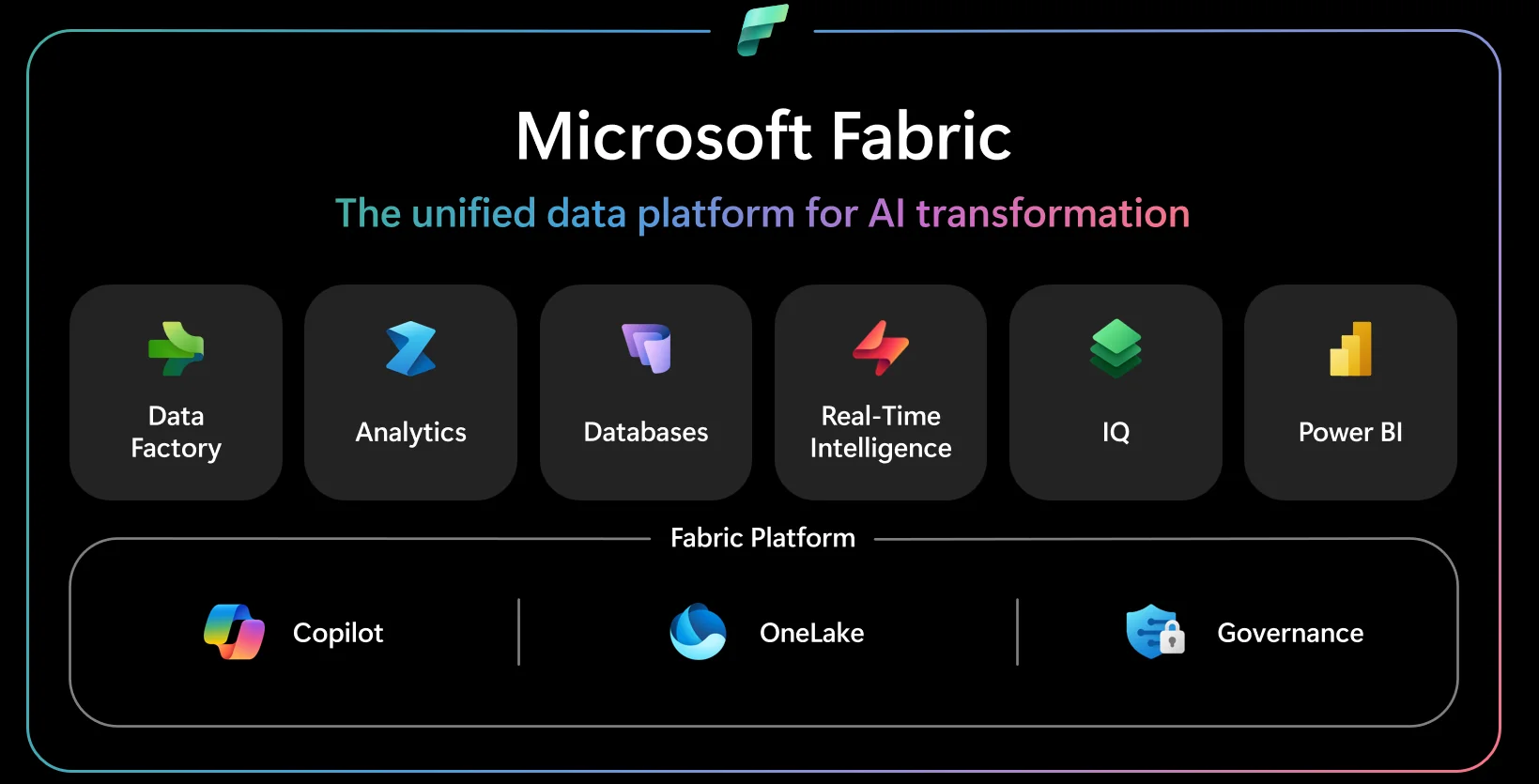
Microsoft Fabric documentation - Source: Microsoft Fabric
1. OneLake as the centralized data foundation
Permalink to “1. OneLake as the centralized data foundation”OneLake stores all data in Delta Lake format, an open-source table format that provides ACID transactions and time travel capabilities. This open architecture means any tool that reads Delta format can access Fabric data, preventing vendor lock-in. Organizations can create shortcuts to existing data in Azure Data Lake Storage Gen2 or Amazon S3, allowing Fabric to read external data without physically moving it into OneLake.
Modern metadata platforms like Atlan integrate with OneLake to provide automated discovery, lineage tracking, and governance for Fabric assets stored in the lakehouse architecture.
2. Unified compute through capacity-based licensing
Permalink to “2. Unified compute through capacity-based licensing”Fabric uses a capacity-based pricing model where organizations purchase pools of Capacity Units rather than licensing individual tools. A single capacity pool powers data integration pipelines, Spark transformations, SQL warehouses, and Power BI reports simultaneously. When one workload finishes, those compute resources become immediately available for other tasks without manual reallocation.
This shared compute model differs fundamentally from traditional analytics stacks where separate tools each require dedicated infrastructure. Organizations running Fabric report 25% productivity improvements for data engineering teams because engineers spend less time managing infrastructure and more time building data products.
3. Integrated experiences for different personas
Permalink to “3. Integrated experiences for different personas”Fabric provides seven integrated experiences tailored to different data roles:
- Data Factory: Handles ingestion and orchestration workflows
- Synapse Data Warehouse: Offers SQL-based analytics with T-SQL support
- Synapse Data Engineering: Provides Spark notebooks and pipeline development
- Synapse Data Science: Enables machine learning model training and deployment
- Real-Time Intelligence: Processes streaming data with KQL queries
- Power BI: Delivers reporting and interactive visualization
- Data Activator: Monitors data and triggers automated actions
Each experience accesses the same OneLake data foundation, which means data engineers, analysts, and scientists work with consistent datasets without complex handoffs. Atlan’s integration with Microsoft Fabric automates metadata documentation as schemas evolve, applies governance tags based on data patterns, and promotes heavily used datasets to certified data products.
What are the key benefits of Microsoft Fabric?
Permalink to “What are the key benefits of Microsoft Fabric?”Microsoft Fabric addresses fundamental challenges in enterprise analytics by consolidating fragmented tool stacks into a unified platform. Organizations struggle with data scattered across separate integration tools, warehouses, lakes, and BI platforms, each requiring specialized skills and creating brittle handoffs. Fabric eliminates this complexity through architectural integration rather than point-to-point connectors.
The platform’s benefits emerge from its unified architecture. Teams experience faster analytics cycles because data doesn’t require movement between systems. Governance becomes simpler because policies apply consistently across all workloads. Costs decrease because organizations pay for one capacity pool instead of multiple tool licenses. According to Forrester’s Total Economic Impact study, enterprises using Fabric achieved 379% ROI over three years.
1. Reduced infrastructure complexity and costs
Permalink to “1. Reduced infrastructure complexity and costs”Traditional analytics architectures require separate platforms for ingestion, transformation, warehousing, and visualization. Each platform needs configuration, monitoring, and maintenance. Integration between platforms creates failure points where schema changes or permission updates break downstream processes. Organizations spend significant engineering time just keeping data flowing.
Fabric’s unified architecture reduces this operational overhead:
- Single platform handles entire analytics workflow from ingestion through visualization
- Microsoft Finance reported 60% faster time to insights and 50% reduction in data generation costs
- Governance becomes embedded in workflows rather than requiring separate governance tools
- Infrastructure savings of $779,000 over three years from consolidating analytics tools
2. Real-time analytics capabilities at enterprise scale
Permalink to “2. Real-time analytics capabilities at enterprise scale”Fabric’s Real-Time Intelligence experience enables organizations to analyze streaming data as it arrives. The platform ingests events from IoT devices, application logs, and transactional systems, then makes this data immediately queryable through KQL (Kusto Query Language). Unlike batch-oriented architectures that process data hourly or daily, Fabric processes streams continuously.
Enterprises use this capability for operational analytics and immediate decision-making:
- Retail organizations analyze point-of-sale transactions in real-time to adjust inventory levels
- Manufacturing companies monitor production line telemetry to detect equipment failures before they occur
- Financial services firms identify fraudulent transactions within seconds of occurrence
- Healthcare providers track patient vitals and alert clinical teams to critical changes
3. AI-powered automation with Copilot
Permalink to “3. AI-powered automation with Copilot”Copilot for Fabric integrates Azure OpenAI Service throughout the platform, enabling natural language interaction with data. Users describe desired insights in plain English, and Copilot generates appropriate queries, transformations, or visualizations. This reduces the technical barrier for business users who need data insights but lack SQL or Python expertise.
Data engineers use Copilot to accelerate pipeline development by describing transformation logic verbally. Analysts use it to summarize report insights or generate narrative explanations of trends. According to Microsoft, organizations using Copilot features report 90% reduction in time spent searching for data and fixing pipeline issues.
How does Microsoft Fabric pricing and licensing work?
Permalink to “How does Microsoft Fabric pricing and licensing work?”Microsoft Fabric uses capacity-based pricing measured in Capacity Units (CUs). Organizations purchase a capacity SKU that provides a pool of compute resources shared across all Fabric workloads. This model replaces per-user licensing for most scenarios, though Power BI Pro licenses remain required for certain use cases depending on capacity size.
Capacity Units bundle CPU, memory, disk I/O, and network bandwidth into a single metric. Fabric offers SKUs ranging from F2 (2 CUs) to F2048 (2048 CUs), with each tier doubling the previous one’s capacity. Pricing starts at approximately $0.18 per CU per hour for pay-as-you-go capacity, though rates vary by region.
Pay-as-you-go versus reserved capacity
Permalink to “Pay-as-you-go versus reserved capacity”Organizations choose between two consumption models:
- Pay-as-you-go pricing: Bills hourly based on capacity usage with ability to pause when not needed. Suits development environments or variable workloads.
- Reserved capacity: Requires one or three-year commitment but provides approximately 41% savings compared to pay-as-you-go rates. Best for consistent production workloads.
Production deployments typically benefit from reserved capacity when usage remains consistent. Organizations often combine both models, using reserved capacity for baseline workloads and pay-as-you-go for seasonal peaks.
Storage and Power BI licensing considerations
Permalink to “Storage and Power BI licensing considerations”OneLake storage is billed separately from compute capacity at approximately $0.023 per GB per month. Storage costs accumulate as data volume grows, making planning essential for large-scale implementations.
Power BI licensing intersects with Fabric capacity in specific ways. Capacities below F64 require individual Power BI Pro licenses (approximately $10 per user monthly) for content creators and consumers. Organizations with F64 or larger capacities eliminate the need for per-user Pro licenses for report consumers. This threshold makes F64 the practical minimum for production deployments serving many users.
How do modern platforms enhance Fabric governance?
Permalink to “How do modern platforms enhance Fabric governance?”Microsoft Fabric includes built-in governance through Microsoft Purview integration, but organizations often need additional capabilities for complete metadata management and automated governance workflows. Modern data governance platforms integrate with Fabric to provide deeper visibility, automated policy enforcement, and collaborative data discovery across the analytics estate.
1. Automated metadata capture and end-to-end lineage
Permalink to “1. Automated metadata capture and end-to-end lineage”Challenge: Manual documentation can’t keep pace with rapid schema changes and pipeline development.
Solution: Modern platforms automatically discover and catalog Fabric assets:
- Workspaces, lakehouses, warehouses, pipelines, Power BI reports captured without manual input
- Technical metadata, usage patterns, quality metrics updated in real-time as teams create tables or modify schemas
- Lineage tracking extends from source systems through Fabric transformations to Power BI reports
- Column-level lineage shows exactly how data flows and transforms at each stage
Impact: Reduces time spent investigating data quality issues from hours to minutes.
2. Embedded governance in daily workflows
Permalink to “2. Embedded governance in daily workflows”Challenge: Separate governance tools create friction and reduce adoption.
Solution: Controls embed directly in applications data teams already use:
- Governance metadata, ownership information, quality scores appear alongside technical details in Fabric
- Classification tags and access policies apply automatically based on data being processed
- Browser extensions surface governance context within Power BI, Fabric notebooks, and other data tools
- Engineers see data sensitivity labels and usage policies as they write transformations
Impact: Prevents compliance issues before they occur by making governance invisible to users.
3. AI-powered discovery and quality monitoring
Permalink to “3. AI-powered discovery and quality monitoring”Challenge: Business users struggle to find datasets using technical table names.
Solution: AI accelerates data discovery and quality management:
| Capability | How It Works | Business Value |
|---|---|---|
| Natural language search | Users find datasets using plain English terms like “customer revenue” | Non-technical users access data independently |
| Semantic understanding | Platform maps business terms to technical tables across multiple systems | Reduces support tickets to data teams |
| Automated quality monitoring | Detects anomalies, schema changes, freshness issues across Fabric datasets | Proactive alerts before users encounter issues |
| Impact analysis | Shows which reports and dashboards break when schemas change | Prevents downstream failures during development |
Impact: Organizations report 53% reduction in time spent on data quality troubleshooting when using automated governance platforms.
Moving forward with Microsoft Fabric
Permalink to “Moving forward with Microsoft Fabric”Planning your Fabric implementation:
- Start with assessment: Evaluate current analytics architecture to identify which workloads consolidate onto Fabric first
- Begin incrementally: Start with Power BI and data integration before migrating complex data science workflows
- Size capacity appropriately: Under-provisioned SKUs create bottlenecks; over-provisioned capacity wastes budget
- Plan for F64 minimum: Production implementations typically need F64 or larger to eliminate per-user Power BI licensing
Governance scales with usage:
- Fabric provides foundational security and compliance controls
- Additional metadata management becomes crucial as data volumes grow and more teams adopt the platform
- Modern governance platforms provide complete lineage, automated quality monitoring, and embedded governance
Integration enables flexibility:
- Open architecture prevents vendor lock-in through Delta Lake format and extensive connectors
- Shortcuts allow reading external data without physical movement
- Incremental adoption supports proof-of-concept implementations that don’t disrupt production systems
Success with Fabric requires planning beyond technology selection. Organizations that invest in proper capacity planning, governance automation, and team enablement achieve faster time-to-value and higher ROI from their unified analytics platform.
Atlan automates governance for Microsoft Fabric deployments and accelerates time-to-value for enterprise analytics.
Let’s help you build it → Book a demo
FAQs about Microsoft Fabric
Permalink to “FAQs about Microsoft Fabric”1. Is Microsoft Fabric a replacement for Azure Synapse Analytics?
Permalink to “1. Is Microsoft Fabric a replacement for Azure Synapse Analytics?”Microsoft positions Fabric as the evolution of Azure Synapse, not an immediate replacement. Synapse remains fully supported for existing customers, but Microsoft focuses new feature development on Fabric. Organizations currently using Synapse dedicated SQL pools should evaluate migration based on their specific requirements, though Microsoft provides migration tools and guidance. Fabric offers 50-90% faster query processing than Synapse at similar price points according to independent ESG validation.
2. Does Microsoft Fabric work with non-Microsoft data sources?
Permalink to “2. Does Microsoft Fabric work with non-Microsoft data sources?”Fabric supports extensive integration with external platforms through native connectors and API access. Organizations connect Fabric to Snowflake, Databricks, PostgreSQL, MySQL, MongoDB, Amazon S3, Google Cloud Storage, and hundreds of other sources. The platform recently achieved OneLake interoperability with Snowflake, allowing bidirectional access to Iceberg tables across both platforms. This open architecture prevents vendor lock-in and enables gradual migration strategies.
3. What happens to Power BI Premium capacity when migrating to Fabric?
Permalink to “3. What happens to Power BI Premium capacity when migrating to Fabric?”Power BI Premium P-SKUs retired in December 2024, requiring customers to migrate to Fabric F-SKUs. Microsoft provides equivalency mapping where P1 capacity equals F64, P2 equals F128, and so on. The migration preserves existing Power BI capabilities while adding access to Fabric’s broader analytics experiences. Organizations gain data engineering, data science, and real-time analytics capabilities without additional licensing beyond their Fabric capacity subscription.
4. How does Fabric pricing compare to maintaining separate analytics tools?
Permalink to “4. How does Fabric pricing compare to maintaining separate analytics tools?”Fabric typically reduces total cost of ownership for organizations managing multiple analytics platforms. A Forrester study found enterprises achieved $779,000 in infrastructure savings over three years by consolidating tools onto Fabric. However, Fabric may cost more for organizations with simple BI-only requirements or those heavily invested in alternative platforms like Databricks. Cost comparison requires analyzing specific workload patterns, data volumes, and existing tool investments.
5. Can organizations implement Fabric incrementally or must they migrate completely?
Permalink to “5. Can organizations implement Fabric incrementally or must they migrate completely?”Fabric supports incremental adoption through its open architecture and extensive connectors. Organizations typically start by consolidating Power BI reporting and data integration workloads, then gradually migrate data engineering and data science capabilities as teams build expertise. Shortcuts allow Fabric to read data from existing Azure Data Lake Storage or Amazon S3 without physically moving it, enabling proof-of-concept implementations that don’t disrupt production systems. Many enterprises run Fabric alongside existing platforms during multi-year modernization initiatives.
Share this article
