


Data teams toil not because they lack tools, but because they’re loaded with many.
Pipelines live in one system. Warehouses live in another. Dashboards refresh somewhere else. Handoffs often create delay and failure points. Over time, teams spend more effort keeping data flowing than actually using it.
Trust drops as data governance shrinks. And decision-making quality drops further. Microsoft responds to this problem with Microsoft Fabric.
Microsoft Fabric brings data ingestion, engineering, warehousing, real-time analytics, data science, and business intelligence into a single SaaS platform.
What are the top use cases of Microsoft Fabric?
Microsoft Fabric brings data pipelines, analytics, and dashboards into one SaaS platform. Fabric runs these workloads in one place and stores data in OneLake, a shared storage layer for Fabric.
OneLake is designed to reduce data movement and duplication. In many cases, teams can reuse the same data across workloads or connect to existing data using OneLake shortcuts instead of copying it. Teams still ingest or replicate data when needed, but Fabric’s model pushes toward fewer redundant copies.
Key applications of Microsoft Fabric:
- Data warehousing and lakehouse analytics: Store data in OneLake and access it across engines without moving it between systems in Fabric.
- Real-time intelligence and streaming: Ingest event streams and logs, analyze them with Real-Time Intelligence, and respond faster using event-driven workflows.
- Business intelligence and reporting: Build dashboards in Power BI that use the same OneLake data, with optional Copilot help for authoring and analysis tasks.
- Data science and machine learning: Use notebooks and Spark-based workflows inside Fabric to build and operationalize models.
- Data integration and ETL: Build pipelines and data prep flows in Fabric’s Data Factory experiences, including Power Query-based workflows.
- Data governance and compliance: Use Microsoft Purview integration for catalog, lineage, sensitivity labels, and auditing across Fabric assets, with some features varying by item type.
Why do enterprises need Microsoft Fabric?
Microsoft announced Fabric’s general availability for purchase on November 15, 2023, after launching it in public preview in May 2023. In May 2025, VentureBeat reported that Microsoft Fabric has more than 21,000 paying organizations, including 70% of the Fortune 500, citing Microsoft leadership.
Microsoft Fabric targets a real enterprise problem: tool sprawl across ingestion, storage, transformation, analytics, and BI. When teams chain many tools together, they often duplicate data and create fragile handoffs. Data moves from one system to another through connectors and schedules. If one step changes or fails, everything downstream breaks. Whether it’s a schema update or a permission change, small changes can pause the entire pipeline.
During troubleshooting, teams have to trace failure across multiple tools, logs, and owners, which impacts the downtime. This is where work shifts from analysis to maintenance, and engineers end up spending hours diagnosing the failure instead of improving dashboards or models. It eventually reduces users’ trust in data.
Microsoft Fabric brings everything into one environment. All workloads run on a shared data foundation known as OneLake. It reduces unnecessary complexity, making data easier to manage.
So why organizations choose Fabric
- Microsoft Fabric removes busywork from data teams. A 2024 Forrester Total Economic Impact study commissioned by Microsoft shows the impact clearly. Organizations using Microsoft Fabric achieved a 379% return on investment over three years. They improved data engineering productivity by 25% and saved $4.8 million by giving analysts easier access to data.
- Microsoft Fabric reduces the time engineers spend searching for data and fixing pipeline issues by up to 90%. Analysts and data scientists no longer wait for IT tickets or manual data movement. They work with trusted data as soon as they need it.
- Teams go even further with modern data catalogs, adding context and governance on top of Fabric. They help teams understand where data comes from, how it moves, who uses it, and when it is safe to trust.
Overall, Microsoft Fabric reduces tool sprawl without forcing users to stitch together five different Azure services.
Here’s some feedback from real users to help you make an informed choice:
| Things Users Care About | What They Say |
|---|---|
| Unified analytics platform | Reviewers like that Microsoft Fabric bundles data integration, lakehouse or warehouse, Spark engineering, and BI into a single platform rather than separate tools and consoles. (Source: G2) |
| Tight Power BI integration | Buyers choose Fabric when Power BI already anchors reporting. Reviews highlight faster paths from ingestion to dashboards and easier sharing of reliable Power BI dashboards, because the stack functions as a single system. (Source: TrustRadius) |
| Time to value | Users describe Fabric as convenient and simple for standard analytics workflows. Teams get to a working pipeline, model, and report quickly without building a custom analytics stack from scratch. (Source: Reddit) |
| Fit | Reviewers note Fabric makes less sense if you only need one capability, such as “just Spark” or “just pipelines.” Standalone Azure services may be a better fit in those cases. (Source: Reddit) |
| Platform maturity | Some teams flag weaker error reporting and challenges with multi-environment promotion compared to more mature analytics platforms. (Source: Reddit) |
5 Microsoft Fabric use cases for 2026
Now that logic is well aligned, let’s explore the use cases that make your transition truly rewarding and trustworthy.
1. Data warehousing and lakehouse analytics
Modern analytics teams don’t want to duplicate data or manage a parallel system. Microsoft Fabric seems like a more sensible choice for warehousing and lakehouse workloads.
Fabric uses OneLake as a unified storage layer across all analytics experiences. Data in OneLake is stored in open Delta Lake format, which allows multiple engines to query the same data without copying it.
- Engineers transform raw data using Spark notebooks.
- Analysts query the same tables using T-SQL in the warehouse.
- BI teams visualize results instantly in Power BI.
All teams can work from the same logical data foundation in OneLake, reducing the need for redundant copies across analytics workloads. It eliminates redundant pipelines and reduces storage duplication.

Data warehousing and lakehouse analytics. Source: Microsoft.
In this architecture, data movement delays are reduced, often cutting minutes from analytics pipelines. The benefit is more than theoretical, with enterprises reporting faster analytics cycles with a lower operational overhead. For example, Microsoft Finance delivers insights 60% faster with Microsoft Fabric. Moreover, the data generation cost was reduced by 50% on average. This might be contextual, but the advantages of consolidating analytics on Fabric have high potential to follow similar trends.
It delivers significant value in retail, manufacturing, and financial services. Microsoft Fabric removes architectural trade-offs, enabling teams to work faster while reducing cost and complexity. Retail users can combine point-of-sale data, inventory signals, and customer behavior to optimize stock levels and personalize promotions in real time.
2. Real-time intelligence and streaming analytics
Microsoft Fabric’s real-time intelligence workload unifies streaming ingestion, low-latency analytics, alerting, and dashboards in one managed SaaS environment. The environment focuses on reducing the time between the event and action.
The real-time hub acts as a catalog for streaming sources such as IoT telemetry, application logs, clickstream events, and event brokers. Teams discover and reuse streams instead of rebuilding ingestion pipelines for every new use case. Built on the same KQL engine as Azure Data Explorer, Fabric supports high-volume, low-latency analytics suitable for real-time operational workloads.
Copilot can assist with query generation and exploration, lowering the barrier for non-specialist users in supported scenarios. It allows marketing, business, and operations teams to explore live data without waiting for specialized streaming engineers. It frees insights locked behind complex query languages and engineering queues.
Real-time analytics delivers value only when it changes decisions fast enough to matter. For example, in:
- Automotive and mobility: Connected vehicles generate continuous telemetry streams. Real-time analytics enables manufacturers to detect abnormal behavior and trigger alerts within minutes. Traditional batch pipelines often introduce longer delays, which is unacceptable for safety-critical diagnostics
- Energy and utilities: Grid operators rely on live consumption and performance data to balance load and prevent outages.
- E-commerce and digital platforms: During peak traffic events, teams analyze clickstream and performance data in real time to prevent checkout failures and personalize experiences in-session. Vodafone ran an A/B test focused on web vitals and reported that improving LCP (largest contentful paint, a speed metric) correlated with 8% more sales, plus better lead-to-visit and cart-to-visit rates.
If the insights are delivered too late, they’re operationally not of much value. With Microsoft Fabric, when you move from batch to real-time analytics, it’s a competitive shift. It empowers data practitioners to optimize and intervene in real time. Organizations that rely on batch pipelines compete with outdated information, and that gap compounds quickly.
When Melbourne Airport adopted Microsoft Fabric, the focus was on empowering staff with faster, self-service access to operational insights. Their teams reported improved decision-making efficiency and the ability to respond to live operational data throughout the day instead of waiting for scheduled reports. They achieved a 30% increase in performance efficiency across data-related operations.
3. Business intelligence and reporting
The whole purpose of business intelligence is to help make better decisions faster. However, most BI stacks slow teams down. Data exists scattered, in multiple systems. Reports rely on extracts, and refresh cycles lag behind the business.
Microsoft Fabric embeds BI directly into the data platform. Power BI isn’t an add-on; it sits on the same storage and governance layer as ingestion, transformation, and analytics. This removes BI friction.
Power BI remains the core visualization layer in Fabric, but Direct Lake mode fundamentally changes how reports work. Instead of copying data into import models, reports query data directly from OneLake. This matters for two reasons:
- Performance improves at scale: Microsoft benchmarks show that Direct Lake can reduce query latency for large datasets compared to traditional import models, as it removes redundant storage and model refresh overhead.
- Data stays current: Teams no longer wait for scheduled refreshes to see updated numbers. Decision-makers work with near-real-time data, not yesterday’s snapshot.
Copilot further compresses the insight cycle. Business users ask questions in natural language. Copilot generates visuals and produces written summaries that explain what changed and why. The dependency on analysis shortens, which is an added advantage for the operational team.
If you’re to look at how different industries apply BI in practice, here’s an overview:
- Insurance: Automate claims dashboards and analyze risk exposure by geography and product in near real time
- Healthcare: Track patient outcomes and regulatory metrics without stitching together reports from multiple systems.
- Retail banking: Give relationship managers a unified customer view that combines transactions and engagement signals.
Across industries, the pattern is the same. When BI sits directly on shared data, teams stop debating numbers and start acting on them. This is not theoretical.
When Iceland Foods adopted Fabric, the company reported that consolidating analytics into one platform sharply reduced data preparation effort and data movement. Teams were able to share insights faster across departments because everyone worked from the same governed data foundation.
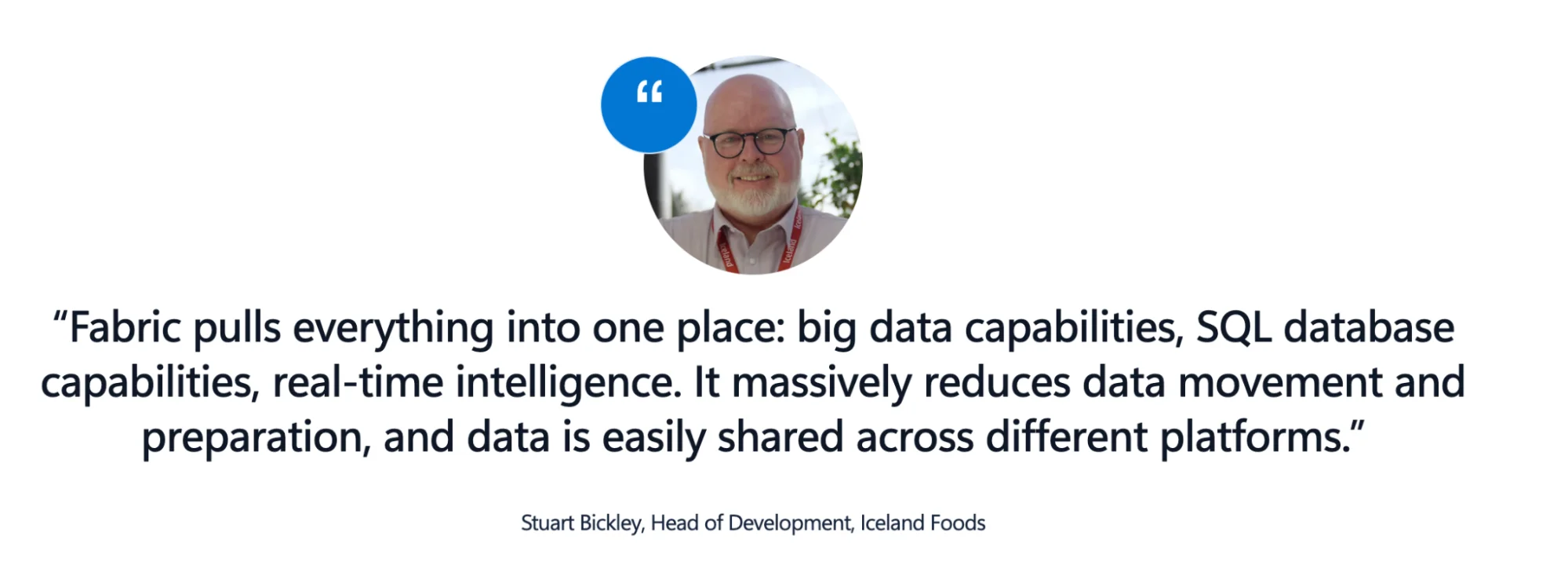
Business intelligence and reporting. Source: Microsoft.
Power BI doesn’t always mean dandy dashboards. It’s more about fewer delays between a question, an answer, and a decision.
4. Data science and machine learning
The data science layer in Microsoft Fabric is built for production work, not experimentation in isolation. The platform offers notebook-based workflows that support Python, R, and PySpark, giving data scientists a familiar environment while keeping compute and storage tightly integrated.
Microsoft Fabric runs these workloads on Apache Spark. This matters because Spark lets teams process large datasets and train models without moving data out of the platform. It’s a way to reduce the time spent on handoffs between engineering, analytics, and modeling.
For teams that need complete lifecycle control, Fabric integrates directly with Azure Machine Learning. This allows model versioning and deployment pipelines without rebuilding workflows outside the Microsoft ecosystem.
With Azure OpenAI, Fabric includes preinstalled libraries and guided interfaces to generate code and accelerate feature engineering. This does not replace data scientists. It reduces setup time.
Below is an overview of where teams apply ML.
- Demand forecasting: Predict sales volumes to improve inventory planning and reduce stockouts. AI-driven forecasting reduces errors by 20% to 50% in supply chain management.
- Customer churn prediction: Identify at-risk users early and trigger retention actions before revenue drops.
- Anomaly detection: Flag unusual behavior in transactions or sensor data.
- Recommendation systems: Personalize products and content based on real usage patterns.
These use cases make an impact only when the data science output is linked to a decision system, such as Power BI.
Why The BI And ML Connection Matters
In many organizations, models live in notebooks while decisions happen in dashboards. Fabric shortens that distance. Data scientists publish model outputs to shared datasets. Business analysts consume them in Power BI reports. Usage data from those reports then feeds back into model refinement. This creates a closed loop.
Models influence decisions. Decisions generate new data. That data improves the next version of the model. This feedback loop is what turns machine learning from a research effort into a business capability.
5. Data governance and security
Data governance is beyond the compliance checkbox; it’s a core capability among analytics platforms. Microsoft Fabric embeds governance directly into the analytics stack and extends it through Microsoft Purview. It gives organizations consistent control over data as it moves from ingestion to reporting.
Purview provides centralized discovery, classification, and lineage tracking across Fabric workloads. This matters because visibility breaks down quickly as data flows through pipelines and BI reports. With Purview, data stewards define sensitivity labels once. Fabric then enforces those labels automatically as data passes through transformations and appears in downstream reports. This reduces the need for manual controls and lowers the risk of policy drift.
Access management follows Azure Active Directory and Microsoft 365 permission models. This simplifies administration. Organizations already using Microsoft identity services avoid duplicating role systems across analytics tools.
Role-based access controls apply at multiple levels, for example:
- workspace and dataset access
- item-level permissions
- row-level security for sensitive attributes
This layered approach aligns with the principle of least privilege, which NIST identifies as a core control for reducing the impact of breaches.
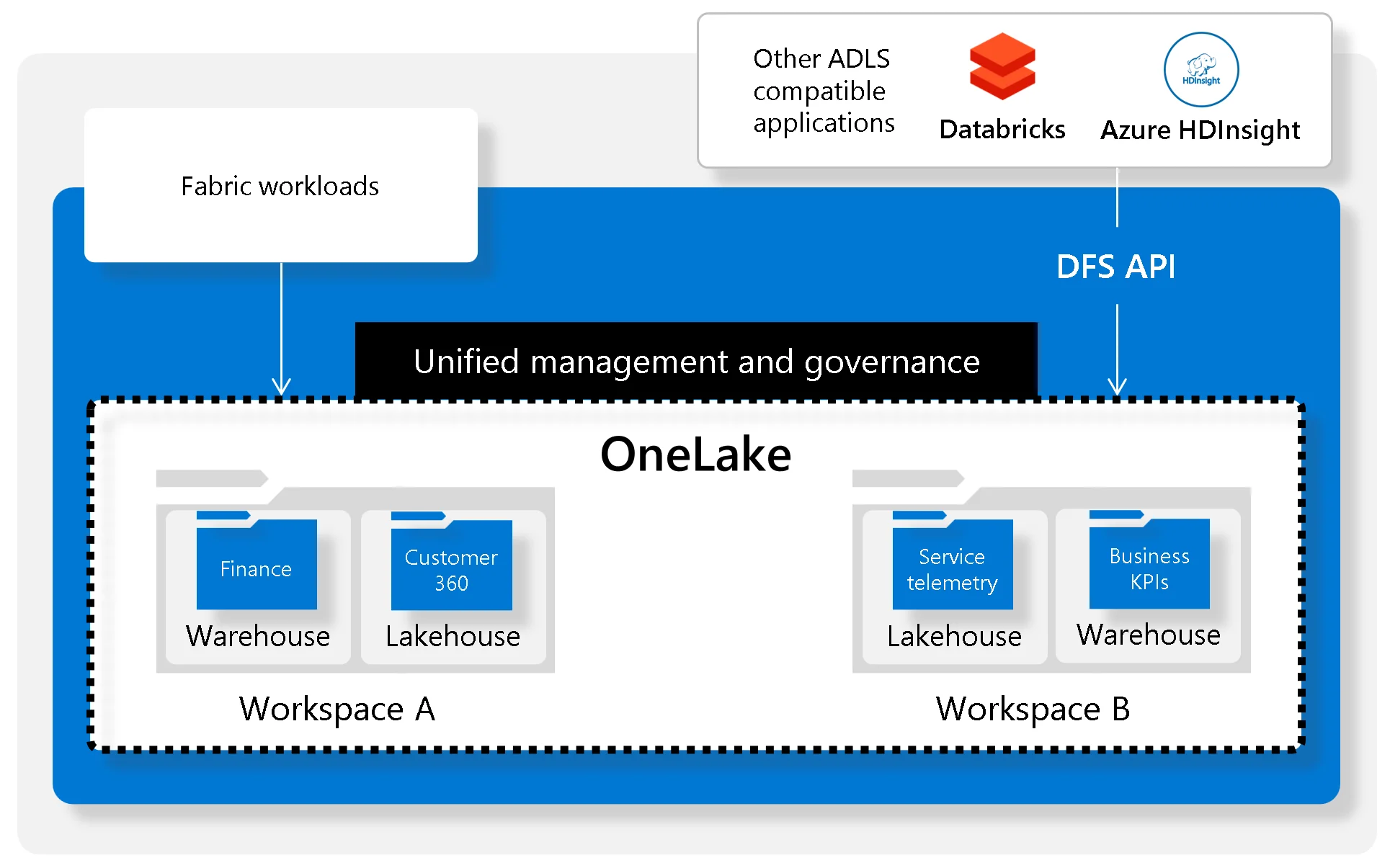
Govern your data lake through OneLake. Source: Microsoft.
Why governance looks different by industry
Governance requirements vary sharply by sector, but the underlying need is the same: traceability and control.
- Financial services: Institutions trace data lineage from source systems through transformations to regulatory reports. Standards such as BCBS 239 require banks to demonstrate the accuracy, completeness, and auditability of risk data. Automated lineage reduces audit preparation time and compliance risk.
- Healthcare: HIPAA enforcement actions continue to rise, with fines frequently tied to poor access controls and data exposure. Automated classification and protection of patient data across analytics workloads help reduce human error.
- Retail and consumer businesses: GDPR and CCPA require organizations to manage consent and respond to data subject requests. Without centralized metadata and lineage, teams struggle to quickly locate all instances of personal data.
Although Fabric delivers foundational governance within a Microsoft ecosystem, many enterprises operate across cloud and data platforms. Such teams might layer specialized governance tools on top of Microsoft Fabric.
How metadata platforms amplify Microsoft Fabric capabilities
Microsoft Fabric delivers unified analytics infrastructure, but metadata platforms unlock its full enterprise value by filling gaps Fabric does not solve on its own.
Where Fabric stops, metadata platforms extend:
- End to end lineage beyond Fabric
- Track data from source systems like SAP, Salesforce, Oracle, and Snowflake through ADF, Synapse, and Fabric pipelines
- Capture column level transformations across SQL, notebooks, and dataflows, not just asset to asset connections
- Connect Fabric semantic models to downstream Power BI, Tableau, and custom applications
- Enable precise impact analysis for schema, logic, and metric changes
- Business context and shared understanding
- Map Fabric tables, columns, and measures to business glossary terms and KPIs
- Preserve metric definitions across domains to prevent conflicting interpretations
- Surface ownership, certification status, and quality signals alongside technical metadata
- Reduce reliance on tribal knowledge when teams scale
- Automation at enterprise scale
- Auto generate and maintain documentation as schemas evolve
- Apply PII, sensitivity, and domain tags based on data patterns and usage
- Promote heavily used Fabric datasets to certified data products
- Identify unused or duplicate assets for cleanup and cost optimization
- Operational confidence
- Know exactly which reports, dashboards, and ML models are affected by any change
- Reduce validation cycles from hours to minutes
- Enable faster iteration without breaking downstream consumers
Active metadata platforms turn Fabric from a powerful execution layer into a governed, discoverable, and trusted data ecosystem.
Atlan + Fabric + Microsoft Purview in practice
The most effective Microsoft data stacks use Fabric, Purview, and Atlan as complementary layers rather than overlapping tools.
Clear separation of responsibilities:
- Microsoft Fabric
- Unified compute, storage, and analytics via OneLake
- Workspaces for engineering, analytics, and data science workloads
- Native integration with Power BI for consumption
- Microsoft Purview
- Centralized policy enforcement for classification, sensitivity labels, and access
- Compliance scanning and regulatory reporting
- Technical enforcement layer for Microsoft assets
- Atlan
- Collaborative metadata platform spanning Microsoft and non Microsoft data ecosystems
- Column level lineage and cross platform impact analysis
- Federated governance workflows aligned to business domains
- Self service discovery and access management
How they work together:
- Atlan continuously crawls Fabric metadata including warehouses, semantic models, notebooks, and pipelines
- Classifications and sensitivity labels sync between Atlan and Purview to keep policies consistent
- Fabric usage patterns and permissions flow into Atlan to enrich popularity, ownership, and certification signals
- Governance rules defined once apply across Fabric, Azure SQL, Snowflake, Databricks, and more
What teams gain:
- Faster Fabric adoption across business teams due to improved discoverability
- Reduced governance overhead through automation and domain ownership
- Fewer production incidents with column level impact analysis before changes ship
- Clear executive visibility into adoption, data quality, and policy compliance
In practice, Fabric runs the data, Purview enforces the rules, and Atlan provides the context that allows organizations to scale analytics with confidence.
Atlan helps organizations govern Microsoft Fabric alongside their entire data ecosystem.
Let's help you build it
Book a demo →FAQs about Microsoft Fabric use cases
Here are some questions the practitioners often ask regarding Microsoft Fabric use cases:
1. What types of organizations benefit most from Microsoft Fabric?
Microsoft Fabric delivers the most value to organizations running multiple analytical workloads across the same data estate. Large enterprises and upper mid-market companies see the most substantial returns because they often struggle with tool sprawl and duplicated data pipelines.
Organizations already using Microsoft 365 and Azure typically adopt Fabric faster since identity and user workflows align with existing systems. It’s less about replacing a single tool and more about simplifying analytics across teams that operate at scale.
2. How does Microsoft Fabric handle data from non-Microsoft Sources?
Fabric supports data ingestion from non-Microsoft platforms through more than 100 connectors. Fabric’s mirroring feature enables near-real-time replication from external systems into OneLake. This supports analytics and reporting without forcing teams to rebuild pipelines. However, bi-directional synchronization is not universal. Capabilities vary by source and connector maturity, so many teams still treat Fabric as a single layer within a broader data architecture.
Familiar sources include Snowflake, Databricks, Amazon S3, Google Cloud Storage, Salesforce, and on-premises databases.
3. What is the relationship between Microsoft Fabric and Power BI?
Power BI is a core workload inside Fabric, not a separate add-on. Existing Power BI users can continue working as usual, while gaining the option to store datasets in OneLake for shared access across analytics workloads.
The Direct Lake mode changes how large datasets are queried. Instead of importing data into Power BI models, reports read directly from OneLake. It reduces refresh overhead and improves performance at scale, especially for enterprise-grade datasets.
4. How does Fabric pricing compare to traditional data warehouses?
Fabric uses a capacity-based pricing model. Organizations purchase Fabric Capacity Units (FCUs) and allocate them across workloads such as data engineering, warehousing, real-time analytics, and BI. This differs from traditional platforms that price storage, compute, and tools separately. The model favors consolidation.
According to a Forrester Total Economic Impact study, organizations that consolidated analytics tools using Fabric achieved infrastructure savings of up to USD 779,000 over three years, mainly by reducing duplicated systems and idle capacity. It’s roughly 379% ROI over three years.
5. Can organizations use Microsoft Fabric alongside other data platforms?
Yes. Most organizations run hybrid environments. Microsoft Fabric supports specific workloads, while other platforms serve different needs. This is common and expected. The challenge is not coexistence. It is governance. You need cross-platform visibility to maintain lineage and a consistent definition across systems.
6. What governance capabilities are built in versus requiring additional tools?
Microsoft Fabric includes native governance through Microsoft Purview. This covers data discovery, classification, sensitivity labels, access controls, and lineage within the Fabric environment. These capabilities work well for Microsoft-centric analytics.
Teams frequently add specialized governance platforms when they require:
- Cross-platform lineage beyond Fabric
- Business glossaries with ownership and collaboration
- Automated data quality signals tied to decision use cases
- Governance workflows that span multiple tools and teams
In these environments, Fabric provides strong foundations, while external governance layers deliver enterprise-wide consistency.
